

Agisoft AI
Use Agisoft AI as the anchor for a real shortlist.
Instead of returning to a broad directory, jump straight into the strongest adjacent matchups for pricing, workflow fit, and differentiation.
Overview
Overview
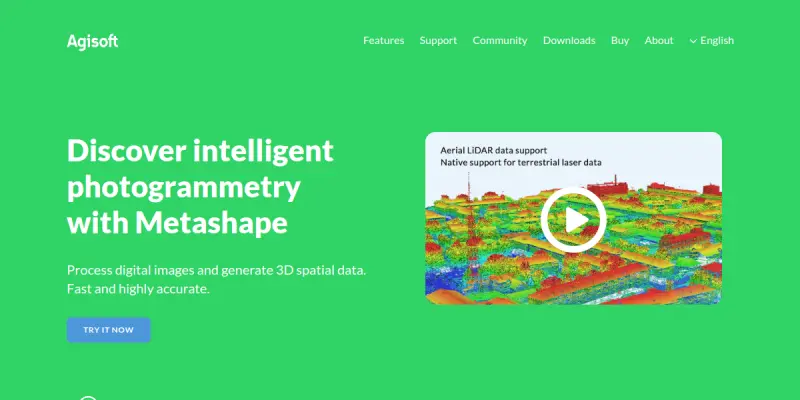
Agisoft AI is a specialized photogrammetry software suite that utilizes artificial intelligence to automate the creation of 3D models from 2D imagery. It bridges the gap between raw photography and professional-grade 3D content, significantly reducing the manual labor traditionally required in point cloud processing and mesh generation. By integrating AI-driven algorithms, the tool enables users to transform simple photos into complex, textured 3D environments with minimal manual intervention.
Key Features
- AI-Driven Mesh Generation: Automatically reconstructs 3D geometry from 2D images using advanced neural networks.
- Point Cloud Processing: Efficiently processes dense point clouds for high-precision terrain and object modeling.
- Automated Texture Mapping: Applies high-resolution textures to 3D models based on input photography.
- Mesh Cleanup and Optimization: Automatically removes noise and optimizes mesh topology for better performance.
- Multi-Format Export: Supports standard file formats like OBJ, FBX, and STL for compatibility with major 3D software.
- Batch Processing: Handles multiple projects simultaneously to significantly increase workflow efficiency.
- Drone Integration: Optimized for processing aerial imagery from drones for surveying and mapping applications.
Use Cases
Construction and Surveying
Professionals in the construction and surveying industries use Agisoft AI to create accurate as-built models of existing structures. This allows for precise measurements and site analysis without the need for manual tape measures or laser scanning equipment.
Cultural Heritage and Archaeology
Researchers utilize the tool to document artifacts and historical sites digitally. It preserves fragile structures by creating detailed 3D models that can be archived and studied without risking physical damage to the original object.
Gaming and Virtual Production
Game developers and VFX artists employ Agisoft AI to generate game-ready assets. The tool can quickly create low-poly meshes and textures from real-world photos, serving as a rapid prototyping solution for environment design.
Architecture and Interior Design
Architects leverage the software to visualize design concepts before construction. It allows for the rapid creation of realistic 3D representations of interiors and exteriors, aiding in client presentations and design reviews.
Pricing & Plans
Agisoft AI operates on a Freemium model, allowing users to access basic features for free while offering advanced capabilities through paid subscriptions. The pricing structure typically includes tiered plans such as Basic, Standard, and Professional, with the Professional tier unlocking higher resolution exports, increased batch limits, and priority processing support.
Integrations & Compatibility
The tool is designed for compatibility with the broader 3D ecosystem. It integrates seamlessly with popular Computer-Aided Design (CAD) software like AutoCAD and Revit, as well as 3D modeling applications such as SketchUp and Blender. This ensures that the 3D data generated can be easily imported into existing project pipelines.
Who Is It For?
Agisoft AI is primarily targeted at professionals in fields requiring high-accuracy 3D data extraction. This includes surveyors, geospatial analysts, 3D modelers, game developers, and architects. It is suitable for both individual creators and small to medium-sized teams looking to automate their photogrammetry workflows.
Limitations
- Hardware Demands: Processing high-resolution imagery requires significant computational power, either in the cloud or on powerful local workstations.
- Learning Curve: While the interface is modern, mastering the photogrammetry settings and AI parameters requires a learning curve for optimal results.
- Input Quality Sensitivity: The accuracy of the final 3D model is highly dependent on the quality, overlap, and angle of the input photographs.
Final Verdict
Agisoft AI represents a significant step forward in automating the 3D modeling process. For users who need to convert 2D photos into 3D assets quickly, it offers a robust solution that balances power with automation. While it may require a learning investment and powerful hardware, the efficiency gains for surveying and modeling tasks make it a valuable addition to the toolkit of any professional in the spatial analysis or design space.
Tool Facts
Screenshots & Interface
Pros
- ✓ Generates high-precision 3D models from drone or handheld imagery with minimal manual input.
- ✓ Automates tedious photogrammetry processing tasks such as point cloud alignment and mesh generation.
- ✓ Supports standard file formats, ensuring seamless integration with popular 3D software like AutoCAD and Blender.
Cons
- × High performance requires powerful local hardware or significant cloud processing time.
- × The learning curve for advanced photogrammetry settings can be steep for new users.
- × The Freemium model restricts high-resolution exports and processing limits without a paid upgrade.
How to Use Agisoft AI in Your Workflow
Integrating Agisoft AI into your professional toolkit enhances efficiency by automating manual steps. By configuring it to suit your specific project requirements, you can optimize output quality and reduce project cycle times. Standard workflows involve testing the tool on simple tasks before scaling its use to complex operations.
Frequently Asked Questions
What is Agisoft AI used for?
Agisoft AI automates photogrammetry to generate 3D models from 2D images. It streamlines the workflow for architects and designers needing automated mesh processing.
What is the pricing model for Agisoft AI?
Agisoft AI uses a Freemium pricing model.
What are the main advantages of Agisoft AI?
The key benefits of Agisoft AI include: Generates high-precision 3D models from drone or handheld imagery with minimal manual input., Automates tedious photogrammetry processing tasks such as point cloud alignment and mesh generation., Supports standard file formats, ensuring seamless integration with popular 3D software like AutoCAD and Blender..
What are the main limitations of Agisoft AI?
Some limitations or cons of Agisoft AI are: High performance requires powerful local hardware or significant cloud processing time., The learning curve for advanced photogrammetry settings can be steep for new users., The Freemium model restricts high-resolution exports and processing limits without a paid upgrade..
Alternative AI Tools

BricsCAD AI
BricsCAD AI integrates native DWG CAD with artificial intelligence to streamline 2D drafting, 3D modeling, and BIM workflows for professionals.

Dynamo AI
Dynamo AI provides a platform for optimizing AI performance, ensuring security, and maintaining compliance for enterprise generative AI applications.

D5 Render AI
D5 Render AI is a real-time AI rendering tool designed for architects and interior designers. It accelerates the visualization process by generating realistic renders directly from 3D design software, enabling rapid design iteration. Its key differentiator is a unified, non-disruptive workflow from initial concept to final presentation.
Rating Details
Based on 0 ratings
Quick Comparisons
Related Tools
More AI tools from the same workflow, industry, or category.
fr3n
fr3n is a creator platform that combines a link-in-bio page, digital storefront, community spaces, and newsletters into one hub. It helps creators sell digital products, run memberships, and build an audience with first-party data.
Aveva AI
Aveva AI optimizes industrial processes and predictive maintenance by leveraging AI models to detect anomalies and support risk-based decision-making in manufacturing.
Paddle AI
Paddle AI streamlines billing, tax compliance, and revenue management for digital businesses. This SaaS platform automates financial operations, supporting global revenue generation for apps like n8n and AdGuard. It integrates essential payment processing tools into a single interface.
Honeywell Forge AI
Honeywell Forge is an industrial IoT platform that combines digital twin technology with AI to optimize facility operations. It is designed for industrial manufacturers seeking predictive maintenance and operational efficiency.
Reviews
No reviews submitted yet. Be the first to share your experience.
Write a Review
Share Your Experience
Join the community to write reviews, submit ratings, and bookmark your favorite AI tools.