

Basecamp AI
Use Basecamp AI as the anchor for a real shortlist.
Instead of returning to a broad directory, jump straight into the strongest adjacent matchups for pricing, workflow fit, and differentiation.
Overview
Overview
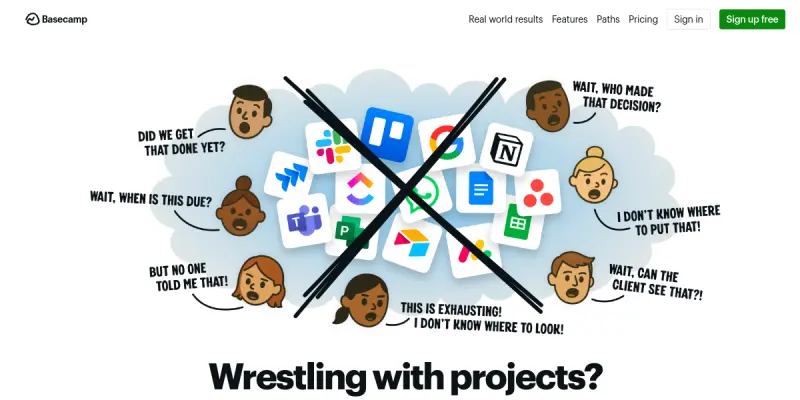
Basecamp is a web-based project management and team collaboration platform designed to help organizations centralize their work. It combines to-do lists, file storage, real-time chat, scheduling, and client communication into a single interface. Originally launched in 2004, Basecamp is built to reduce the need for email and disparate productivity tools, offering a unified workspace for teams of all sizes.
Key Features
- Message Boards: Organized, threaded discussions replace scattered email threads, keeping conversations in context.
- To-Do Lists: Create and assign tasks with due dates, checklists, and file attachments for clear accountability.
- Schedules: A shared calendar for milestones, deadlines, and events visible to the entire team.
- Docs & Files: Write documents collaboratively and upload files with version history.
- Real-Time Chat: Instant messaging with group and direct message capability.
- Automatic Check-Ins: Set recurring questions to get status updates from team members without meetings.
- Client Access: Invite clients to specific projects with limited permissions for transparent collaboration.
- Hill Charts: Visualize project progress with an intuitive chart that shows where work stands.
Use Cases
Remote Team Collaboration
Basecamp provides a central hub for distributed teams to manage projects, communicate asynchronously, and stay aligned without relying on email or multiple apps.
Client-Facing Project Management
Agencies and freelancers can share project progress, gather feedback, and share files with clients in a controlled environment, reducing back-and-forth emails.
Company-Wide Communication
The Message Board and Announcements features enable leadership to broadcast updates and for teams to discuss company goals in an organized manner.
Task and Workflow Management
Teams can break down projects into actionable to-do lists, assign responsibilities, set deadlines, and track completion with minimal overhead.
Pricing & Plans
Basecamp offers a free tier with limited projects and users. Paid plans start with a flat monthly fee for unlimited users and projects, including all features. A 30-day free trial is available for paid plans. Enterprise pricing is not publicly listed.
Integrations & Compatibility
Basecamp integrates with popular external services such as Zapier, Slack, Google Drive, Dropbox, and Harvest. It also offers an API for custom integrations. It is accessible via web browser and mobile apps for iOS and Android.
Who Is It For?
Basecamp is suitable for small to medium-sized businesses, remote teams, creative agencies, freelancers, and any organization seeking a straightforward, all-in-one project management solution without complex workflows.
Limitations
- Limited advanced project management features like Gantt charts, dependencies, and time tracking natively.
- Free plan restricts the number of projects and users, which may not suit larger teams.
- Not designed for agile or software development workflows with sprints and backlogs.
Final Verdict
Basecamp is a mature, reliable project management tool that excels at simplifying communication and task organization. Its strength lies in its simplicity and all-in-one design, but teams requiring deep customization or advanced planning features may find it limiting.
Tool Facts
Screenshots & Interface
Pros
- ✓ All-in-one platform reduces need for multiple separate tools.
- ✓ Client access feature simplifies external collaboration and feedback.
- ✓ Hill Charts provide an intuitive visual representation of project progress.
- ✓ Automatic Check-Ins replace status meetings with recurring questions.
- ✓ Flat pricing model is transparent and predictable for growing teams.
Cons
- × Lacks native Gantt charts and task dependencies for complex project planning.
- × Free plan limits projects and users, which may be insufficient for larger teams.
- × No built-in time tracking or reporting dashboards for detailed analytics.
- × Not optimized for Agile or Scrum methodologies common in software development.
How to Use Basecamp AI in Your Workflow
Integrating Basecamp AI into your professional toolkit enhances efficiency by automating manual steps. By configuring it to suit your specific project requirements, you can optimize output quality and reduce project cycle times. Standard workflows involve testing the tool on simple tasks before scaling its use to complex operations.
Frequently Asked Questions
What is Basecamp AI used for?
Basecamp is a project management and team communication platform that centralizes tasks, files, and discussions. It helps small to mid-sized teams organize work, collaborate with clients, and reduce email overload. Its main differentiator is an all-in-one approach that replaces multiple separate tools.
What is the pricing model for Basecamp AI?
Basecamp AI uses a Free pricing model.
What are the main advantages of Basecamp AI?
The key benefits of Basecamp AI include: All-in-one platform reduces need for multiple separate tools., Client access feature simplifies external collaboration and feedback., Hill Charts provide an intuitive visual representation of project progress., Automatic Check-Ins replace status meetings with recurring questions., Flat pricing model is transparent and predictable for growing teams..
What are the main limitations of Basecamp AI?
Some limitations or cons of Basecamp AI are: Lacks native Gantt charts and task dependencies for complex project planning., Free plan limits projects and users, which may be insufficient for larger teams., No built-in time tracking or reporting dashboards for detailed analytics., Not optimized for Agile or Scrum methodologies common in software development..
Alternative AI Tools
Webex AI
Webex AI is a communication platform that uses artificial intelligence to enhance meeting productivity and collaboration for teams and businesses. It offers AI-powered features such as real-time transcription, meeting summaries, and action item extraction. The tool integrates with the broader Webex ecosystem to streamline workflows.
Lavender AI
Lavender is an AI-powered email assistant for sales teams. It analyzes tone and provides real-time suggestions to improve response rates.

Botxo AI
Botxo AI is an AI-powered email writing assistant for professionals. It helps compose, reply, and manage email communications faster using advanced language models. Its key differentiator is its browser extension for seamless integration with any email platform.
Rating Details
Based on 0 ratings
Quick Comparisons
Related Tools
More AI tools from the same workflow, industry, or category.
Mailbutler AI
Mailbutler AI is an email extension that integrates AI-powered writing, scheduling, and tracking features directly into your existing inbox. It helps professionals and teams streamline email workflows and save time on routine communication tasks.
Lucidspark AI
Lucidspark AI is a virtual whiteboard tool that helps teams brainstorm, organize ideas, and move from concept to execution. It is designed for remote and hybrid teams seeking a structured yet flexible collaboration space. Its integration with Lucidchart sets it apart for end-to-end visual workflow planning.
SignNow AI
SignNow AI automates document signing and workflow management for businesses. It uses AI to extract fields, send documents for signature, and track completion. Ideal for HR, legal, and sales teams.
ProtonMail AI
ProtonMail AI is an integrated writing assistant for secure email, leveraging Swiss privacy standards to draft, summarize, and translate messages within the Proton Mail interface.
Reviews
No reviews submitted yet. Be the first to share your experience.
Write a Review
Share Your Experience
Join the community to write reviews, submit ratings, and bookmark your favorite AI tools.