

Churnkey AI
Use Churnkey AI as the anchor for a real shortlist.
Instead of returning to a broad directory, jump straight into the strongest adjacent matchups for pricing, workflow fit, and differentiation.
Overview
Overview
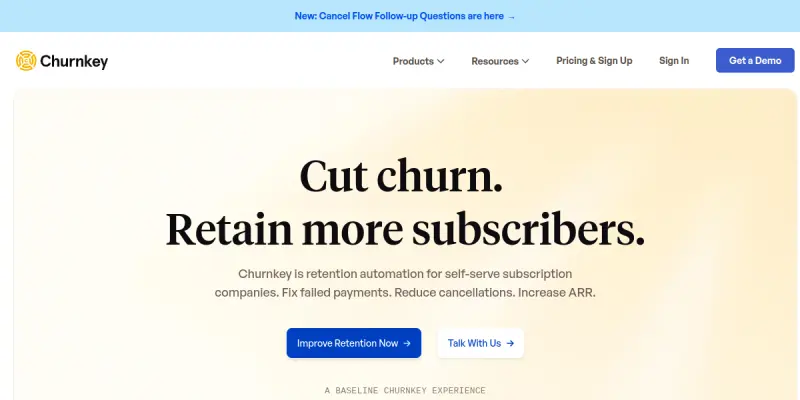
Churnkey is a specialized AI-driven tool designed to help businesses recover lost revenue by automating customer retention strategies. Unlike general customer support tools, Churnkey focuses specifically on identifying at-risk users and deploying automated email sequences to win them back. It is particularly popular among SaaS companies and subscription-based businesses looking to stabilize their Monthly Recurring Revenue (MRR).
Key Features
- Automated Revenue Recovery Flows: Create customizable email sequences that trigger based on user behavior, such as login frequency or feature usage.
- A/B Testing Capabilities: Compare different subject lines, messaging styles, and send times to optimize campaign performance.
- Real-Time Analytics Dashboard: Monitor open rates, click-through rates, and recovery rates in a centralized dashboard.
- Seamless Integrations: Connects directly with payment processors like Stripe and subscription platforms to access user data automatically.
- No-Code Setup: Build complex automation workflows using a visual interface without needing engineering resources.
- Multi-Channel Support: Utilize email and SMS notifications to reach customers wherever they prefer to communicate.
Use Cases
Recovering Trial Users
Many SaaS companies struggle to convert free trial users into paid subscribers. Churnkey allows businesses to set up automated emails that trigger when a trial is about to expire, offering guidance or a discount to encourage conversion.
Reducing Credit Card Churn
For businesses with monthly billing cycles, losing a credit card is a major issue. Churnkey detects failed payments or payment method updates and sends automated reminders to the user, significantly lowering churn rates.
Win-Back Campaigns
For lapsed customers who have already churned, Churnkey offers specific "win-back" flows designed to re-engage dormant users with special offers or surveys to understand why they left.
Pricing & Plans
Churnkey offers a free tier, making it accessible for startups and small businesses to start automating their retention efforts immediately. While the free plan has limitations on the number of workflows or emails, it provides a solid foundation to test the platform.
Integrations & Compatibility
Churnkey integrates with a wide range of tools including Stripe, Paddle, LemonSqueezy, RevenueCat, and many others. It also provides a robust API that allows developers to build custom integrations or trigger churn flows from external applications.
Who Is It For?
This tool is ideal for SaaS founders, subscription business owners, and customer success managers who want to automate the manual process of chasing down lost revenue. It is best suited for companies with recurring revenue models.
Limitations
Users may need to spend time configuring triggers to ensure the AI identifies the right users for recovery; the tool relies on email deliverability, so poor email list hygiene can impact results; the free plan may not be sufficient for high-volume businesses with complex needs.
Final Verdict
Churnkey is a powerful solution for any subscription business looking to take the manual effort out of customer retention. By automating the recovery process, it allows teams to focus on product development while the system handles the delicate task of re-engaging customers. It is highly recommended for its ease of use and direct impact on MRR.
Tool Facts
Screenshots & Interface
Pros
- ✓ Automates complex revenue recovery workflows without requiring engineering resources
- ✓ Provides granular analytics to track open rates, click-throughs, and recovery success
- ✓ Seamlessly integrates with major payment processors like Stripe and Paddle
Cons
- × The free plan has limitations on the number of active automation workflows
- × Effectiveness relies on high-quality user data and clean email lists
- × Requires some initial configuration to set up triggers that align with business logic
How to Use Churnkey AI in Your Workflow
Integrating Churnkey AI into your professional toolkit enhances efficiency by automating manual steps. By configuring it to suit your specific project requirements, you can optimize output quality and reduce project cycle times. Standard workflows involve testing the tool on simple tasks before scaling its use to complex operations.
Frequently Asked Questions
What is Churnkey AI used for?
Churnkey automates revenue recovery with personalized churn prevention workflows for SaaS businesses. It helps reduce subscription cancellations through triggered email campaigns.
What is the pricing model for Churnkey AI?
Churnkey AI uses a Free pricing model.
What are the main advantages of Churnkey AI?
The key benefits of Churnkey AI include: Automates complex revenue recovery workflows without requiring engineering resources, Provides granular analytics to track open rates, click-throughs, and recovery success, Seamlessly integrates with major payment processors like Stripe and Paddle.
What are the main limitations of Churnkey AI?
Some limitations or cons of Churnkey AI are: The free plan has limitations on the number of active automation workflows, Effectiveness relies on high-quality user data and clean email lists, Requires some initial configuration to set up triggers that align with business logic.
Alternative AI Tools

Inline Manual AI
Inline Manual AI is a digital adoption platform that creates interactive product tours, on-screen tips, and step-by-step tutorials. It helps SaaS businesses improve user onboarding and reduce support queries without requiring coding skills.

HeyMarvin AI
HeyMarvin AI is a customer knowledge management platform for support teams. It centralizes customer data and uses AI to assist with research and insights. The tool integrates directly into existing workflows to surface information where decisions are made.

Mouseflow AI
Mouseflow provides website behavior analytics through session replays, heatmaps, and feedback widgets. It helps businesses understand user interactions to optimize conversion rates and fix usability issues.
Rating Details
Based on 0 ratings
Related Tools
More AI tools from the same workflow, industry, or category.
Inspectlet AI
Inspectlet records videos of website visitors to show every mouse movement, scroll, click, and keypress. It helps product teams, marketers, and UX researchers understand user behavior through session replays and heatmaps. Unlike traditional analytics, it provides visual, play-by-play insights into how people interact with your site.
Chatfuel
Chatfuel is a no-code platform for building AI chatbots on Instagram, WhatsApp, and TikTok. It enables businesses to automate customer support and sales workflows directly on social media. The tool integrates with Meta business tools to manage customer interactions at scale.
Amazon Lex
Amazon Lex is an AWS service for building conversational chatbots and voice assistants. It uses deep learning models for speech recognition and natural language understanding.
Whatfix AI
Whatfix AI is a digital adoption platform that helps users navigate enterprise software through simulation training and personalized guidance, designed for businesses of all sizes.
Reviews
No reviews submitted yet. Be the first to share your experience.
Write a Review
Share Your Experience
Join the community to write reviews, submit ratings, and bookmark your favorite AI tools.