

Dabble Writer
Use Dabble Writer as the anchor for a real shortlist.
Instead of returning to a broad directory, jump straight into the strongest adjacent matchups for pricing, workflow fit, and differentiation.
Overview
Overview
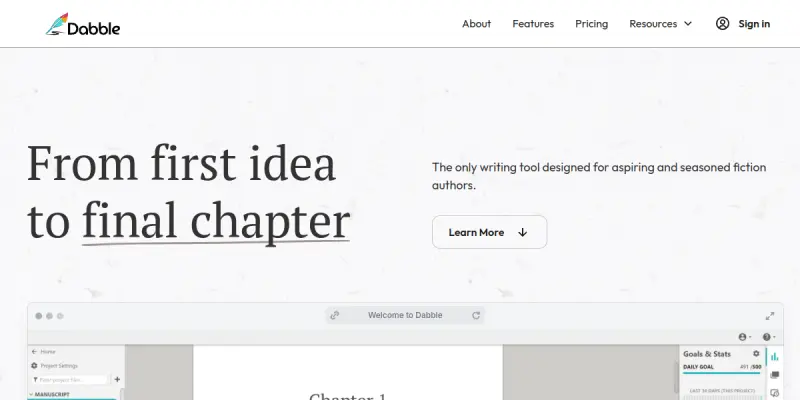
Dabble Writer is a cloud-based novel writing platform designed specifically for fiction authors. It provides a distraction-free environment for planning plots, writing drafts, and organizing manuscripts. With features like plot grids, character notes, and writing goals, Dabble aims to streamline the entire novel writing process from first idea to final draft.
Key Features
- Distraction-Free Editor: A clean, minimal writing interface that helps authors focus on their story without clutter.
- Plot Grid: A visual outlining tool that allows writers to plan scenes and chapters using a drag-and-drop board.
- Character Notes: Dedicated space to develop character profiles, backstories, and relationships.
- Writing Goals: Set daily or weekly word count targets and track progress over time.
- Dark Mode: A low-light interface option for comfortable writing during long sessions.
- Cloud Sync: Automatically saves and syncs manuscripts across devices, so work is never lost.
Use Cases
Novel Writing
Fiction authors use Dabble to plan and write full-length novels. The plot grid helps structure complex narratives, while the distraction-free editor keeps writers focused on their prose.
NaNoWriMo Preparation
During National Novel Writing Month, authors leverage Dabble's goal-setting features to maintain momentum and hit daily word counts.
Collaborative Projects
Multiple authors or editors can access the same manuscript for feedback and revisions, making Dabble suitable for co-writing or critique groups.
Outlining and Pre-Writing
Before drafting, writers can use the plot grid and character notes to develop story arcs, settings, and character motivations.
Pricing & Plans
Dabble offers a Freemium model with a free 14-day trial. After the trial, users can choose from monthly or annual subscription tiers. Paid plans unlock additional features like unlimited projects and advanced export options. Specific pricing details are available on the Dabble website.
Integrations & Compatibility
Dabble is a web-based application accessible from any modern browser. It supports exporting manuscripts to PDF, Word, and plain text formats. There is no native mobile app, but the responsive web interface works on tablets and smartphones.
Who Is It For?
Dabble is built for fiction authors of all experience levels—from aspiring writers working on their first novel to seasoned authors managing multiple series. It is also useful for writing coaches, editors, and beta readers who collaborate with authors.
Limitations
- Lacks advanced grammar checking or AI-powered editing suggestions found in some competitors.
- No dedicated mobile app; the web interface may not be as convenient as native apps on mobile devices.
- Limited formatting options for non-fiction or screenwriting use cases.
Final Verdict
Dabble Writer is a solid choice for fiction authors looking for a dedicated, distraction-free writing environment with strong planning and goal-setting features. While it may not replace full-featured word processors for non-fiction or screenwriting, its focus on novel writing makes it a valuable tool for storytellers.
Tool Facts
Screenshots & Interface
Pros
- ✓ Distraction-free editor helps maintain focus during long writing sessions.
- ✓ Plot grid and character notes provide robust planning tools for complex novels.
- ✓ Cloud sync ensures work is automatically saved and accessible across devices.
- ✓ Writing goals and progress tracking keep authors motivated and on schedule.
- ✓ Free 14-day trial allows users to test the platform before committing.
Cons
- × No built-in grammar or spell-checking tools, requiring external editing software.
- × Lacks a dedicated mobile app, limiting on-the-go writing convenience.
- × Limited formatting options for non-fiction manuscripts or screenplays.
- × Collaboration features are basic compared to dedicated co-writing platforms.
How to Use Dabble Writer in Your Workflow
Integrating Dabble Writer into your professional toolkit enhances efficiency by automating manual steps. By configuring it to suit your specific project requirements, you can optimize output quality and reduce project cycle times. Standard workflows involve testing the tool on simple tasks before scaling its use to complex operations.
Frequently Asked Questions
What is Dabble Writer used for?
Dabble is novel writing software for fiction authors that combines plot planning, drafting, and organization in one distraction-free environment. It offers tools for story structure, character development, and progress tracking.
What is the pricing model for Dabble Writer?
Dabble Writer uses a Freemium pricing model.
What are the main advantages of Dabble Writer?
The key benefits of Dabble Writer include: Distraction-free editor helps maintain focus during long writing sessions., Plot grid and character notes provide robust planning tools for complex novels., Cloud sync ensures work is automatically saved and accessible across devices., Writing goals and progress tracking keep authors motivated and on schedule., Free 14-day trial allows users to test the platform before committing..
What are the main limitations of Dabble Writer?
Some limitations or cons of Dabble Writer are: No built-in grammar or spell-checking tools, requiring external editing software., Lacks a dedicated mobile app, limiting on-the-go writing convenience., Limited formatting options for non-fiction manuscripts or screenplays., Collaboration features are basic compared to dedicated co-writing platforms..
Alternative AI Tools

Grammar Lookup
Grammar Lookup is an online editor for correcting spelling, grammar, and punctuation mistakes. It assists writers and editors in refining their content with ease, offering support for multiple languages.

Omnisend AI
Omnisend AI is an AI-powered email and SMS marketing platform designed for ecommerce brands using Shopify, WooCommerce, and other storefronts. It helps users create personalized campaigns, automate workflows, and optimize messaging to boost customer engagement. Key differentiators include a unified marketing automation suite and a reported $79 return per dollar spent.

Moonbeam
Moonbeam is an AI-powered writing assistant that helps users create, edit, and refine content quickly. It supports multiple languages and formats, making it suitable for bloggers, marketers, and content teams. A key differentiator is its ability to adjust tone and paraphrase with context awareness.
Rating Details
Based on 0 ratings
Related Tools
More AI tools from the same workflow, industry, or category.
fablepilot
FablePilot is a free AI story generator that turns a single prompt into a complete story — no sign-up required. Add illustrations or generate a plot outline.
Ghosts.app
Ghosts is an AI ghostwriter for agencies, creators, and law firms. It produces researched, cited drafts in a specific voice without requiring prompts. Users brief a specialist agent and approve a finished draft.
GrowthBar
GrowthBar is an AI tool for content generation, designed to boost productivity and streamline workflows for writers and content creators, with features like editing and tone adjustment.
GetGenie AI
GetGenie AI is an AI-powered writing and SEO assistant that helps content creators and marketers generate optimized content quickly. It includes built-in keyword research and SERP analysis to improve organic search performance.
Reviews
No reviews submitted yet. Be the first to share your experience.
Write a Review
Share Your Experience
Join the community to write reviews, submit ratings, and bookmark your favorite AI tools.