

DeepMotion
Use DeepMotion as the anchor for a real shortlist.
Instead of returning to a broad directory, jump straight into the strongest adjacent matchups for pricing, workflow fit, and differentiation.
Overview
Overview
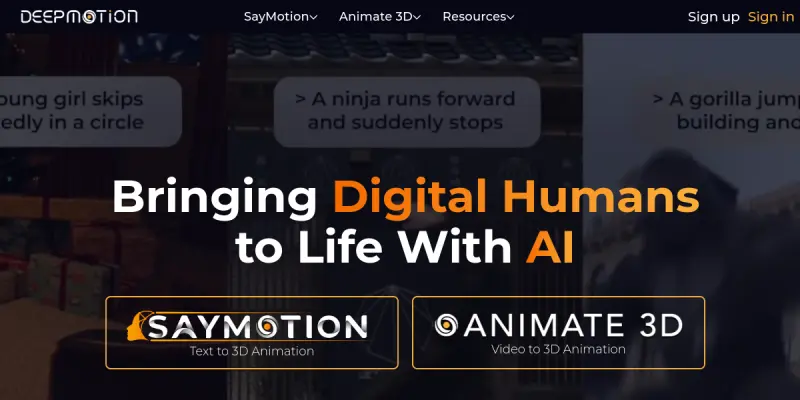
DeepMotion is a web-based platform that utilizes AI and computer vision to convert 2D video footage into 3D motion data. It serves as a powerful tool for motion capture and rigging, allowing users to create professional-grade animations without expensive hardware or traditional motion capture suits. The tool is particularly known for its "Auto-Rigging" technology, which automatically adds skeletal structures to 3D models based on video input.
Key Features
- Auto-Rigging: Automatically adds bones and joints to 3D models using neural networks.
- Video-to-3D: Converts 2D video into 3D motion capture data for animations.
- Avatar Creator: Generates realistic 3D avatars from single images or videos.
- Real-time Tracking: Provides real-time body tracking suitable for VR and AR applications.
- Web-based Interface: No software installation required; runs directly in a browser.
- Animation Tools: Offers tools for lip-syncing and character animation.
- Export Options: Supports exporting animations for Unity, Unreal Engine, and WebGL.
Use Cases
Game Development
Game developers can use DeepMotion to quickly animate game characters without the cost of hiring a motion capture studio. The AI-driven rigging saves significant time during the pre-production phase of game design.
Virtual Reality (VR) and Augmented Reality (AR)
Creators of VRChat avatars or AR experiences can leverage the real-time body tracking to create interactive digital characters that move naturally with the user.
Marketing and Social Media
Businesses can generate dynamic, high-quality motion graphics for advertisements or social media clips. The speed of the browser-based platform allows for rapid iteration and quick turnaround on marketing assets.
Animation Production
Animators can use the platform as a reference tool or to speed up the rigging process for complex scenes, reducing the manual labor traditionally associated with 3D modeling.
Pricing & Plans
DeepMotion offers a free tier that allows users to create and export basic animations. For more advanced features, such as higher export resolution, specific file formats, and access to the Animate 3D and Animate VR suites, users can subscribe to paid monthly or annual plans. Enterprise solutions are available for teams requiring dedicated support and custom integrations.
Integrations & Compatibility
The platform is designed for broad compatibility. Animations can be exported directly to popular game engines like Unity and Unreal Engine. It is also compatible with WebGL, making it easy to embed animations on websites. The browser-based nature ensures compatibility with Windows, macOS, and Linux operating systems.
Who Is It For?
DeepMotion is designed for game developers, 3D artists, VR/AR developers, and animators who need to produce motion content quickly. It is ideal for indie developers who cannot afford expensive motion capture equipment, as well as professional studios looking to streamline their rigging workflows.
Limitations
- Input Quality Sensitivity: The accuracy of the motion capture heavily depends on the lighting and quality of the input video.
- Manual Refinement: Complex or highly stylized movements may still require manual adjustment in the editor to look perfect.
- Export Limits: The free tier imposes restrictions on export resolution and file formats, which may not be sufficient for high-end professional projects.
- Browser Performance: Heavy animations may require a powerful computer to run the browser client smoothly.
Final Verdict
DeepMotion is a highly accessible tool that democratizes motion capture technology. By removing the barrier of expensive hardware, it empowers creators to bring characters to life with ease. While it may not replace high-end, bespoke motion capture for AAA game development, it serves as an excellent solution for indie projects, prototyping, and content creation.
Tool Facts
Screenshots & Interface
Pros
- ✓ Enables automatic rigging of 3D models directly from video footage.
- ✓ Runs entirely in the browser without requiring heavy software installations.
- ✓ Supports real-time motion capture suitable for VR and AR applications.
Cons
- × The accuracy of tracking is highly dependent on the lighting and quality of the input video.
- × The free tier imposes restrictions on export resolution and file formats.
- × Complex or highly stylized movements may still require manual tweaking.
How to Use DeepMotion in Your Workflow
Integrating DeepMotion into your professional toolkit enhances efficiency by automating manual steps. By configuring it to suit your specific project requirements, you can optimize output quality and reduce project cycle times. Standard workflows involve testing the tool on simple tasks before scaling its use to complex operations.
Frequently Asked Questions
What is DeepMotion used for?
DeepMotion converts 2D video into 3D animations using AI motion capture. Ideal for game developers and motion designers needing browser-based rigging.
What is the pricing model for DeepMotion?
DeepMotion uses a Free pricing model.
What are the main advantages of DeepMotion?
The key benefits of DeepMotion include: Enables automatic rigging of 3D models directly from video footage., Runs entirely in the browser without requiring heavy software installations., Supports real-time motion capture suitable for VR and AR applications..
What are the main limitations of DeepMotion?
Some limitations or cons of DeepMotion are: The accuracy of tracking is highly dependent on the lighting and quality of the input video., The free tier imposes restrictions on export resolution and file formats., Complex or highly stylized movements may still require manual tweaking..
Alternative AI Tools

UneeQ
Create lifelike AI avatars for training and customer support. UneeQ enables immersive digital human experiences to boost engagement and retention.

Luma AI
Luma AI generates high-quality videos and 3D assets from text prompts or images. The platform leverages generative models to produce photorealistic video clips and environments for creators.

Panopto AI
Panopto AI uses artificial intelligence to record, capture, and search video content. Designed for IT teams and content creators, it offers automated transcription and smart search across recorded videos. Its key differentiator is AI-powered video capture that makes content instantly searchable.
Rating Details
Based on 0 ratings
Quick Comparisons
Related Tools
More AI tools from the same workflow, industry, or category.
ClipTrend.ai
ClipTrend.ai is an AI image-to-video workspace for creators, marketers, and short-form video teams.
SongR
SongR is a text-to-song app that generates custom music tracks from a few keywords. It is designed for content creators and social media users who need quick, royalty-free songs in genres like pop, rock, hip-hop, and chant. Its key differentiator is instant generation without requiring musical expertise.
Quantum Capture
Quantum Capture generates AI-powered talking head videos from text input. It is designed for content creators and marketers who need quick, studio-quality video clips without expensive equipment. The platform specializes in creating realistic avatars with consistent lip-sync and facial expressions.
Kaltura AI
Kaltura is an enterprise video platform that combines cloud hosting with AI tools for content creation, marketing, and learning management. It helps businesses create branded video experiences for webinars, social media, and internal training.
Reviews
No reviews submitted yet. Be the first to share your experience.
Write a Review
Share Your Experience
Join the community to write reviews, submit ratings, and bookmark your favorite AI tools.