

Desktime AI
Use Desktime AI as the anchor for a real shortlist.
Instead of returning to a broad directory, jump straight into the strongest adjacent matchups for pricing, workflow fit, and differentiation.
Overview
Overview
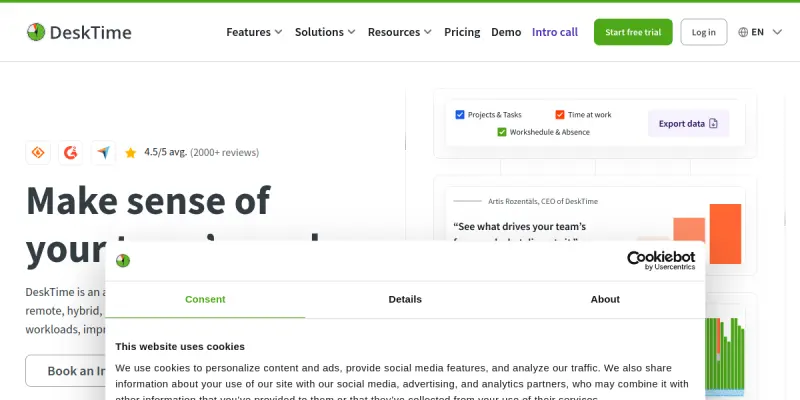
DeskTime is a comprehensive time tracking and productivity management tool designed for teams. It helps businesses monitor work hours and categorize them into specific projects or tasks to gain insights into team performance. The platform focuses on providing data-driven analytics to help organizations optimize their workflows.
Key Features
- Automated Time Tracking: Automatically logs time spent on applications and websites while allowing manual overrides for accuracy.
- Productivity Reports: Generates detailed reports on how time is distributed across projects, tasks, and team members.
- Project Management: Categorizes logged hours into projects, making it easy to track billable hours and project progress.
- Screenshot Monitoring: Offers an optional feature to take random screenshots to verify employee activity.
- Timesheet Automation: Automatically generates timesheets for payroll processing and submission.
- Team Management: Allows managers to set up teams and define their working hours.
Use Cases
Freelancers and Consultants
Freelancers can use DeskTime to accurately track billable hours against specific client projects, ensuring fair compensation and transparent invoicing.
Remote Teams
Remote teams benefit from the ability to monitor productivity without the need for micromanagement, fostering accountability across different time zones.
Project Managers
Project managers can utilize the detailed analytics to identify bottlenecks, allocate resources more effectively, and ensure projects stay on schedule.
Pricing & Plans
Desktime offers a free 14-day trial to allow users to explore the full suite of features. Paid subscriptions are required to access advanced analytics, unlimited projects, and detailed reporting capabilities. Pricing is typically tiered based on the number of team members.
Integrations & Compatibility
Desktime integrates with popular project management tools like Trello, Asana, and Jira. It also connects with communication platforms such as Slack and Microsoft Teams. The tool is available as a web application and native apps for iOS and Android devices.
Who Is It For?
This tool is ideal for small to medium-sized businesses, remote teams, and freelancers who need to monitor work hours and improve team productivity. It is particularly useful for organizations looking to automate timesheets and gain visibility into project progress.
Limitations
- The accuracy of time logs can be affected if employees do not use the tool consistently or manually correct errors.
- Features like screenshot monitoring may raise privacy concerns for some organizations.
- The free trial period is limited to two weeks.
Final Verdict
DeskTime provides a solid foundation for time tracking and productivity analysis. While it may lack some advanced AI features found in newer tools, its robust reporting and automation capabilities make it a reliable choice for teams focused on basic time management.
Tool Facts
Screenshots & Interface
Pros
- ✓ Automated time tracking with manual override options ensures accurate logs.
- ✓ Detailed productivity reports highlight team performance and time distribution.
- ✓ Multi-device support allows tracking from desktop, mobile, and browser.
Cons
- × Manual time entry can lead to time theft or inaccuracies if not configured properly.
- × The free tier is limited in features compared to paid plans.
- × Requires setup time to categorize projects correctly for useful analytics.
How to Use Desktime AI in Your Workflow
Integrating Desktime AI into your professional toolkit enhances efficiency by automating manual steps. By configuring it to suit your specific project requirements, you can optimize output quality and reduce project cycle times. Standard workflows involve testing the tool on simple tasks before scaling its use to complex operations.
Frequently Asked Questions
What is Desktime AI used for?
DeskTime is a time tracking tool that monitors work hours and analyzes team productivity. It identifies inefficiencies through detailed reports. The platform supports project management and timesheet automation.
What is the pricing model for Desktime AI?
Desktime AI uses a Paid pricing model.
What are the main advantages of Desktime AI?
The key benefits of Desktime AI include: Automated time tracking with manual override options ensures accurate logs., Detailed productivity reports highlight team performance and time distribution., Multi-device support allows tracking from desktop, mobile, and browser..
What are the main limitations of Desktime AI?
Some limitations or cons of Desktime AI are: Manual time entry can lead to time theft or inaccuracies if not configured properly., The free tier is limited in features compared to paid plans., Requires setup time to categorize projects correctly for useful analytics..
Alternative AI Tools

Everhour AI
Time tracking and billing software integrated directly into project management tools. Designed for teams and agencies needing precise budget control and invoicing. Tracks billable hours across Asana, ClickUp, and Jira.

Kantata AI
Kantata AI is a professional services automation platform that uses AI to streamline project scoping, resource allocation, and financial forecasting.

TimeCamp AI
TimeCamp AI uses AI to automate time tracking, converting logged hours into project insights, invoices, and budget alerts. It integrates natively with Jira, Asana, and over 50 other tools, and offers a free tier for new users.
Rating Details
Based on 0 ratings
Quick Comparisons
Related Tools
More AI tools from the same workflow, industry, or category.
10,000ft AI
10,000ft AI is a resource management platform that uses artificial intelligence to help project managers plan, allocate, and track team resources. It offers real-time visibility into capacity and utilization for service-based organizations. The tool integrates with popular project management software to streamline workforce planning.
Kantree AI
Kantree AI is a flexible project management platform that enables teams to collaborate in real-time and visually manage workflows. It offers both self-hosted and cloud versions to suit different organizational needs. The platform leverages AI to automate tasks and improve planning efficiency.
Portfolio Management AI
Portfolio Management AI helps project managers allocate resources, track tasks, and optimize workflows using artificial intelligence. It is designed for teams managing multiple projects who need real-time portfolio visibility. The tool stands out with its AI-driven resource forecasting.
Wrike AI
Wrike AI is an enterprise project management platform that uses artificial intelligence to automate workflows, improve collaboration, and provide real-time project visibility. It is designed for teams and organizations looking to streamline task management and increase operational efficiency.
Reviews
No reviews submitted yet. Be the first to share your experience.
Write a Review
Share Your Experience
Join the community to write reviews, submit ratings, and bookmark your favorite AI tools.