

Elephas
Use Elephas as the anchor for a real shortlist.
Instead of returning to a broad directory, jump straight into the strongest adjacent matchups for pricing, workflow fit, and differentiation.
Overview
Overview
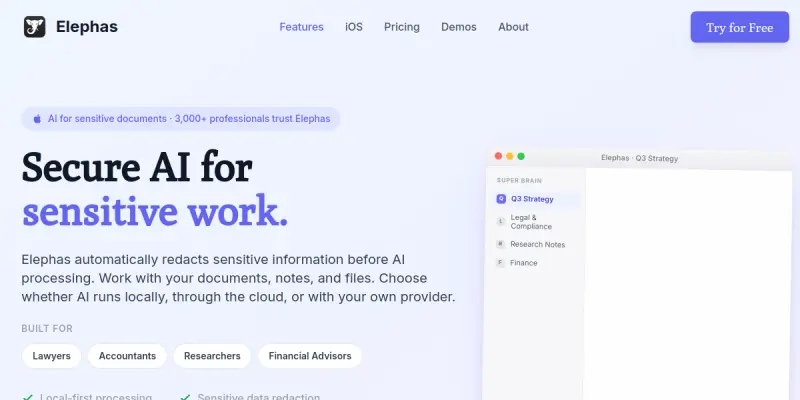
Elephas is a private AI writing assistant purpose-built for professionals who handle sensitive information. Running natively on macOS, it connects to multiple large language models—including ChatGPT, Claude, and Gemini—while keeping confidential data secure. Its standout feature, Smart Redaction, automatically detects and removes personally identifiable information (PII) before any data is sent to external AI servers. This makes Elephas a strong choice for lawyers, accountants, financial advisors, researchers, and anyone subject to data protection regulations.
Key Features
- Multi-Model Support: Access ChatGPT, Claude, and Gemini from a single interface without switching apps.
- Smart Redaction: Automatically strip client names, case numbers, financial data, and other PII from your text before it leaves your Mac.
- On-Device Processing: Many writing tasks are processed locally, minimizing exposure of your data to external servers.
- Tone Adjustment: Rewrite content to match formal, professional, or casual tones with a single click.
- Paraphrasing Tool: Quickly rephrase sentences while preserving original meaning and context.
- Language Translation: Translate text between multiple languages while keeping the intended tone.
- Custom Shortcuts: Create keyboard shortcuts for frequently used prompts and actions to speed up your workflow.
- System-Wide Access: Use Elephas from any application on your Mac via a floating overlay or menu bar.
Use Cases
Legal Document Drafting
Lawyers can draft contracts, memos, and correspondence using AI while Smart Redaction ensures client names and case details are not transmitted to external servers. This allows legal professionals to maintain confidentiality while benefiting from AI assistance.
Financial Reporting
Accountants and financial advisors can generate reports, analysis summaries, and client communication drafts without exposing sensitive financial data. The on-device processing and redaction capabilities align with compliance requirements such as GDPR and SOX.
Academic Research
Researchers can use Elephas to paraphrase scientific literature, draft grant proposals, or summarize findings while keeping proprietary or unpublished data secure. Multi-model access allows comparing outputs from different AI models.
Client Communication
Financial advisors and consultants can craft personalized emails, newsletters, and updates for clients. Tone adjustment and paraphrasing help maintain a consistent, professional voice across all communications.
Confidential Business Writing
Any professional working with trade secrets, intellectual property, or internal strategy documents can use Elephas to generate drafts and notes without risking data leaks via public AI services.
Pricing & Plans
Elephas operates on a freemium model. The free tier includes basic writing assistance with limited words per month. Paid subscriptions unlock unlimited usage, advanced features such as Smart Redaction, priority support, and access to all supported AI models. Enterprise pricing is available upon request for teams and organizations requiring custom data handling policies and dedicated support.
Integrations & Compatibility
Elephas is a macOS-only application. It integrates natively with system-wide text fields, meaning it works with any app that accepts text input—web browsers, email clients, word processors, and note-taking tools. There is no web or mobile version currently available.
Who Is It For?
Elephas is designed for professionals in regulated industries: lawyers, accountants, financial advisors, researchers, and consultants. It is also suitable for any Mac user who regularly handles confidential or sensitive written content and wants to use AI without compromising data privacy.
Limitations
- Mac-Only: Elephas is exclusively available on macOS, excluding Windows, Linux, and mobile users.
- No Direct Integrations: Unlike some enterprise AI tools, Elephas does not offer direct integrations with platforms like Microsoft 365 or Google Workspace.
- Free Tier Limits: The free tier is restricted in daily word count, which may not be sufficient for heavy users.
- Occasional Redaction Errors: Smart Redaction may sometimes over-redact or miss certain data points, requiring manual review.
Final Verdict
Elephas fills a genuine niche for privacy-conscious professionals who need AI writing assistance on sensitive documents. Its Smart Redaction and on-device processing set it apart from generic AI writing tools. However, the macOS exclusivity and lack of deep third-party integrations may limit its appeal for some teams. For Mac users in legal, finance, or research fields, Elephas is a practical and secure choice.
Tool Facts
Screenshots & Interface
Pros
- ✓ Smart Redaction automatically removes PII before data is sent to external AI servers, providing a strong privacy layer.
- ✓ Supports multiple AI models (ChatGPT, Claude, Gemini) from a single interface, allowing users to compare outputs.
- ✓ Works system-wide on macOS, so users can access AI assistance from any text input field without switching apps.
- ✓ Tone adjustment and paraphrasing tools help quickly refine writing for professional or personal contexts.
- ✓ On-device processing for many tasks reduces reliance on external servers for common writing operations.
Cons
- × Elephas is only available on macOS, excluding Windows, Linux, and mobile users.
- × The free tier has a daily word limit that may be restrictive for heavy users.
- × Smart Redaction can occasionally miss or over-redact data, requiring manual verification.
- × The tool does not offer native integrations with common platforms like Microsoft 365 or Google Workspace.
How to Use Elephas in Your Workflow
Integrating Elephas into your professional toolkit enhances efficiency by automating manual steps. By configuring it to suit your specific project requirements, you can optimize output quality and reduce project cycle times. Standard workflows involve testing the tool on simple tasks before scaling its use to complex operations.
Frequently Asked Questions
What is Elephas used for?
Elephas is a private AI writing assistant for Mac that integrates ChatGPT, Claude, and Gemini. It is designed for professionals handling sensitive data like lawyers and accountants, with a Smart Redaction feature that removes client information before it reaches external AI services.
What is the pricing model for Elephas?
Elephas uses a Freemium pricing model.
What are the main advantages of Elephas?
The key benefits of Elephas include: Smart Redaction automatically removes PII before data is sent to external AI servers, providing a strong privacy layer., Supports multiple AI models (ChatGPT, Claude, Gemini) from a single interface, allowing users to compare outputs., Works system-wide on macOS, so users can access AI assistance from any text input field without switching apps., Tone adjustment and paraphrasing tools help quickly refine writing for professional or personal contexts., On-device processing for many tasks reduces reliance on external servers for common writing operations..
What are the main limitations of Elephas?
Some limitations or cons of Elephas are: Elephas is only available on macOS, excluding Windows, Linux, and mobile users., The free tier has a daily word limit that may be restrictive for heavy users., Smart Redaction can occasionally miss or over-redact data, requiring manual verification., The tool does not offer native integrations with common platforms like Microsoft 365 or Google Workspace..
Alternative AI Tools

Synthesys
Synthesys is an AI content generation platform that produces high-quality text, images, and voiceovers. It helps marketers, content creators, and businesses scale their content production while maintaining brand consistency.
Wordtune
Wordtune is a free AI writing assistant that helps you paraphrase text and adjust the tone of your writing.

Writesonic
Writesonic is an AI copywriting platform that generates SEO-optimized blog posts and ad copy in over 25 languages.
Rating Details
Based on 0 ratings
Quick Comparisons
Related Tools
More AI tools from the same workflow, industry, or category.
fablepilot
FablePilot is a free AI story generator that turns a single prompt into a complete story — no sign-up required. Add illustrations or generate a plot outline.
Ghosts.app
Ghosts is an AI ghostwriter for agencies, creators, and law firms. It produces researched, cited drafts in a specific voice without requiring prompts. Users brief a specialist agent and approve a finished draft.
GrowthBar
GrowthBar is an AI tool for content generation, designed to boost productivity and streamline workflows for writers and content creators, with features like editing and tone adjustment.
GetGenie AI
GetGenie AI is an AI-powered writing and SEO assistant that helps content creators and marketers generate optimized content quickly. It includes built-in keyword research and SERP analysis to improve organic search performance.
Reviews
No reviews submitted yet. Be the first to share your experience.
Write a Review
Share Your Experience
Join the community to write reviews, submit ratings, and bookmark your favorite AI tools.