

Everhour AI
Use Everhour AI as the anchor for a real shortlist.
Instead of returning to a broad directory, jump straight into the strongest adjacent matchups for pricing, workflow fit, and differentiation.
Overview
Overview
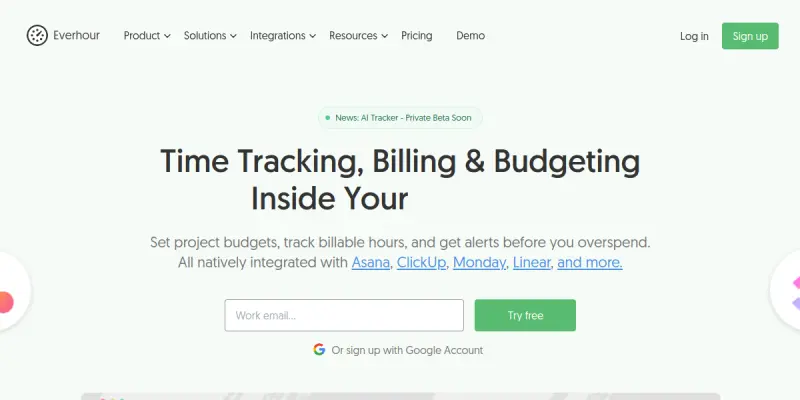
Everhour is a time tracking and project management tool designed to be embedded directly into popular project management platforms. It bridges the gap between tracking hours and financial management by offering built-in budgeting, invoicing, and reporting features. Unlike standalone trackers, Everhour integrates natively with tools like Asana and ClickUp, allowing teams to log time and monitor budget health without switching contexts.
Key Features
- Time Tracking: Track time via browser extension or manual entry with a simple interface.
- Project Budgeting: Set total budget caps and monitor spending in real-time with threshold alerts.
- Billing & Invoicing: Generate invoices directly from tracked hours and export to accounting software.
- Resource Management: View team workload and capacity to optimize resource allocation.
- Reporting: Export detailed reports for client billing or internal project analysis.
- Integrations: Connects natively with Asana, Jira, ClickUp, Monday.com, Trello, and Basecamp.
Use Cases
Agencies and Consultancies
Agencies can use Everhour to accurately bill clients based on tracked hours and manage project profitability. It allows for granular task-level tracking, ensuring that every minute spent on a client project is accounted for.
Software Development Teams
Developers can track time against specific tickets or sprints within Jira or Asana, ensuring accurate project delivery estimation and resource forecasting.
Marketing Teams
Marketing managers can allocate budgets for ad spend and content creation, tracking where hours and funds are being utilized to ensure campaigns stay on budget.
Pricing & Plans
Everhour operates on a Freemium model, allowing teams to start without cost. The Free plan includes basic time tracking and limited integrations. Paid tiers (Standard, Pro, Team, Enterprise) offer advanced reporting, unlimited projects, and priority support. Enterprise plans are available for large organizations requiring custom solutions and dedicated account management.
Integrations & Compatibility
Everhour integrates natively with Asana, ClickUp, Monday.com, Jira, Trello, and Basecamp. It also offers a standalone web app and browser extension for tracking time outside of these environments.
Who Is It For?
This tool is ideal for project managers, team leads, and freelancers who need precise time tracking and budget control. It is particularly useful for agencies, software development firms, and marketing teams that bill by the hour or need to manage tight project budgets.
Limitations
- Requires manual time entry for the most accurate data, which can be time-consuming for small teams.
- Advanced reporting features are locked behind paid tiers.
- The mobile app functionality can be limited compared to desktop capabilities.
- The browser extension can sometimes be unstable in certain browsers or require frequent updates.
Final Verdict
Everhour stands out as a robust solution for teams that want to manage time and money within their existing project management workflow. Its deep integration with popular tools makes it a convenient choice, though the manual entry requirement is a notable drawback for high-volume users.
Tool Facts
Screenshots & Interface
Pros
- ✓ Seamless integration with major project management platforms like Asana and Jira
- ✓ Real-time budget tracking with automatic alerts
- ✓ Detailed timesheet reports for client billing
- ✓ Native time tracking within project management workflows
Cons
- × Requires manual time entry for accuracy, which can be time-consuming
- × Advanced reporting and team management features are limited on free plans
- × Steeper learning curve compared to simple time trackers
- × Browser extension can sometimes be unstable in certain browsers
How to Use Everhour AI in Your Workflow
Integrating Everhour AI into your professional toolkit enhances efficiency by automating manual steps. By configuring it to suit your specific project requirements, you can optimize output quality and reduce project cycle times. Standard workflows involve testing the tool on simple tasks before scaling its use to complex operations.
Frequently Asked Questions
What is Everhour AI used for?
Time tracking and billing software integrated directly into project management tools. Designed for teams and agencies needing precise budget control and invoicing. Tracks billable hours across Asana, ClickUp, and Jira.
What is the pricing model for Everhour AI?
Everhour AI uses a Freemium pricing model.
What are the main advantages of Everhour AI?
The key benefits of Everhour AI include: Seamless integration with major project management platforms like Asana and Jira, Real-time budget tracking with automatic alerts, Detailed timesheet reports for client billing, Native time tracking within project management workflows.
What are the main limitations of Everhour AI?
Some limitations or cons of Everhour AI are: Requires manual time entry for accuracy, which can be time-consuming, Advanced reporting and team management features are limited on free plans, Steeper learning curve compared to simple time trackers, Browser extension can sometimes be unstable in certain browsers.
Alternative AI Tools

Runn AI
Runn AI empowers professional services firms to manage resources, track project profitability, and forecast capacity in real time. It uses AI-driven suggestions to optimize team assignments and avoid scheduling conflicts.
Saviom AI
Saviom AI automates resource planning for complex projects using AI. It helps organizations optimize workforce allocation and improve project profitability.

Tmetric AI
TMetric is a time tracking and project management platform for teams. It helps monitor productivity, manage billing, and streamline payroll. Its AI features offer automatic time suggestions and project insights.
Rating Details
Based on 0 ratings
Quick Comparisons
Related Tools
More AI tools from the same workflow, industry, or category.
10,000ft AI
10,000ft AI is a resource management platform that uses artificial intelligence to help project managers plan, allocate, and track team resources. It offers real-time visibility into capacity and utilization for service-based organizations. The tool integrates with popular project management software to streamline workforce planning.
Kantree AI
Kantree AI is a flexible project management platform that enables teams to collaborate in real-time and visually manage workflows. It offers both self-hosted and cloud versions to suit different organizational needs. The platform leverages AI to automate tasks and improve planning efficiency.
Portfolio Management AI
Portfolio Management AI helps project managers allocate resources, track tasks, and optimize workflows using artificial intelligence. It is designed for teams managing multiple projects who need real-time portfolio visibility. The tool stands out with its AI-driven resource forecasting.
Wrike AI
Wrike AI is an enterprise project management platform that uses artificial intelligence to automate workflows, improve collaboration, and provide real-time project visibility. It is designed for teams and organizations looking to streamline task management and increase operational efficiency.
Reviews
No reviews submitted yet. Be the first to share your experience.
Write a Review
Share Your Experience
Join the community to write reviews, submit ratings, and bookmark your favorite AI tools.