

Filmora AI
Use Filmora AI as the anchor for a real shortlist.
Instead of returning to a broad directory, jump straight into the strongest adjacent matchups for pricing, workflow fit, and differentiation.
Overview
Overview
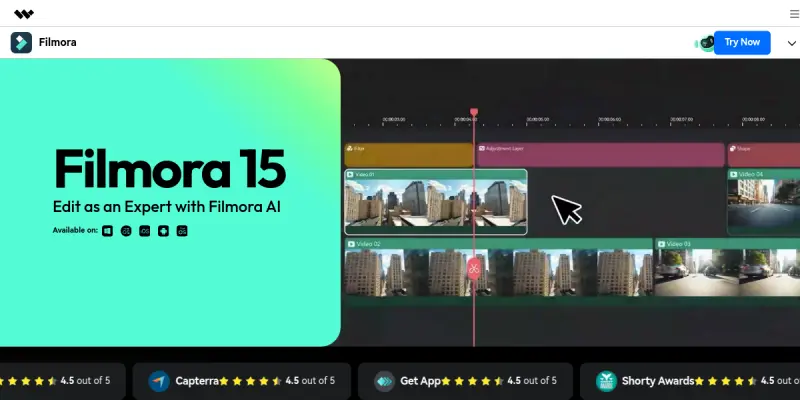
Filmora is an all-in-one video editing platform developed by Wondershare, designed for both desktop and mobile devices. It combines a traditional timeline-based editor with a suite of AI-powered features to simplify video creation for users of all skill levels. From automatic scene detection and text-to-video generation to intelligent audio editing, Filmora aims to reduce the time and technical expertise required to produce high-quality content.
Key Features
- AI Text-to-Video: Generate video clips from text prompts using AI models, suitable for quickly creating social media content or explainer videos.
- AI Auto Reframe: Automatically reframe videos for different aspect ratios, making it easy to repurpose content for platforms like TikTok, Instagram, or YouTube.
- AI Audio Denoise: Remove background noise from audio tracks to improve clarity in dialogue and sound effects.
- AI Portrait Cutout: Isolate subjects from the background without a green screen, enabling creative layering and effects.
- AI Scene Detection: Automatically split long clips into separate scenes based on visual transitions, streamlining the editing workflow.
- Motion Tracking: Track objects or text across frames to attach graphics, text, or effects to moving subjects.
- Keyframing: Animate properties like position, scale, and opacity over time for custom animations.
- Extensive Effects Library: Access a large collection of transitions, filters, overlays, and titles.
Use Cases
Social Media Content Creation
Content creators can leverage Filmora's AI tools to quickly turn raw footage into polished videos for Instagram Reels, TikTok, or YouTube Shorts. The AI auto reframe feature ensures videos fit vertical or square formats without manual cropping.
Marketing and Advertising
Marketers can create product demos, promotional videos, and social media ads using AI text-to-video and motion graphics templates. The built-in stock media library provides access to royalty-free footage and music.
Educational Videos
Educators and trainers can produce explainer videos, tutorials, and course content with ease. AI voiceover capabilities (if available) and text overlays help convey information clearly.
Vlogging and Personal Projects
Hobbyists and vloggers can edit travel diaries, event recaps, and personal vlogs using the intuitive drag-and-drop interface. AI scene detection helps organize footage efficiently.
Pricing & Plans
Filmora operates on a freemium model. The free version includes basic editing features and watermark on exported videos. Paid plans are available in monthly, annual, and perpetual license options. Each plan unlocks additional features, effects, and removes the watermark. Exact pricing is subject to change and should be verified on the official website. Enterprise or team custom pricing is available upon request.
Integrations & Compatibility
Filmora is available for Windows, macOS, iOS, and Android. It supports import/export of a wide range of video, audio, and image formats. Direct sharing to YouTube, Vimeo, and other platforms is built-in. It does not offer native API or direct integrations with third-party project management tools.
Who Is It For?
Filmora is ideal for beginner to intermediate video editors who want a balance of simplicity and advanced features. It is also well-suited for social media managers, marketers, educators, and small business owners who need to produce videos quickly without professional post-production skills.
Limitations
- The free version adds a watermark and limits some advanced features.
- AI features like text-to-video may require cloud credits, which can be consumed quickly.
- Long-form video generation can be slow compared to desktop-only tools.
- Temporal consistency in AI-generated animations can sometimes break, requiring manual correction.
Final Verdict
Filmora AI is a capable video editing platform that successfully bridges the gap between user-friendly editors and pro-level software. Its AI features provide meaningful automation for repetitive tasks, but they are not a replacement for careful manual editing. The best fit is creators who value speed and convenience over frame-by-frame control.
Tool Facts
Screenshots & Interface
Pros
- ✓ Generates video clips from text prompts using AI, reducing creative turnaround time.
- ✓ Includes AI-powered tools like auto reframe, audio denoise, and portrait cutout for efficient editing.
- ✓ Supports cross-platform editing (desktop and mobile) with project syncing.
- ✓ Offers a freemium tier, making it accessible for beginners and hobbyists.
Cons
- × Generating long-form video can be credit-heavy and slow compared to traditional rendering.
- × Temporal consistency in AI-generated animations can sometimes break, requiring manual correction.
- × Free version exports include a watermark and limits access to advanced features.
- × Limited fine control over complex character movements compared to professional animation software.
How to Use Filmora AI in Your Workflow
Integrating Filmora AI into your professional toolkit enhances efficiency by automating manual steps. By configuring it to suit your specific project requirements, you can optimize output quality and reduce project cycle times. Standard workflows involve testing the tool on simple tasks before scaling its use to complex operations.
Frequently Asked Questions
What is Filmora AI used for?
Filmora is an all-in-one video editing platform for desktop and mobile, leveraging AI tools like text-to-video and automatic scene detection. It helps content creators, marketers, and educators produce professional-looking videos with minimal effort. Its key differentiator is the seamless integration of AI-powered features within a traditional timeline editor.
What is the pricing model for Filmora AI?
Filmora AI uses a Freemium pricing model.
What are the main advantages of Filmora AI?
The key benefits of Filmora AI include: Generates video clips from text prompts using AI, reducing creative turnaround time., Includes AI-powered tools like auto reframe, audio denoise, and portrait cutout for efficient editing., Supports cross-platform editing (desktop and mobile) with project syncing., Offers a freemium tier, making it accessible for beginners and hobbyists..
What are the main limitations of Filmora AI?
Some limitations or cons of Filmora AI are: Generating long-form video can be credit-heavy and slow compared to traditional rendering., Temporal consistency in AI-generated animations can sometimes break, requiring manual correction., Free version exports include a watermark and limits access to advanced features., Limited fine control over complex character movements compared to professional animation software..
Alternative AI Tools

Cascadeur
Cascadeur is a standalone software for 3D keyframe animation of humanoids. It uses AI to automate physics and secondary motion, allowing animators to focus on posing. The tool supports keyframe-based workflows for character animation.

Spline AI
Spline AI is an AI-powered 3D design tool that lets users create interactive 3D scenes and animations using natural language prompts. It is designed for designers and developers who want to rapidly prototype 3D assets without manual modeling. Its key differentiator is the ability to generate and edit 3D objects through conversational text commands.

HeyGen
HeyGen is an AI video platform that creates professional spokesperson videos with realistic avatars. It is designed for marketers and content creators who need rapid video production without complex editing.
Rating Details
Based on 0 ratings
Quick Comparisons
Related Tools
More AI tools from the same workflow, industry, or category.
ClipTrend.ai
ClipTrend.ai is an AI image-to-video workspace for creators, marketers, and short-form video teams.
SongR
SongR is a text-to-song app that generates custom music tracks from a few keywords. It is designed for content creators and social media users who need quick, royalty-free songs in genres like pop, rock, hip-hop, and chant. Its key differentiator is instant generation without requiring musical expertise.
Quantum Capture
Quantum Capture generates AI-powered talking head videos from text input. It is designed for content creators and marketers who need quick, studio-quality video clips without expensive equipment. The platform specializes in creating realistic avatars with consistent lip-sync and facial expressions.
Kaltura AI
Kaltura is an enterprise video platform that combines cloud hosting with AI tools for content creation, marketing, and learning management. It helps businesses create branded video experiences for webinars, social media, and internal training.
Reviews
No reviews submitted yet. Be the first to share your experience.
Write a Review
Share Your Experience
Join the community to write reviews, submit ratings, and bookmark your favorite AI tools.