

GraphicSprings
Use GraphicSprings as the anchor for a real shortlist.
Instead of returning to a broad directory, jump straight into the strongest adjacent matchups for pricing, workflow fit, and differentiation.
Overview
Overview
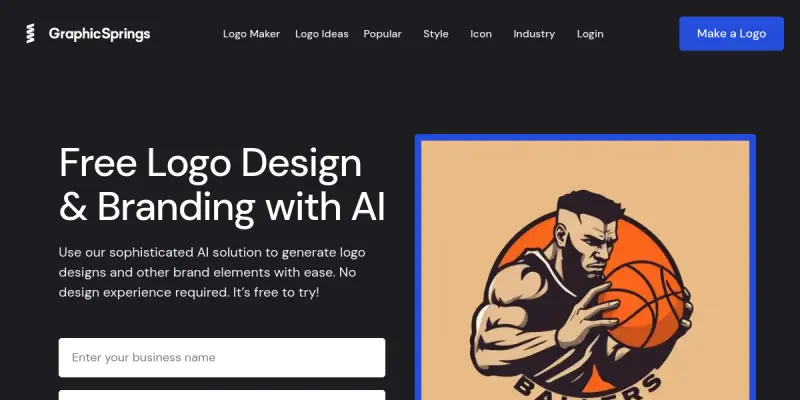
GraphicSprings is an AI-powered logo design platform designed to help individuals and businesses create professional branding assets without the need for advanced design skills. By combining user-friendly templates with generative AI, the tool streamlines the process of logo creation, ensuring that even non-designers can produce high-quality visual identities. The platform focuses specifically on the logo design niche, offering a specialized environment for generating brand assets like icons, symbols, and typography.
Key Features
- AI Logo Generation: Utilizes machine learning algorithms to generate unique logo concepts based on text prompts provided by the user.
- Extensive Template Library: Provides access to thousands of professionally designed templates across diverse industries, from tech to food.
- Drag-and-Drop Editor: Features an intuitive interface allowing users to easily modify text, swap colors, and rearrange elements.
- Vector Export: Supports high-quality downloads in SVG and PNG formats, ensuring logos scale perfectly for both digital and print media.
- Brand Kit Organization: Helps users manage their logo variations, color palettes, and font choices for consistent branding.
- Instant Preview: Allows users to see changes in real-time before finalizing the design.
Use Cases
Startups and Entrepreneurs
GraphicSprings is ideal for startups looking to establish a brand identity quickly. The AI-driven generation process allows founders to iterate on concepts rapidly, saving time and money compared to hiring a professional designer. It serves as a perfect "MVP" (Minimum Viable Product) for brand identity.
Small Business Marketing
Small business owners can use the tool to create consistent branding for their marketing materials, including social media profiles, business cards, and websites. The ability to export vector files ensures that logos remain crisp at any size, maintaining a professional appearance across all touchpoints.
Freelancers and Agencies
Freelancers can use GraphicSprings as a rapid prototyping tool to deliver initial concepts to clients. The wide variety of templates serves as a strong foundation for further manual refinement, helping agencies speed up their initial consultation phase.
Personal Branding
Individuals looking to create a unique logo for their personal portfolio or social media presence can also utilize the platform's flexible customization options to stand out.
Pricing & Plans
GraphicSprings operates on a freemium model. The free tier allows users to generate logos and access basic editing tools, though outputs typically include a visible watermark. Paid subscription plans remove watermarks, unlock high-resolution downloads, and provide access to the full template library and advanced editing features. Specific tiers usually differ in the number of downloads and the level of resolution available.
Integrations & Compatibility
The platform is web-based, ensuring compatibility with all modern operating systems and browsers without the need for software installation. Key integration points include the ability to export assets directly to standard vector (SVG) and raster (PNG) formats, which are compatible with major design software like Adobe Illustrator and Canva.
Who Is It For?
This tool is best suited for entrepreneurs, small business owners, and non-designers who need a fast, affordable solution for branding. It is not designed for complex graphic design projects like website layouts or complex illustrations but excels specifically in logo creation and brand asset generation.
Limitations
- Template Restriction: The tool relies heavily on pre-set templates, which may limit creative freedom compared to vector drawing software like Adobe Illustrator.
- Watermarking: The free version includes a visible watermark on all downloaded assets, which is not professional for client presentations or print materials.
- AI Limitations: While AI generation is fast, the results can sometimes be inconsistent or require significant manual correction to look perfect.
Final Verdict
GraphicSprings is a practical solution for those needing a quick logo. It democratizes design by offering AI assistance and templates. While it lacks the depth of professional software, its ease of use and speed make it a strong contender for MVP branding needs. For users requiring high-end customization, it serves as a great starting point rather than a final solution.
Tool Facts
Screenshots & Interface
Pros
- ✓ Generates vector-based logos suitable for web and print
- ✓ Includes a library of customizable templates across industries
- ✓ Accessible interface requires no design skills to operate
Cons
- × Watermark on free tier outputs limits professional use
- × Template variety may feel restrictive compared to vector software
- × Limited customization options for complex design needs
How to Use GraphicSprings in Your Workflow
Integrating GraphicSprings into your professional toolkit enhances efficiency by automating manual steps. By configuring it to suit your specific project requirements, you can optimize output quality and reduce project cycle times. Standard workflows involve testing the tool on simple tasks before scaling its use to complex operations.
Frequently Asked Questions
What is GraphicSprings used for?
GraphicSprings generates professional logos and brand assets using AI. It offers a free trial and customizable templates for freelancers and small businesses.
What is the pricing model for GraphicSprings?
GraphicSprings uses a Paid pricing model.
What are the main advantages of GraphicSprings?
The key benefits of GraphicSprings include: Generates vector-based logos suitable for web and print, Includes a library of customizable templates across industries, Accessible interface requires no design skills to operate.
What are the main limitations of GraphicSprings?
Some limitations or cons of GraphicSprings are: Watermark on free tier outputs limits professional use, Template variety may feel restrictive compared to vector software, Limited customization options for complex design needs.
Alternative AI Tools

RenderNet
RenderNet is an AI video generation tool designed for e-commerce businesses and marketers. It enables users to create studio-quality video ads for platforms like TikTok, Instagram Reels, and YouTube Shorts, without requiring a production crew. Its key differentiator is its focus on product-centric ad creation with automated editing and scripting.

Overflow AI
Overflow AI is a Mexican company that specializes in developing custom chatbots and AI-powered applications. It offers tailored solutions for businesses looking to automate customer interactions and streamline operations through conversational AI.

BeFunky AI
BeFunky AI is an online photo editing tool that enables users to apply effects, retouch images, and create collages. It is designed for casual users and social media content creators who need quick edits without desktop software.
Rating Details
Based on 0 ratings
Related Tools
More AI tools from the same workflow, industry, or category.
Createimg.ai
Createimg.ai provides text-to-image generation and photo editing tools including background removal. It is designed for e-commerce sellers and creators needing free visual assets.
JetBrains AI
JetBrains AI is an AI-powered toolset integrated into JetBrains IDEs, offering code completion, debugging assistance, and intelligent suggestions for developers. It leverages large language models to help teams write, understand, and refactor code more efficiently. A key differentiator is its seamless integration with JetBrains' existing development environment.
Stable Diffusion Inpaint
Stable Diffusion Inpaint is an AI-powered tool that uses diffusion models to intelligently fill in or replace parts of an image. It is designed for photographers, designers, and content creators who need precise and context-aware image editing. Its key differentiator is the ability to generate new content that seamlessly blends with the existing image.
Crello AI
VistaCreate (formerly Crello) is a cloud-based design tool using AI to generate graphics from text prompts. It features 100K+ templates for social media and marketing.
Reviews
No reviews submitted yet. Be the first to share your experience.
Write a Review
Share Your Experience
Join the community to write reviews, submit ratings, and bookmark your favorite AI tools.