
GTmetrix AI
Use GTmetrix AI as the anchor for a real shortlist.
Instead of returning to a broad directory, jump straight into the strongest adjacent matchups for pricing, workflow fit, and differentiation.
Overview
Overview
GTmetrix is a comprehensive website performance analysis tool that combines data from Google PageSpeed Insights and WebPageTest. It provides users with detailed reports on page load times, resource usage, and overall site health. By leveraging AI-driven insights, GTmetrix helps identify bottlenecks and offers actionable recommendations to improve Core Web Vitals and search engine rankings.
Key Features
- Waterfall Analysis: Visualizes the loading sequence of all elements on a webpage to pinpoint slow resources.
- Core Web Vitals Tracking: Monitors LCP, CLS, and INP metrics to ensure compliance with Google's quality guidelines.
- AI Audit: Uses artificial intelligence to summarize performance issues and suggest prioritized fixes.
- Historical Data: Tracks performance changes over time to monitor the impact of optimizations.
- Benchmarks: Compare site performance against industry averages.
- Detailed Graphs: Provides interactive charts to understand how load times vary across different regions and devices.
Use Cases
Pre-Launch Performance Testing
Before deploying a new website or major campaign, developers can use GTmetrix to simulate load times and identify critical errors that could negatively impact user experience.
SEO Optimization
Since site speed is a ranking factor for search engines, SEO professionals utilize GTmetrix to ensure their clients' websites meet the technical requirements for high search visibility.
Resource Bottleneck Identification
When a website feels slow, developers use the waterfall graph feature to isolate specific scripts, images, or plugins that are causing delays in the rendering process.
Ongoing Monitoring
Regular performance audits allow site owners to monitor the impact of updates, new plugins, or server changes on overall site speed.
Pricing & Plans
GTmetrix operates on a Freemium model. The free tier allows users to run up to two tests per day with basic analysis. A paid subscription (Pro plan) removes daily limits, offers historical data storage, and provides advanced features like custom reports and detailed benchmarking.
Integrations & Compatibility
GTmetrix integrates with Google PageSpeed Insights and WebPageTest. It is compatible with any website that can be accessed via a public URL, making it suitable for a wide range of platforms including WordPress, Shopify, and custom HTML/CSS sites.
Who Is It For?
This tool is designed for web developers, system administrators, SEO specialists, and content managers who need to ensure their digital properties load quickly and efficiently across different devices and network conditions.
Limitations
- URL Accessibility: The tool requires the target website to be publicly accessible via a URL; private or password-protected sites cannot be analyzed without server-side access.
- Technical Complexity: The detailed data provided can be overwhelming for non-technical users who may struggle to interpret waterfall graphs or technical jargon.
- External Factors: The results can be influenced by the user's own internet connection speed, potentially skewing performance comparisons.
Final Verdict
GTmetrix remains a standard for website performance monitoring. Its combination of historical data tracking and detailed waterfall analysis makes it an essential utility for anyone serious about improving site speed. While the free tier is sufficient for casual checks, the Pro version is highly recommended for agencies and developers requiring detailed reporting.
Tool Facts
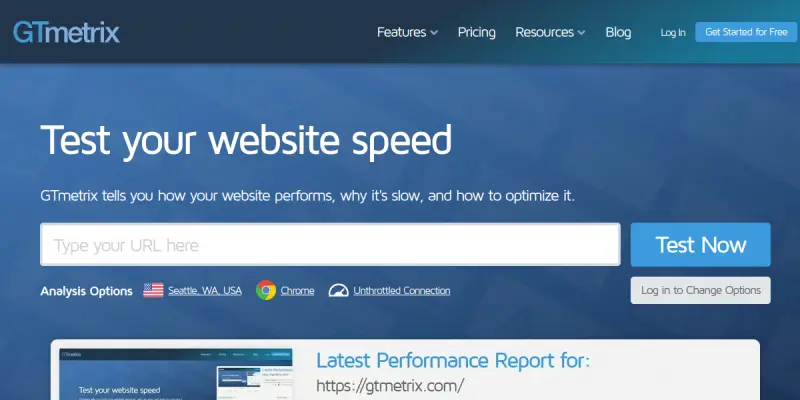
Screenshots & Interface
Pros
- ✓ Provides detailed waterfall graphs to identify specific slow-loading resources.
- ✓ Offers actionable optimization tips based on Google PageSpeed Insights.
- ✓ Combines multiple testing engines for comprehensive website analysis.
- ✓ Tracks performance history to measure the impact of changes over time.
Cons
- × Requires the target website to be publicly accessible; private sites cannot be analyzed.
- × The technical data output can be difficult for non-technical users to interpret.
- × Results can be skewed by the user's own local internet connection speed.
How to Use GTmetrix AI in Your Workflow
Integrating GTmetrix AI into your professional toolkit enhances efficiency by automating manual steps. By configuring it to suit your specific project requirements, you can optimize output quality and reduce project cycle times. Standard workflows involve testing the tool on simple tasks before scaling its use to complex operations.
Frequently Asked Questions
What is GTmetrix AI used for?
GTmetrix analyzes website speed using Google PageSpeed Insights, offering detailed performance reports and optimization suggestions for developers and marketers.
What is the pricing model for GTmetrix AI?
GTmetrix AI uses a Freemium pricing model.
What are the main advantages of GTmetrix AI?
The key benefits of GTmetrix AI include: Provides detailed waterfall graphs to identify specific slow-loading resources., Offers actionable optimization tips based on Google PageSpeed Insights., Combines multiple testing engines for comprehensive website analysis., Tracks performance history to measure the impact of changes over time..
What are the main limitations of GTmetrix AI?
Some limitations or cons of GTmetrix AI are: Requires the target website to be publicly accessible; private sites cannot be analyzed., The technical data output can be difficult for non-technical users to interpret., Results can be skewed by the user's own local internet connection speed..
Alternative AI Tools

Narrato AI
Narrato AI is an all-in-one content marketing workspace that helps teams ideate, create, optimize, manage, and publish content. It combines AI writing assistance with project management and SEO tools for content teams and marketers.

Serpstat AI
Serpstat AI provides SEO data analytics and keyword research for marketers. It tracks search rankings and analyzes backlinks to improve organic visibility. The platform uses AI to suggest content improvements and identify competitor strategies.

Core Web Vitals AI
Core Web Vitals AI optimizes website performance and Core Web Vitals scores for enterprises. It uses data-driven analysis to fix persistent speed issues that standard tools miss.
Rating Details
Based on 0 ratings
Related Tools
More AI tools from the same workflow, industry, or category.
RankOrg
RankOrg automates the creation and daily publication of SEO-optimized blog posts directly to your website. It helps startups, small businesses, and lean content teams grow organic traffic without the burden of manual content production. A key differentiator is its closed-loop system from keyword selection to live publishing.
Constant Contact AI
Constant Contact AI simplifies email marketing campaigns with automated content creation and audience segmentation. It serves small business owners and marketers needing reliable email automation. Differentiator: Integrated CRM features within a familiar email platform.
Moz AI
Moz AI is a suite of AI-powered SEO tools designed for marketers and SEO professionals. It helps users optimize content, conduct keyword research, and analyze search performance to improve organic rankings. The platform leverages machine learning to provide data-driven insights.
RankMath AI
RankMath AI is a WordPress SEO plugin that streamlines on-page optimization with structured data support. It features an AI assistant to generate meta descriptions and offers detailed keyword tracking for better search rankings.
Reviews
No reviews submitted yet. Be the first to share your experience.
Write a Review
Share Your Experience
Join the community to write reviews, submit ratings, and bookmark your favorite AI tools.