

Happy Scribe
Use Happy Scribe as the anchor for a real shortlist.
Instead of returning to a broad directory, jump straight into the strongest adjacent matchups for pricing, workflow fit, and differentiation.
Overview
Overview
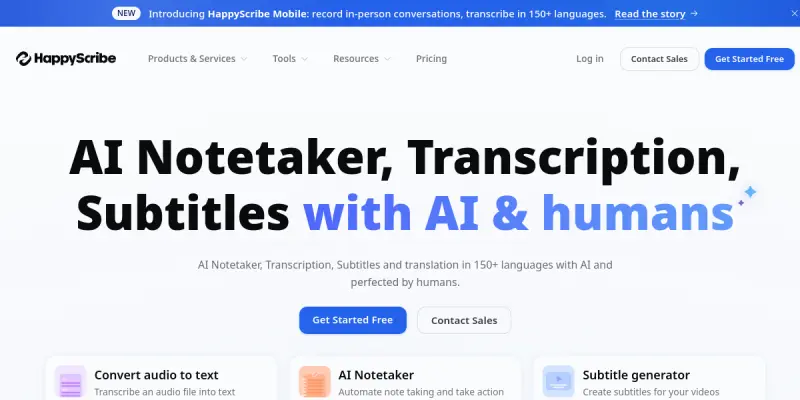
Happy Scribe is an AI-powered transcription and subtitling platform that converts audio and video content into text with high accuracy. Designed for content creators, journalists, podcasters, marketers, and businesses, it supports over 120 languages and offers both automatic and human-verified transcription options. The platform also includes a built-in editor for refining transcripts and exporting subtitles in various formats (SRT, VTT, etc.).
Key Features
- Automatic Transcription: Upload audio or video files and receive AI-generated transcripts in minutes, supporting over 120 languages and dialects.
- Speaker Identification: Automatically detects and labels different speakers in a conversation, making it easier to follow multi-person recordings.
- Built-in Editor: Edit transcripts directly within the platform with a user-friendly interface that highlights timestamps and confidence scores.
- Subtitle Export: Export transcripts as subtitles in formats such as SRT, VTT, ASS, and TXT, fully compatible with major video players and platforms.
- Human Verification: Upgrade to human-verified transcription for near-100% accuracy on critical projects.
- API Access: Integrate Happy Scribe's transcription capabilities into your own applications or workflows using the REST API.
- Collaboration Tools: Share transcripts and subtitles with team members for review and editing in real time.
- Audio & Video Support: Accepts a wide range of file formats including MP3, WAV, MP4, MOV, and more.
Use Cases
Content Creation
Content creators and YouTubers use Happy Scribe to quickly generate accurate captions and subtitles for their videos, improving accessibility and searchability.
Journalism & Research
Journalists and researchers can transcribe interviews, focus groups, and field recordings efficiently, with speaker identification to keep track of who said what.
Business Meetings & Training
Businesses transcribe internal meetings, webinars, and training sessions to create searchable archives and enable team members who missed the live event to catch up.
Academic Work
Students and academics can transcribe lectures, seminars, and oral history interviews for easier note-taking and citation.
Pricing & Plans
Happy Scribe operates on a Freemium model. The free tier offers limited minutes and automatic transcription only. Paid plans come in two tiers: a standard plan with more minutes and access to human verification, and an enterprise plan with custom pricing, dedicated support, and API access. Specific pricing is available on the Happy Scribe website.
Integrations & Compatibility
Happy Scribe integrates with popular video editing software (e.g., Adobe Premiere Pro, Final Cut Pro) and media platforms via subtitle export. The platform also offers a REST API for custom integrations and supports direct upload from cloud storage services like Google Drive and Dropbox.
Who Is It For?
Happy Scribe is ideal for content creators, journalists, podcasters, marketers, business professionals, and academics who need fast, accurate transcription and subtitling services across multiple languages.
Limitations
- Accuracy of automatic transcription may decrease with heavy accents, background noise, or low-quality recordings.
- The free tier is limited to a small number of minutes per month, which may not suffice for heavy users.
- Human-verified transcription is only available on paid plans, adding cost for projects that require high accuracy.
- The platform is cloud-based and requires a stable internet connection for uploading and editing.
Final Verdict
Happy Scribe is a solid choice for anyone needing reliable, multi-language transcription with optional human verification. Its ease of use, broad language support, and flexible export options make it a valuable tool for content and business workflows.
Tool Facts
Screenshots & Interface
Pros
- ✓ Supports transcription and subtitling in over 120 languages.
- ✓ Speaker identification automatically labels different voices in recordings.
- ✓ Built-in editor allows easy refinement of transcripts with timestamp navigation.
- ✓ Offers human-verified transcription for near-100% accuracy on paid plans.
- ✓ REST API enables seamless integration with custom workflows and applications.
Cons
- × Automatic transcription accuracy can degrade with heavy accents or noisy audio.
- × Free tier offers very limited usage minutes per month.
- × Human-verified transcription is only available on paid plans, adding cost.
- × The cloud-based platform requires a consistent internet connection for uploads and editing.
How to Use Happy Scribe in Your Workflow
Integrating Happy Scribe into your professional toolkit enhances efficiency by automating manual steps. By configuring it to suit your specific project requirements, you can optimize output quality and reduce project cycle times. Standard workflows involve testing the tool on simple tasks before scaling its use to complex operations.
Frequently Asked Questions
What is Happy Scribe used for?
Happy Scribe is an AI-powered transcription and subtitling platform that converts audio and video files into text. It serves content creators, journalists, and businesses who need accurate, fast transcripts for their media projects. Its key differentiator is support for over 120 languages and automated speaker identification.
What is the pricing model for Happy Scribe?
Happy Scribe uses a Freemium pricing model.
What are the main advantages of Happy Scribe?
The key benefits of Happy Scribe include: Supports transcription and subtitling in over 120 languages., Speaker identification automatically labels different voices in recordings., Built-in editor allows easy refinement of transcripts with timestamp navigation., Offers human-verified transcription for near-100% accuracy on paid plans., REST API enables seamless integration with custom workflows and applications..
What are the main limitations of Happy Scribe?
Some limitations or cons of Happy Scribe are: Automatic transcription accuracy can degrade with heavy accents or noisy audio., Free tier offers very limited usage minutes per month., Human-verified transcription is only available on paid plans, adding cost., The cloud-based platform requires a consistent internet connection for uploads and editing..
Alternative AI Tools
Lalals
Lalals is an AI-powered tool that generates music from text prompts and voice inputs. It is designed for musicians, content creators, and producers who want to quickly produce royalty-free tracks. Its key differentiator is support for multiple music genres and vocal styles.

Fathom AI
Fathom AI is a meeting notetaker that automatically records, transcribes, and summarizes conversations from platforms like Zoom and Google Meet. It helps professionals save time by eliminating manual note-taking during calls. Its key differentiator is the ability to surface action items and highlights without requiring bot participation.

Snipd AI
Save insights by tapping your headphones, chat with episodes, discover the best highlights - and more!
Rating Details
Based on 0 ratings
Quick Comparisons
Related Tools
More AI tools from the same workflow, industry, or category.
ClipTrend.ai
ClipTrend.ai is an AI image-to-video workspace for creators, marketers, and short-form video teams.
SongR
SongR is a text-to-song app that generates custom music tracks from a few keywords. It is designed for content creators and social media users who need quick, royalty-free songs in genres like pop, rock, hip-hop, and chant. Its key differentiator is instant generation without requiring musical expertise.
Quantum Capture
Quantum Capture generates AI-powered talking head videos from text input. It is designed for content creators and marketers who need quick, studio-quality video clips without expensive equipment. The platform specializes in creating realistic avatars with consistent lip-sync and facial expressions.
Kaltura AI
Kaltura is an enterprise video platform that combines cloud hosting with AI tools for content creation, marketing, and learning management. It helps businesses create branded video experiences for webinars, social media, and internal training.
Reviews
No reviews submitted yet. Be the first to share your experience.
Write a Review
Share Your Experience
Join the community to write reviews, submit ratings, and bookmark your favorite AI tools.