

Heptabase AI
Use Heptabase AI as the anchor for a real shortlist.
Instead of returning to a broad directory, jump straight into the strongest adjacent matchups for pricing, workflow fit, and differentiation.
Overview
Overview
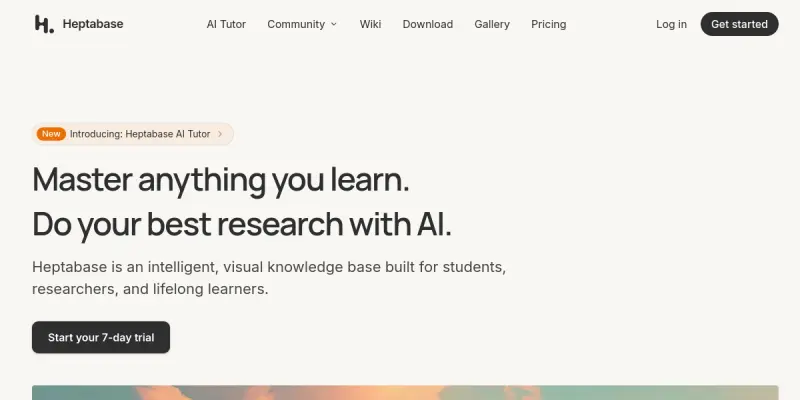
Heptabase is a visual knowledge base and note-taking application designed to help users organize, connect, and understand complex information. Unlike traditional linear note-taking tools, Heptabase uses a whiteboard-style interface where users can create cards, link them, and arrange them spatially. This approach makes it particularly suitable for students, researchers, and lifelong learners who need to synthesize information from multiple sources. Heptabase also includes AI-powered features to assist with summarization, connection discovery, and idea generation.
Key Features
- Visual Whiteboard: Create and arrange cards on an infinite canvas to visually map out ideas and relationships.
- Card-Based Note-Taking: Each note is a card that can be tagged, linked, and moved freely on the whiteboard.
- AI Assistant: Leverage AI to summarize content, suggest connections between cards, and generate new ideas.
- Web Clipper: Save articles, pages, and other web content directly into your Heptabase knowledge base.
- Backlinking: Automatically link related cards to create a web of interconnected knowledge.
- Templates: Use pre-built templates for common knowledge management workflows like research projects and learning plans.
- Collaboration: Share whiteboards and collaborate with others in real-time (available on paid plans).
- Search & Filter: Quickly find cards using full-text search and filtering by tags, dates, and other metadata.
Use Cases
Academic Research
Researchers can use Heptabase to collect and organize papers, notes, and ideas. The visual whiteboard helps in mapping out research questions, methodologies, and findings, making it easier to spot gaps and connections.
Personal Knowledge Management
Lifelong learners can build a second brain by capturing ideas from books, courses, and articles. Heptabase’s card system and backlinking create a personal wiki that grows over time.
Project Planning
Students and professionals can plan projects using the whiteboard to brainstorm, outline steps, and track progress. Cards can represent tasks, resources, and deadlines.
Content Creation
Writers and creators can use Heptabase to structure articles, videos, or courses. The visual layout helps in arranging sections and ensuring logical flow.
Team Collaboration
Teams can use shared whiteboards for brainstorming sessions, retrospectives, and knowledge sharing. Real-time collaboration enables synchronous work.
Pricing & Plans
Heptabase operates on a freemium model. The Free plan includes basic features such as a limited number of cards and whiteboards. The Pro plan, priced at $8.99 per month (paid annually) or $11.99 month-to-month, unlocks unlimited cards, whiteboards, AI features, and collaboration capabilities. There is no publicly disclosed enterprise plan.
Integrations & Compatibility
Heptabase offers a web clipper browser extension for Chrome and Edge. It also supports importing data from other tools such as Notion, Roam Research, and Markdown files. The platform is available as a web app and desktop apps for macOS and Windows. Mobile apps are in development.
Who Is It For?
Heptabase is designed for students, researchers, lifelong learners, writers, and professionals who need to manage and connect complex information. It is best suited for individuals who prefer visual and spatial organization over linear note-taking.
Limitations
- No native mobile app, limiting access on the go.
- AI features require an internet connection and are only available on the Pro plan.
- Learning curve for users accustomed to traditional text-based note-taking tools.
- Collaboration is limited to paid plans.
Final Verdict
Heptabase is a powerful visual knowledge base that excels at helping users organize and connect complex information. Its card-based whiteboard interface is a refreshing alternative to linear note-taking, and the AI features add significant value. However, the lack of a mobile app and the paywall on AI features may be drawbacks for some users. Overall, Heptabase is a strong choice for anyone looking to build a visual second brain.
Tool Facts
Screenshots & Interface
Pros
- ✓ Visual whiteboard interface makes it easy to map and connect complex ideas.
- ✓ AI assistant helps summarize content and suggest connections between cards.
- ✓ Web clipper allows quick saving of online content into the knowledge base.
- ✓ Backlinking automatically creates a web of related information.
- ✓ Supports import from popular tools like Notion and Roam Research.
Cons
- × No native mobile app limits access on smartphones and tablets.
- × AI features are restricted to the paid Pro plan.
- × Learning curve for users accustomed to linear note-taking tools like Evernote or OneNote.
- × Collaboration features are only available on paid plans.
How to Use Heptabase AI in Your Workflow
Integrating Heptabase AI into your professional toolkit enhances efficiency by automating manual steps. By configuring it to suit your specific project requirements, you can optimize output quality and reduce project cycle times. Standard workflows involve testing the tool on simple tasks before scaling its use to complex operations.
Frequently Asked Questions
What is Heptabase AI used for?
Heptabase is a visual knowledge base that helps students, researchers, and lifelong learners organize and connect complex information. It combines note-taking with a digital whiteboard to map ideas and build a second brain. Its key differentiator is the use of visual cards and whiteboard-style thinking for deeper understanding.
What is the pricing model for Heptabase AI?
Heptabase AI uses a Freemium pricing model.
What are the main advantages of Heptabase AI?
The key benefits of Heptabase AI include: Visual whiteboard interface makes it easy to map and connect complex ideas., AI assistant helps summarize content and suggest connections between cards., Web clipper allows quick saving of online content into the knowledge base., Backlinking automatically creates a web of related information., Supports import from popular tools like Notion and Roam Research..
What are the main limitations of Heptabase AI?
Some limitations or cons of Heptabase AI are: No native mobile app limits access on smartphones and tablets., AI features are restricted to the paid Pro plan., Learning curve for users accustomed to linear note-taking tools like Evernote or OneNote., Collaboration features are only available on paid plans..
Alternative AI Tools

Docear AI
Docear AI helps researchers and students organize, annotate, and connect ideas from academic papers. Its mind-map interface lets users visually link concepts, making literature review faster and more intuitive.

Paperpile AI
Paperpile is a research manager designed for academics. It integrates with Word and Google Docs for seamless citations and uses AI to suggest related papers.

BookStack AI
BookStack AI offers AI-powered bookkeeping tailored for US tech startups, delivering investor-ready financial books within 48 hours. It combines automated bookkeeping with expert review to ensure accuracy and compliance, targeting early-stage companies seeking to streamline their accounting.
Rating Details
Based on 0 ratings
Related Tools
More AI tools from the same workflow, industry, or category.
Mailbutler AI
Mailbutler AI is an email extension that integrates AI-powered writing, scheduling, and tracking features directly into your existing inbox. It helps professionals and teams streamline email workflows and save time on routine communication tasks.
Lucidspark AI
Lucidspark AI is a virtual whiteboard tool that helps teams brainstorm, organize ideas, and move from concept to execution. It is designed for remote and hybrid teams seeking a structured yet flexible collaboration space. Its integration with Lucidchart sets it apart for end-to-end visual workflow planning.
SignNow AI
SignNow AI automates document signing and workflow management for businesses. It uses AI to extract fields, send documents for signature, and track completion. Ideal for HR, legal, and sales teams.
ProtonMail AI
ProtonMail AI is an integrated writing assistant for secure email, leveraging Swiss privacy standards to draft, summarize, and translate messages within the Proton Mail interface.
Reviews
No reviews submitted yet. Be the first to share your experience.
Write a Review
Share Your Experience
Join the community to write reviews, submit ratings, and bookmark your favorite AI tools.