

Hotpot AI
Use Hotpot AI as the anchor for a real shortlist.
Instead of returning to a broad directory, jump straight into the strongest adjacent matchups for pricing, workflow fit, and differentiation.
Overview
Overview
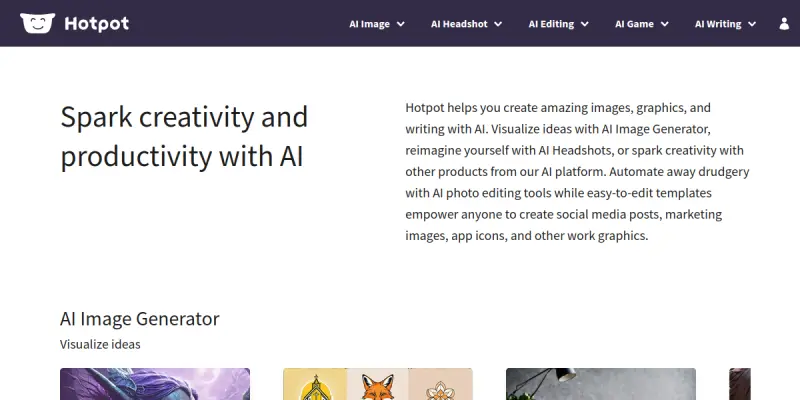
Hotpot AI is a versatile creative platform that leverages artificial intelligence to generate images, graphics, and written content. Designed for marketers, content creators, and small business owners, it combines an AI Image Generator, AI Headshots, and photo editing tools with user-friendly templates. The platform aims to simplify the creation of visual assets for social media, marketing materials, app icons, and other digital content.
Key Features
- AI Image Generator: Creates high-quality images from text prompts, enabling rapid visualization of concepts and ideas.
- AI Headshots: Generates professional-looking headshots from user-uploaded photos, suitable for LinkedIn profiles, resumes, and corporate websites.
- AI Photo Editing: Automates routine editing tasks such as background removal, retouching, and color correction to save time.
- Templates Library: Offers a collection of customizable templates for social media posts, marketing graphics, and app icons, reducing design effort.
- Writing Assistant: Produces text content including headlines, captions, and short copy to complement visual outputs.
- Batch Processing: Supports processing multiple images or tasks simultaneously to improve workflow efficiency.
Use Cases
Social Media Content Creation
Marketers and social media managers can quickly generate engaging posts with custom visuals and captions, maintaining brand consistency across platforms like Instagram, Facebook, and LinkedIn.
Marketing and Advertising
Designers and advertisers can produce promotional images, banners, and ad creatives without needing advanced design skills, accelerating campaign turnaround times.
Personal Branding and Professional Profiles
Individuals can create polished headshots and profile pictures for LinkedIn, resumes, and personal websites, enhancing their professional image.
App and Software Development
Developers and product teams can generate app icons, onboarding screens, and UI mockups to prototype and present ideas more effectively.
Pricing & Plans
Hotpot AI operates on a freemium pricing model. The free tier provides limited access to features and output quality. Paid subscriptions unlock higher resolution images, faster processing, and additional templates. Specific pricing details are available on the official website and may vary based on usage volume.
Integrations & Compatibility
Hotpot AI is a web-based platform accessible through modern browsers. It does not currently offer native integrations with popular design tools like Adobe Creative Cloud or Figma. However, users can export assets in standard formats (PNG, JPG) for use across other applications.
Who Is It For?
Hotpot AI is ideal for non-designers seeking to create professional visuals quickly, including small business owners, social media managers, marketers, and freelancers. It also serves as a productivity tool for designers who want to automate repetitive tasks and generate drafts.
Limitations
- Internet Dependency: Requires a stable internet connection; offline functionality is not available.
- Output Accuracy: The quality of generated images and text heavily depends on the clarity and specificity of user prompts.
- Limited Advanced Features: Professional-grade editing capabilities are absent; the platform is best suited for simple to moderately complex designs.
- No Native Integrations: Lacks direct connectivity with popular design ecosystems, which may hinder workflow for power users.
Final Verdict
Hotpot AI is a practical entry-level tool for individuals and teams looking to streamline content creation without a steep learning curve. Its freemium model lowers the barrier to entry, while the template library and AI-driven features accelerate common design tasks. However, users requiring deep customization or advanced editing should consider complementary software. Overall, Hotpot AI is a solid choice for quick, AI-assisted creative work.
Tool Facts
Screenshots & Interface
Pros
- ✓ AI Image Generator produces high-quality visuals from text prompts in seconds.
- ✓ AI Headshots feature saves time by transforming selfies into professional portraits.
- ✓ Template library provides pre-designed assets for social media, marketing, and app icons.
- ✓ Batch processing capability allows handling multiple tasks simultaneously for increased efficiency.
Cons
- × Requires constant internet connection; no offline mode available.
- × Advanced features and high-resolution outputs are locked behind a paid subscription.
- × Generated content quality is inconsistent and relies heavily on prompt clarity.
- × No native integrations with popular design tools like Adobe Creative Cloud or Figma.
How to Use Hotpot AI in Your Workflow
Integrating Hotpot AI into your professional toolkit enhances efficiency by automating manual steps. By configuring it to suit your specific project requirements, you can optimize output quality and reduce project cycle times. Standard workflows involve testing the tool on simple tasks before scaling its use to complex operations.
Frequently Asked Questions
What is Hotpot AI used for?
Hotpot AI is a creative platform that generates images, headshots, and written content using AI. It offers an AI Image Generator, AI Headshots, and photo editing tools. Users can create social media posts, marketing images, and app icons via customizable templates.
What is the pricing model for Hotpot AI?
Hotpot AI uses a Freemium pricing model.
What are the main advantages of Hotpot AI?
The key benefits of Hotpot AI include: AI Image Generator produces high-quality visuals from text prompts in seconds., AI Headshots feature saves time by transforming selfies into professional portraits., Template library provides pre-designed assets for social media, marketing, and app icons., Batch processing capability allows handling multiple tasks simultaneously for increased efficiency..
What are the main limitations of Hotpot AI?
Some limitations or cons of Hotpot AI are: Requires constant internet connection; no offline mode available., Advanced features and high-resolution outputs are locked behind a paid subscription., Generated content quality is inconsistent and relies heavily on prompt clarity., No native integrations with popular design tools like Adobe Creative Cloud or Figma..
Alternative AI Tools

Locofy
Locofy is an AI-powered tool that converts Figma and Penpot designs into clean, developer-friendly frontend code. It is built for frontend developers and design teams aiming to accelerate prototyping and handoff. A key differentiator is its support for on-premise or cloud deployment with SOC2 and ISO certifications.
StarryAI
StarryAI is an AI image generator that transforms your photos into dreamlike artwork based on text prompts. It primarily serves artists and content creators seeking high-quality, stylized visuals with minimal effort. The tool distinguishes itself by prioritizing prompt-based creation over simple image editing.

Stable Diffusion
Stable Diffusion is an open-source text-to-image model that generates photorealistic visuals from natural language prompts. It is widely used by artists, designers, and developers for creative and commercial projects, and runs locally on consumer hardware.
Rating Details
Based on 0 ratings
Quick Comparisons
Related Tools
More AI tools from the same workflow, industry, or category.
Createimg.ai
Createimg.ai provides text-to-image generation and photo editing tools including background removal. It is designed for e-commerce sellers and creators needing free visual assets.
JetBrains AI
JetBrains AI is an AI-powered toolset integrated into JetBrains IDEs, offering code completion, debugging assistance, and intelligent suggestions for developers. It leverages large language models to help teams write, understand, and refactor code more efficiently. A key differentiator is its seamless integration with JetBrains' existing development environment.
Stable Diffusion Inpaint
Stable Diffusion Inpaint is an AI-powered tool that uses diffusion models to intelligently fill in or replace parts of an image. It is designed for photographers, designers, and content creators who need precise and context-aware image editing. Its key differentiator is the ability to generate new content that seamlessly blends with the existing image.
Crello AI
VistaCreate (formerly Crello) is a cloud-based design tool using AI to generate graphics from text prompts. It features 100K+ templates for social media and marketing.
Reviews
No reviews submitted yet. Be the first to share your experience.
Write a Review
Share Your Experience
Join the community to write reviews, submit ratings, and bookmark your favorite AI tools.