

Joplin AI
Use Joplin AI as the anchor for a real shortlist.
Instead of returning to a broad directory, jump straight into the strongest adjacent matchups for pricing, workflow fit, and differentiation.
Overview
Overview
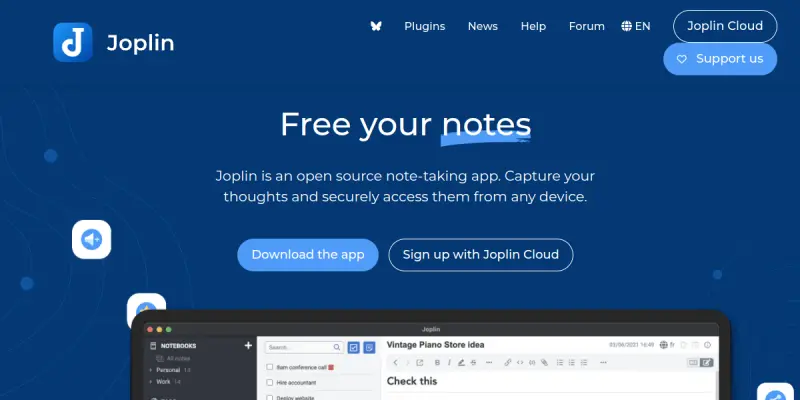
Joplin AI is an intelligent extension for the open-source Joplin note-taking application. It utilizes advanced machine learning models to assist users in managing their knowledge base more effectively. By integrating directly into the Joplin editor, it provides tools for summarizing long notes, generating content from outlines, and answering specific questions based on the user's existing data. The platform emphasizes privacy and security, maintaining end-to-end encryption even when utilizing AI features.
Key Features
- AI Summarization: Automatically condense long notes and articles into concise summaries.
- Ask Notes: Chat with your notes to retrieve specific information or clarify complex topics.
- Content Generation: Create new notes or outlines from scratch using natural language prompts.
- Translation: Translate notes into multiple languages directly within the editor.
- Markdown Support: Native support for Markdown syntax with live preview.
- End-to-End Encryption: All data is encrypted on the device before syncing.
- Offline Capability: Full access to notes and AI features without an internet connection.
- Multi-Platform: Available on Windows, macOS, Linux, Android, and iOS.
Use Cases
Personal Knowledge Management
For researchers and students, Joplin AI serves as a powerful tool to digest vast amounts of information. Users can paste long research papers or lecture notes, and the AI will generate a summary highlighting key points, allowing for faster review and better retention of complex material.
Project Management
Teams working on collaborative projects can use Joplin AI to organize meeting notes and action items. The 'Ask Notes' feature allows team members to query the project log for specific decisions made in past meetings, ensuring continuity and reducing the need for repetitive meetings.
Secure Journaling
Privacy-conscious users benefit from Joplin's open-source nature and encryption. The AI features allow for organizing private thoughts and diary entries securely, with the confidence that the underlying data structure is transparent and not locked behind a proprietary black box.
Developer Documentation
Developers maintaining technical documentation can use the AI to refactor existing code snippets within their notes or generate documentation from code comments, streamlining the technical writing process.
Pricing & Plans
Joplin operates on a Freemium model. The core application and AI features are free to use. There are no mandatory subscription fees for basic usage. Advanced features or premium support options are not currently advertised, suggesting the tool remains free for personal and professional use.
Integrations & Compatibility
Joplin AI integrates seamlessly with the Joplin ecosystem. It supports syncing with various cloud providers including Nextcloud, Dropbox, OneDrive, and AWS S3. It is compatible with all major operating systems, including Windows, macOS, Linux, Android, and iOS. The app uses the standard Markdown format for interoperability with other writing tools.
Who Is It For?
Joplin AI is ideal for privacy-conscious professionals, students, and knowledge workers who require a robust, offline-first note-taking solution enhanced by artificial intelligence. It is particularly suited for those who value open-source software and data sovereignty.
Limitations
- Privacy Considerations: While the app is encrypted, users must be aware of where the AI processing occurs, as some models may require data to be sent to external servers.
- Markdown Dependency: The tool is optimized for Markdown, which may have a steeper learning curve for users accustomed to WYSIWYG editors.
- AI Feature Scope: The AI capabilities are currently focused on text processing rather than image analysis or file generation.
Final Verdict
Joplin AI represents a significant step forward for privacy-focused productivity tools. By combining the robust, open-source architecture of Joplin with the utility of AI, it offers a compelling alternative to mainstream cloud-based note apps. While it may lack the sleek design of some proprietary competitors, its commitment to user privacy and data control makes it a standout choice for serious knowledge managers.
Tool Facts
Screenshots & Interface
Pros
- ✓ End-to-end encryption ensures data privacy and security.
- ✓ Offline-first architecture allows full access to notes and AI features without an internet connection.
- ✓ Seamless integration of AI tools directly into the note editor.
Cons
- × Privacy concerns exist regarding how AI data is processed and stored externally.
- × The interface is utilitarian and lacks the modern polish of some proprietary competitors.
- × The tool is optimized for Markdown, which may be difficult for casual users.
How to Use Joplin AI in Your Workflow
Integrating Joplin AI into your professional toolkit enhances efficiency by automating manual steps. By configuring it to suit your specific project requirements, you can optimize output quality and reduce project cycle times. Standard workflows involve testing the tool on simple tasks before scaling its use to complex operations.
Frequently Asked Questions
What is Joplin AI used for?
Joplin AI is an open-source note-taking app that integrates AI to summarize content and answer questions. It offers end-to-end encryption for secure local storage.
What is the pricing model for Joplin AI?
Joplin AI uses a Freemium pricing model.
What are the main advantages of Joplin AI?
The key benefits of Joplin AI include: End-to-end encryption ensures data privacy and security., Offline-first architecture allows full access to notes and AI features without an internet connection., Seamless integration of AI tools directly into the note editor..
What are the main limitations of Joplin AI?
Some limitations or cons of Joplin AI are: Privacy concerns exist regarding how AI data is processed and stored externally., The interface is utilitarian and lacks the modern polish of some proprietary competitors., The tool is optimized for Markdown, which may be difficult for casual users..
Alternative AI Tools

Jitterbit AI
Jitterbit AI is a low-code integration platform that helps businesses automate workflows, connect data sources, and build applications. It combines iPaaS, data orchestration, and AI-powered tools for non-technical and technical users alike. Its key differentiator is unifying these capabilities on a single, visual interface.

Sembly AI
Sembly AI is an AI-powered meeting assistant that automatically transcribes, summarizes, and extracts action items from conversations. It helps professionals in consulting, legal, and other service industries turn meeting recordings into client-ready deliverables. Its key differentiator is the ability to generate bespoke work products tailored to specific client needs.

Drift Scheduling AI
Drift Scheduling AI by Salesloft is a conversational scheduling tool that helps marketing, sales, and service teams book meetings and engage buyers online. It uses AI to automate meeting coordination and reduce friction in the sales process.
Rating Details
Based on 0 ratings
Quick Comparisons
Related Tools
More AI tools from the same workflow, industry, or category.
Mailbutler AI
Mailbutler AI is an email extension that integrates AI-powered writing, scheduling, and tracking features directly into your existing inbox. It helps professionals and teams streamline email workflows and save time on routine communication tasks.
Lucidspark AI
Lucidspark AI is a virtual whiteboard tool that helps teams brainstorm, organize ideas, and move from concept to execution. It is designed for remote and hybrid teams seeking a structured yet flexible collaboration space. Its integration with Lucidchart sets it apart for end-to-end visual workflow planning.
SignNow AI
SignNow AI automates document signing and workflow management for businesses. It uses AI to extract fields, send documents for signature, and track completion. Ideal for HR, legal, and sales teams.
ProtonMail AI
ProtonMail AI is an integrated writing assistant for secure email, leveraging Swiss privacy standards to draft, summarize, and translate messages within the Proton Mail interface.
Reviews
No reviews submitted yet. Be the first to share your experience.
Write a Review
Share Your Experience
Join the community to write reviews, submit ratings, and bookmark your favorite AI tools.