

Kayako AI
Use Kayako AI as the anchor for a real shortlist.
Instead of returning to a broad directory, jump straight into the strongest adjacent matchups for pricing, workflow fit, and differentiation.
Overview
Overview
Kayako AI is a customer support platform that integrates artificial intelligence to automate common support requests. It is designed to help businesses reduce the volume of tickets handled by human agents, allowing teams to focus on more complex issues. The platform's AI capabilities aim to improve response times and overall customer satisfaction.
Key Features
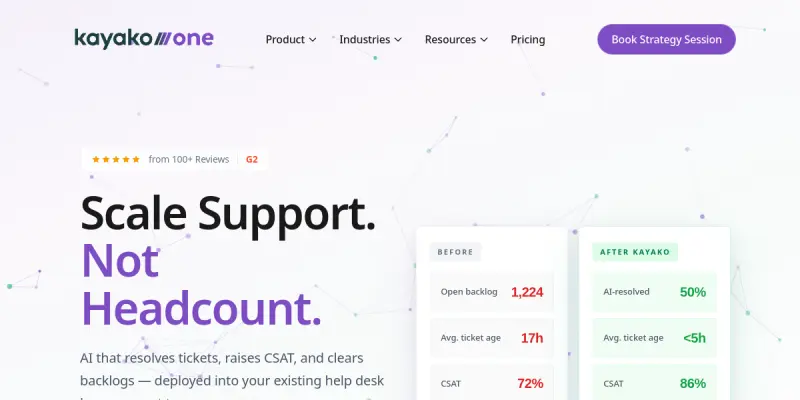
- AI Ticket Automation: Automatically resolves up to 60% of incoming support tickets by analyzing and responding to customer queries.
- Smart Routing: Directs complex or unresolved issues to the appropriate human agent based on skill set and availability.
- Knowledge Base Integration: Connects with existing knowledge bases to provide AI-generated answers without manual intervention.
- Analytics Dashboard: Offers insights into ticket volume, resolution rates, and agent performance.
- Multi-Channel Support: Manages queries from email, chat, and social media within a single interface.
- Customizable Workflows: Allows administrators to set up rules for ticket prioritization, escalation, and status updates.
- Third-Party Integrations: Integrates with popular CRM, helpdesk, and productivity tools.
Use Cases
Reducing Ticket Volume
Organizations can use Kayako AI to handle frequently asked questions and standard requests, drastically cutting down the number of tickets that reach human agents.
Improving Response Times
By automating initial responses, the platform helps customers receive instant answers, reducing wait times and improving overall service levels.
Scaling Support Operations
Growing companies can manage increased support demand without proportionally increasing support staff, as the AI handles a significant portion of the workload.
Enhancing Agent Productivity
Human agents can focus on complex, high-value interactions, improving job satisfaction and efficiency.
Pricing & Plans
Kayako AI offers a free tier with basic automation capabilities. Paid plans unlock advanced features such as enhanced analytics, priority support, and higher ticket automation limits. Specific pricing details are not publicly disclosed and should be obtained directly from Kayako.
Integrations & Compatibility
The platform integrates with major CRM systems (e.g., Salesforce), helpdesks, and communication tools. It also supports custom integrations via API.
Who Is It For?
Kayako AI is suitable for customer support teams of all sizes, particularly those in fast-growing companies looking to optimize their support operations. It is also appropriate for organizations seeking to reduce support costs without sacrificing quality.
Limitations
- The free tier may have limited automation capacity.
- AI accuracy is dependent on the quality of the knowledge base and training data.
- Some complex customer queries may still require human escalation.
- The platform requires a stable internet connection for all features.
Final Verdict
Kayako AI provides a practical solution for automating a significant portion of customer support tickets. Its AI-driven automation can lead to measurable efficiency gains and cost savings. However, its effectiveness relies on proper setup and integration with existing knowledge bases. Overall, it is a solid choice for businesses aiming to scale their support operations while maintaining quality.
Tool Facts
Screenshots & Interface
Pros
- ✓ Automates up to 60% of support tickets, reducing agent workload.
- ✓ Integrates with major CRM and helpdesk tools for seamless workflow.
- ✓ Offers a free tier to test core automation features.
- ✓ Provides analytics to monitor ticket resolution and agent performance.
Cons
- × Free tier may have limited automation capacity and features.
- × AI accuracy is dependent on thorough setup of knowledge base and training data.
- × Complex queries still require human escalation, limiting full automation.
How to Use Kayako AI in Your Workflow
Integrating Kayako AI into your professional toolkit enhances efficiency by automating manual steps. By configuring it to suit your specific project requirements, you can optimize output quality and reduce project cycle times. Standard workflows involve testing the tool on simple tasks before scaling its use to complex operations.
Frequently Asked Questions
What is Kayako AI used for?
Kayako AI is a customer support platform that uses artificial intelligence to automate ticket resolution. It helps support teams handle common issues without human intervention, reducing response times. The platform is designed for businesses looking to lower support costs and improve efficiency.
What is the pricing model for Kayako AI?
Kayako AI uses a Free pricing model.
What are the main advantages of Kayako AI?
The key benefits of Kayako AI include: Automates up to 60% of support tickets, reducing agent workload., Integrates with major CRM and helpdesk tools for seamless workflow., Offers a free tier to test core automation features., Provides analytics to monitor ticket resolution and agent performance..
What are the main limitations of Kayako AI?
Some limitations or cons of Kayako AI are: Free tier may have limited automation capacity and features., AI accuracy is dependent on thorough setup of knowledge base and training data., Complex queries still require human escalation, limiting full automation..
Alternative AI Tools

Amazon Lex
Amazon Lex is an AWS service for building conversational chatbots and voice assistants. It uses deep learning models for speech recognition and natural language understanding.

Slite AI
Slite AI is a knowledge base platform that uses artificial intelligence to help teams find company information quickly. It is designed for remote and in-office teams who need instant answers from a central repository, with a focus on simplicity and reliability.

Topdesk AI
Topdesk AI integrates artificial intelligence into IT service management to automate ticket resolution and assist agents. It is designed for IT teams looking to reduce manual workload and improve response times.
Rating Details
Based on 0 ratings
Quick Comparisons
Related Tools
More AI tools from the same workflow, industry, or category.
Inspectlet AI
Inspectlet records videos of website visitors to show every mouse movement, scroll, click, and keypress. It helps product teams, marketers, and UX researchers understand user behavior through session replays and heatmaps. Unlike traditional analytics, it provides visual, play-by-play insights into how people interact with your site.
Chatfuel
Chatfuel is a no-code platform for building AI chatbots on Instagram, WhatsApp, and TikTok. It enables businesses to automate customer support and sales workflows directly on social media. The tool integrates with Meta business tools to manage customer interactions at scale.
Amazon Lex
Amazon Lex is an AWS service for building conversational chatbots and voice assistants. It uses deep learning models for speech recognition and natural language understanding.
Whatfix AI
Whatfix AI is a digital adoption platform that helps users navigate enterprise software through simulation training and personalized guidance, designed for businesses of all sizes.
Reviews
No reviews submitted yet. Be the first to share your experience.
Write a Review
Share Your Experience
Join the community to write reviews, submit ratings, and bookmark your favorite AI tools.