

Krisp
Use Krisp as the anchor for a real shortlist.
Instead of returning to a broad directory, jump straight into the strongest adjacent matchups for pricing, workflow fit, and differentiation.
Overview
Overview
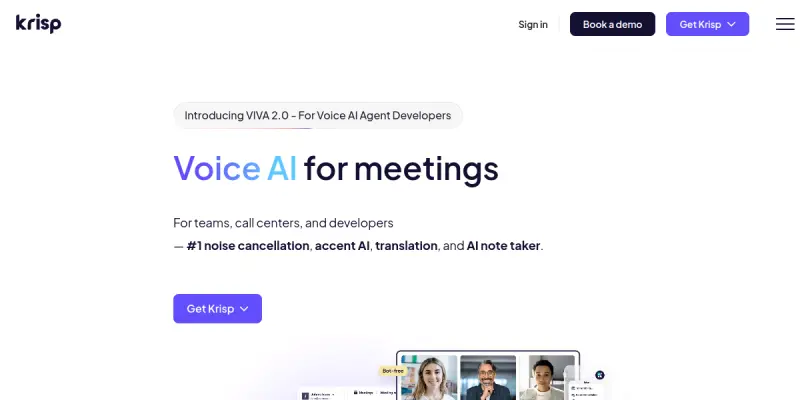
Krisp is a software application designed to enhance audio quality during virtual communications by utilizing artificial intelligence to distinguish between human speech and background noise. Beyond real-time noise cancellation, Krisp offers a suite of tools including an AI note-taker for transcribing meetings and accent identification to assist with understanding diverse speakers. It serves as a comprehensive solution for professionals looking to eliminate distractions in their home or office environments.
Key Features
- Real-time Noise Cancellation: Separates human voice from background noise like traffic, sirens, and keyboard clicks.
- AI Note Taker: Automatically records, transcribes, and summarizes meetings across various platforms.
- Accent AI: Identifies different accents to improve clarity and comprehension during calls.
- Call Center AI: Optimizes customer service interactions by removing background noise and analyzing call quality.
- Platform Integration: Seamlessly works with Zoom, Google Meet, Microsoft Teams, Slack, and RingCentral.
- Speaker Identification: Distinguishes between different participants to ensure accurate transcription.
Use Cases
Remote Work & Home Offices
Krisp is essential for remote professionals who work from noisy environments. By filtering out background noise, it allows for professional audio quality without needing expensive soundproof rooms or hardware.
Customer Support Teams
Call centers can use Krisp to ensure agents are heard clearly by customers. It reduces the cognitive load on agents by removing distractions, allowing them to focus on the conversation.
International Teams
The Accent AI feature helps bridge communication gaps for global teams, ensuring that language barriers do not hinder collaboration.
Pricing & Plans
Krisp operates on a Freemium model. The free version allows users to use basic noise cancellation for a limited number of hours. Paid plans, starting at a monthly subscription, unlock advanced features such as the AI Note Taker, Accent AI, and unlimited noise cancellation usage. Enterprise plans are available for larger organizations requiring custom integrations and support.
Integrations & Compatibility
Krisp integrates with the most popular video conferencing and communication tools on the market. It supports Zoom, Google Meet, Microsoft Teams, and Webex for noise cancellation. Additionally, it integrates with Slack and RingCentral to block notifications and noise across these platforms.
Who Is It For?
Krisp is designed for anyone who relies on audio communication, including remote workers, freelancers, customer support agents, and podcasters. It is particularly beneficial for teams working in noisy shared spaces or individuals who wish to maintain a professional audio standard during virtual meetings.
Limitations
- Requires a stable and high-speed internet connection to process audio streams effectively.
- Advanced features like the AI Note Taker and Accent AI are restricted to paid subscription tiers.
- Real-time processing can consume significant computer resources (CPU/RAM), which may affect performance on older devices.
Final Verdict
Krisp stands out as a reliable and effective solution for improving audio clarity in virtual meetings. While it requires a paid subscription for its full suite of features, its noise cancellation capabilities are industry-leading. It is a valuable addition to the toolkit of any remote worker or professional who values clear communication.
Tool Facts
Screenshots & Interface
Pros
- ✓ Effectively removes background noise in real-time without latency.
- ✓ Integrates seamlessly with major platforms like Zoom, Teams, and Google Meet.
- ✓ Useful AI tools like the Note Taker and Accent ID provide significant value for remote teams.
Cons
- × Requires a stable, high-speed internet connection for real-time processing.
- × Advanced features like the AI Note Taker and Accent AI are locked behind paid plans.
- × Real-time audio processing can consume significant CPU and RAM resources.
How to Use Krisp in Your Workflow
Integrating Krisp into your professional toolkit enhances efficiency by automating manual steps. By configuring it to suit your specific project requirements, you can optimize output quality and reduce project cycle times. Standard workflows involve testing the tool on simple tasks before scaling its use to complex operations.
Frequently Asked Questions
What is Krisp used for?
Krisp is an AI-powered noise cancellation tool that removes background noise during calls and meetings. It includes features like an AI note-taker and accent identification to improve communication clarity. The software supports video conferencing platforms like Zoom and Microsoft Teams.
What is the pricing model for Krisp?
Krisp uses a Freemium pricing model.
What are the main advantages of Krisp?
The key benefits of Krisp include: Effectively removes background noise in real-time without latency., Integrates seamlessly with major platforms like Zoom, Teams, and Google Meet., Useful AI tools like the Note Taker and Accent ID provide significant value for remote teams..
What are the main limitations of Krisp?
Some limitations or cons of Krisp are: Requires a stable, high-speed internet connection for real-time processing., Advanced features like the AI Note Taker and Accent AI are locked behind paid plans., Real-time audio processing can consume significant CPU and RAM resources..
Alternative AI Tools

Listnr
Listnr is a professional AI voice generator for creators, helping them produce realistic voices and multilingual content with 1000+ AI voices in 142+ languages, making it a unique solution for multimedia projects.

Moises AI
Moises AI separates vocals and instruments using AI, allowing musicians to practice isolated tracks or create remixes. It offers mastering tools and multi-track editing for creators.

Artlist AI
Generate royalty-free music and sound effects using AI for your projects. This SaaS platform offers a free tier for experimentation alongside paid plans for commercial use.
Rating Details
Based on 0 ratings
Quick Comparisons
Related Tools
More AI tools from the same workflow, industry, or category.
ClipTrend.ai
ClipTrend.ai is an AI image-to-video workspace for creators, marketers, and short-form video teams.
SongR
SongR is a text-to-song app that generates custom music tracks from a few keywords. It is designed for content creators and social media users who need quick, royalty-free songs in genres like pop, rock, hip-hop, and chant. Its key differentiator is instant generation without requiring musical expertise.
Quantum Capture
Quantum Capture generates AI-powered talking head videos from text input. It is designed for content creators and marketers who need quick, studio-quality video clips without expensive equipment. The platform specializes in creating realistic avatars with consistent lip-sync and facial expressions.
Kaltura AI
Kaltura is an enterprise video platform that combines cloud hosting with AI tools for content creation, marketing, and learning management. It helps businesses create branded video experiences for webinars, social media, and internal training.
Reviews
No reviews submitted yet. Be the first to share your experience.
Write a Review
Share Your Experience
Join the community to write reviews, submit ratings, and bookmark your favorite AI tools.