

Limnr AI
Use Limnr AI as the anchor for a real shortlist.
Instead of returning to a broad directory, jump straight into the strongest adjacent matchups for pricing, workflow fit, and differentiation.
Overview
Overview
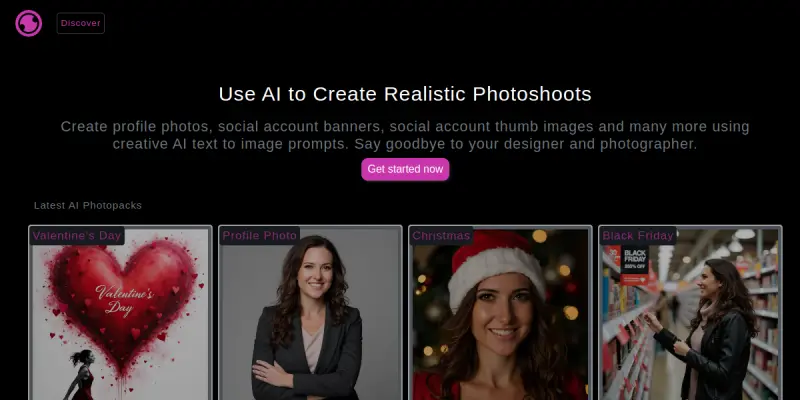
Limnr AI is a browser-based text-to-image generation tool designed to assist creators in producing visual content rapidly. By leveraging advanced machine learning models, the platform converts textual descriptions into visual assets, catering to a wide range of design needs without requiring specialized software installation.
Key Features
- Text-to-Image Generation: Creates high-quality images from simple text prompts.
- Free Access Tier: Offers a robust free plan allowing users to experiment without cost.
- Browser-Based Interface: Runs entirely in the browser, requiring no software downloads or setup.
- Style Variations: Generates multiple iterations of an image to provide creative options.
- Rapid Prototyping: Speeds up the visual brainstorming process for designers and marketers.
- Responsive Design: Works seamlessly across desktop and mobile devices.
Use Cases
Marketing & Social Media
Content creators use Limnr AI to quickly generate banner images, profile pictures, and post graphics. The ability to iterate on styles rapidly helps marketing teams maintain a consistent visual identity across campaigns.
Rapid Prototyping
Designers utilize the tool to visualize concepts before committing to detailed rendering. This allows for quick feedback loops and exploration of different artistic directions without the time cost of manual illustration.
Personal Projects
Hobbyists and writers use the tool to create unique covers for stories or illustrations for personal blogs, leveraging the free tier to explore their creativity without financial risk.
Pricing & Plans
Limnr AI operates on a freemium model. The current pricing structure includes a free tier that provides access to core generation features, making it accessible to casual users. Detailed pricing for advanced features or higher resolution outputs is typically available on the provider's website.
Integrations & Compatibility
The tool is designed as a standalone web application, ensuring broad compatibility with any modern operating system. While specific API integrations are not explicitly detailed, the browser-based nature suggests compatibility with standard web automation tools and general content management systems through direct export options.
Who Is It For?
This tool is ideal for digital marketers, content creators, graphic design students, and hobbyists who need quick visual assets. It is particularly suited for individuals or small teams looking to prototype ideas or generate stock-like imagery without the overhead of premium design software.
Limitations
- Output Quality Variance: The accuracy and aesthetic appeal of generated images can vary significantly based on the specificity of the input prompt.
- Resolution Constraints: The free tier may impose limits on image resolution or output file size compared to paid subscriptions.
- Copyright Concerns: Users must verify usage rights for AI-generated assets, as they do not always qualify as copyrightable works in all jurisdictions.
Final Verdict
Limnr AI serves as a solid entry point for AI-assisted image creation. Its major strength lies in its accessibility and free tier, making it a great tool for quick projects. However, users seeking professional-grade control over composition and style may need to supplement it with dedicated design software.
Tool Facts
Screenshots & Interface
Pros
- ✓ Free access allows for unlimited experimentation without financial commitment.
- ✓ Generates diverse visual styles from simple text inputs.
- ✓ No software installation required; runs entirely in the browser.
- ✓ Browser-based interface ensures cross-platform accessibility.
Cons
- × Output quality is highly dependent on the specificity of the input prompt.
- × Resolution limits may apply on the free tier compared to paid plans.
- × Limited control over fine-tuned artistic styles compared to manual design tools.
How to Use Limnr AI in Your Workflow
Integrating Limnr AI into your professional toolkit enhances efficiency by automating manual steps. By configuring it to suit your specific project requirements, you can optimize output quality and reduce project cycle times. Standard workflows involve testing the tool on simple tasks before scaling its use to complex operations.
Frequently Asked Questions
What is Limnr AI used for?
Limnr AI generates images from text prompts using AI. It provides a free tier for creators and designers to produce visual assets quickly.
What is the pricing model for Limnr AI?
Limnr AI uses a Free pricing model.
What are the main advantages of Limnr AI?
The key benefits of Limnr AI include: Free access allows for unlimited experimentation without financial commitment., Generates diverse visual styles from simple text inputs., No software installation required; runs entirely in the browser., Browser-based interface ensures cross-platform accessibility..
What are the main limitations of Limnr AI?
Some limitations or cons of Limnr AI are: Output quality is highly dependent on the specificity of the input prompt., Resolution limits may apply on the free tier compared to paid plans., Limited control over fine-tuned artistic styles compared to manual design tools..
Alternative AI Tools
Runway ML
Runway ML offers a suite of AI creative tools for video and image generation. It provides an intuitive platform for designers to generate high-quality media assets without coding.

Ideogram
Ideogram is an AI image generator known for its ability to accurately render text within images. It creates visuals for marketing, branding, and design projects.
Anima
Anima is a browser-based prototyping tool that turns static designs into interactive web and mobile apps. It integrates directly with Figma to help designers and developers bridge the gap between design and code.
Rating Details
Based on 0 ratings
Quick Comparisons
Related Tools
More AI tools from the same workflow, industry, or category.
Createimg.ai
Createimg.ai provides text-to-image generation and photo editing tools including background removal. It is designed for e-commerce sellers and creators needing free visual assets.
JetBrains AI
JetBrains AI is an AI-powered toolset integrated into JetBrains IDEs, offering code completion, debugging assistance, and intelligent suggestions for developers. It leverages large language models to help teams write, understand, and refactor code more efficiently. A key differentiator is its seamless integration with JetBrains' existing development environment.
Stable Diffusion Inpaint
Stable Diffusion Inpaint is an AI-powered tool that uses diffusion models to intelligently fill in or replace parts of an image. It is designed for photographers, designers, and content creators who need precise and context-aware image editing. Its key differentiator is the ability to generate new content that seamlessly blends with the existing image.
Crello AI
VistaCreate (formerly Crello) is a cloud-based design tool using AI to generate graphics from text prompts. It features 100K+ templates for social media and marketing.
Reviews
No reviews submitted yet. Be the first to share your experience.
Write a Review
Share Your Experience
Join the community to write reviews, submit ratings, and bookmark your favorite AI tools.