
Notta
Use Notta as the anchor for a real shortlist.
Instead of returning to a broad directory, jump straight into the strongest adjacent matchups for pricing, workflow fit, and differentiation.
Overview
Overview
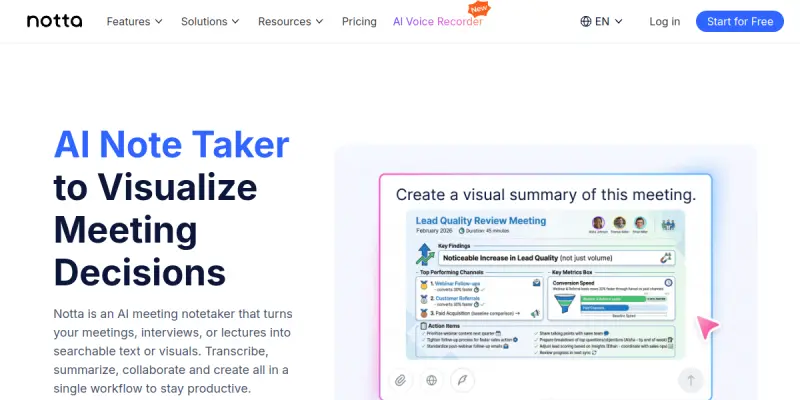
Notta is an AI-powered note-taking tool designed to automatically transcribe, summarize, and generate action plans from meetings, interviews, and recordings. It supports multiple languages and integrates with popular calendar and video conferencing platforms, streamlining the workflow for professionals who need accurate and organized notes.
Key Features
- Real-Time Transcription: Transcribes conversations in real time with high accuracy, supporting over 100 languages.
- Automatic Summarization: Generates concise summaries of meetings and interviews, saving time on note-taking.
- Action Item Extraction: Identifies and lists action items, tasks, and decisions from conversations.
- Calendar & Video Conferencing Integration: Syncs with Google Calendar, Outlook, Zoom, and Microsoft Teams to automatically join and transcribe meetings.
- Search & Playback: Allows users to search within transcripts and play back specific segments.
- Collaborative Notes: Enables team members to edit, comment, and share transcripts and summaries.
- Export Options: Exports transcripts and summaries to PDF, DOCX, TXT, and other formats.
- Mobile & Web Access: Works across iOS, Android, and web browsers for on-the-go note-taking.
Use Cases
Business Meetings
Professionals can use Notta to automatically capture and organize meeting notes, ensuring nothing is missed. The tool integrates with common calendar and video conferencing apps to join meetings and start recording without manual intervention.
Interviews & Research
Journalists, researchers, and podcasters can record and transcribe interviews, then generate summaries and highlight key quotes. The searchable transcripts make it easy to find specific topics or statements.
Education & Lectures
Students and educators can record lectures and generate full transcripts and summaries for study and review. Notta’s multi-language support is especially useful for multilingual classrooms.
Content Creation
Content creators can repurpose recorded conversations into blog posts, social media snippets, and articles using the generated transcripts and summaries.
Team Collaboration
Teams can share meeting notes, assign action items, and track decisions across projects, improving transparency and accountability.
Pricing & Plans
Notta offers a Free tier with limited transcription minutes and basic features. Paid plans include:
- Pro: More transcription minutes, higher accuracy, and export options.
- Business: Additional collaboration features, integrations, and admin controls.
- Enterprise: Custom solutions with dedicated support, SSO, and advanced security.
For the most current pricing, visit the Notta website.
Integrations & Compatibility
Notta integrates with Zoom, Google Meet, Microsoft Teams, Webex, Google Calendar, Outlook, Slack, and various CRMs. It is compatible with web browsers, iOS, and Android devices.
Who Is It For?
Notta is designed for business professionals, journalists, researchers, students, educators, content creators, and teams who need efficient, AI-driven note-taking and transcription services.
Limitations
- Free Tier Limits: The free plan has a low transcription minute cap.
- Language Accuracy: While supporting many languages, accuracy can vary depending on accents and audio quality.
- Internet Dependency: Requires a stable internet connection for real-time transcription and cloud-based features.
Final Verdict
Notta is a robust AI note-taking tool that excels in meeting transcription and summarization. Its strong integrations and multi-language support make it a valuable asset for professionals and teams. However, users on the free tier may find the minute limit restrictive, and those with poor audio quality may experience reduced accuracy. Overall, it is a reliable choice for anyone looking to automate note-taking.
Tool Facts
Screenshots & Interface
Pros
- ✓ Real-time transcription supports over 100 languages with high accuracy.
- ✓ Seamless integration with major calendar and video conferencing platforms (Zoom, Teams, Google Meet).
- ✓ Automatic summarization and action item extraction reduce manual note-taking effort.
- ✓ Collaborative editing and sharing features improve team productivity.
- ✓ Search and playback functionality makes it easy to revisit specific parts of a conversation.
Cons
- × Free tier offers only limited transcription minutes, which may be insufficient for heavy users.
- × Accuracy can decline in noisy environments or with heavy accents.
- × Real-time features require a stable and fast internet connection.
- × No offline mode or local transcription option is available.
How to Use Notta in Your Workflow
Integrating Notta into your professional toolkit enhances efficiency by automating manual steps. By configuring it to suit your specific project requirements, you can optimize output quality and reduce project cycle times. Standard workflows involve testing the tool on simple tasks before scaling its use to complex operations.
Frequently Asked Questions
What is Notta used for?
Notta is an AI-powered note-taking tool that transcribes meetings, interviews, and recordings in real time. It automatically generates summaries and action items, making it ideal for busy professionals and teams. Its key differentiator is seamless integration with popular calendar and video conferencing platforms.
What is the pricing model for Notta?
Notta uses a Paid pricing model.
What are the main advantages of Notta?
The key benefits of Notta include: Real-time transcription supports over 100 languages with high accuracy., Seamless integration with major calendar and video conferencing platforms (Zoom, Teams, Google Meet)., Automatic summarization and action item extraction reduce manual note-taking effort., Collaborative editing and sharing features improve team productivity., Search and playback functionality makes it easy to revisit specific parts of a conversation..
What are the main limitations of Notta?
Some limitations or cons of Notta are: Free tier offers only limited transcription minutes, which may be insufficient for heavy users., Accuracy can decline in noisy environments or with heavy accents., Real-time features require a stable and fast internet connection., No offline mode or local transcription option is available..
Alternative AI Tools

Soundful
Soundful is an AI music generator that helps content creators, musicians, and producers produce royalty-free tracks in various genres. It offers customization controls for tempo, key, and mood, enabling rapid music creation without specialized audio skills.

Podsqueeze
Podsqueeze is an AI-powered podcast platform that generates transcripts, summaries, clips, and enhances audio. It helps podcasters save time on post-production and content repurposing. The tool offers a free tier to get started.

Murf AI
Murf AI is a text-to-speech platform that generates realistic voiceovers for videos, podcasts, and presentations. It offers a browser-based studio and an API for developers to integrate synthetic voices into applications.
Rating Details
Based on 0 ratings
Quick Comparisons
Related Tools
More AI tools from the same workflow, industry, or category.
ClipTrend.ai
ClipTrend.ai is an AI image-to-video workspace for creators, marketers, and short-form video teams.
SongR
SongR is a text-to-song app that generates custom music tracks from a few keywords. It is designed for content creators and social media users who need quick, royalty-free songs in genres like pop, rock, hip-hop, and chant. Its key differentiator is instant generation without requiring musical expertise.
Quantum Capture
Quantum Capture generates AI-powered talking head videos from text input. It is designed for content creators and marketers who need quick, studio-quality video clips without expensive equipment. The platform specializes in creating realistic avatars with consistent lip-sync and facial expressions.
Kaltura AI
Kaltura is an enterprise video platform that combines cloud hosting with AI tools for content creation, marketing, and learning management. It helps businesses create branded video experiences for webinars, social media, and internal training.
Reviews
No reviews submitted yet. Be the first to share your experience.
Write a Review
Share Your Experience
Join the community to write reviews, submit ratings, and bookmark your favorite AI tools.