

Plottr AI
Use Plottr AI as the anchor for a real shortlist.
Instead of returning to a broad directory, jump straight into the strongest adjacent matchups for pricing, workflow fit, and differentiation.
Overview
Overview
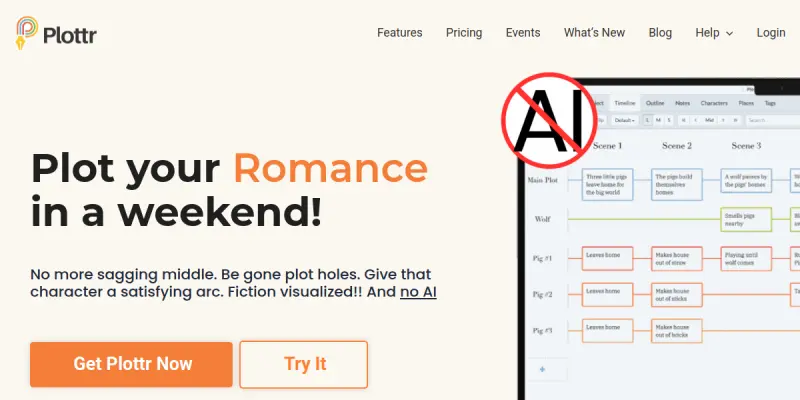
Plottr is a specialized story outlining software designed to help authors visualize their narratives. Unlike traditional note-taking apps, Plottr focuses on a visual timeline interface that allows writers to see their entire story arc at a glance. It combines the organization of a spreadsheet with the flexibility of a drag-and-drop canvas, making it easier to structure complex plots and manage character arcs without getting lost in the details. The tool supports various genres, offering templates that guide users through standard narrative structures.
Key Features
- Visual Timeline: A dynamic, drag-and-drop interface allows users to plot events chronologically, making it easy to adjust the pacing of the story.
- Character Sheets: Dedicated profiles for managing character details, backstories, relationships, and character arcs.
- Plot Templates: Pre-built structures for various genres, including romance, mystery, thriller, and fantasy, which users can customize.
- Drag-and-Drop Editing: Users can easily move plot points around the timeline to refine the narrative flow without losing context.
- Series Support: Tools to link multiple books together, maintaining continuity across a book series.
- Export Options: Save outlines as PDFs or Word documents to use for manuscript planning or sharing with collaborators.
Use Cases
Novel Planning
Authors use Plottr to structure their novels from beginning to end, ensuring narrative pacing and logical progression of events. It helps in breaking down a complex story into manageable chapters.
Screenwriting
The timeline format is ideal for screenwriters to organize scenes and beats according to standard screenplay formats, ensuring the script flows logically.
Character Development
Writers utilize the character sheets to track character arcs and ensure consistency throughout the story, preventing plot holes related to character behavior.
Series Organization
Writers managing book series can use Plottr to link plots across different books, ensuring continuity and tracking character growth over multiple volumes.
Pricing & Plans
Plottr operates on a Freemium model. The free version allows users to download the software and access basic outlining tools, though it may have limitations on export features or template access. A paid subscription is required to unlock the full range of templates, advanced export options, and the complete suite of plotting tools.
Integrations & Compatibility
Plottr is a standalone desktop application available for both Windows and macOS. It does not currently offer native integrations with cloud storage services or other writing software, requiring users to export files manually to import them into word processors like Microsoft Word or Scrivener.
Who Is It For?
This tool is specifically designed for fiction authors, novelists, and screenwriters who need a structured approach to outlining their stories. It is ideal for visual learners who prefer mapping out their narrative structure rather than working with a linear text editor.
Limitations
- Plottr is a desktop application with limited mobile accessibility; there is no native mobile app.
- It does not include built-in AI writing generation features to help draft text.
- The learning curve may be steep for users who are unfamiliar with timeline-based plotting software.
- It functions offline, which can be a limitation for those who prefer cloud-based real-time collaboration.
Final Verdict
Plottr serves as a robust alternative to standard note-taking apps for writers who benefit from visual organization. While it lacks advanced AI features, its strength lies in its intuitive timeline interface and comprehensive template library. For authors who struggle to visualize their narrative arc, Plottr provides a clear path from idea to finished manuscript.
Tool Facts
Screenshots & Interface
Pros
- ✓ Visual timeline interface simplifies complex plot structures
- ✓ Built-in character sheets and world-building tools
- ✓ Drag-and-drop functionality for flexible plotting
- ✓ Export capabilities to standard manuscript formats
Cons
- × Desktop application limits accessibility on mobile devices
- × Lacks integrated AI writing generation features
- × Learning curve for users unfamiliar with timeline-based plotting
How to Use Plottr AI in Your Workflow
Integrating Plottr AI into your professional toolkit enhances efficiency by automating manual steps. By configuring it to suit your specific project requirements, you can optimize output quality and reduce project cycle times. Standard workflows involve testing the tool on simple tasks before scaling its use to complex operations.
Frequently Asked Questions
What is Plottr AI used for?
Plottr is a story outlining software for authors that uses visual timelines to plot books. It includes character sheets and templates to organize fiction projects.
What is the pricing model for Plottr AI?
Plottr AI uses a Freemium pricing model.
What are the main advantages of Plottr AI?
The key benefits of Plottr AI include: Visual timeline interface simplifies complex plot structures, Built-in character sheets and world-building tools, Drag-and-drop functionality for flexible plotting, Export capabilities to standard manuscript formats.
What are the main limitations of Plottr AI?
Some limitations or cons of Plottr AI are: Desktop application limits accessibility on mobile devices, Lacks integrated AI writing generation features, Learning curve for users unfamiliar with timeline-based plotting.
Alternative AI Tools

Grammar Lookup
Grammar Lookup is an online editor for correcting spelling, grammar, and punctuation mistakes. It assists writers and editors in refining their content with ease, offering support for multiple languages.

Pictory
Pictory is an AI-powered video generator for content creators and marketers. It transforms text, URLs, presentations, and media into professional branded videos with automatic captions and voiceovers, reducing production time from hours to minutes.
INK Editor
SmythOS provides open-source infrastructure for building and deploying AI agents. It enables secure and aligned automation at scale through visual workflows.
Rating Details
Based on 0 ratings
Quick Comparisons
Related Tools
More AI tools from the same workflow, industry, or category.
fablepilot
FablePilot is a free AI story generator that turns a single prompt into a complete story — no sign-up required. Add illustrations or generate a plot outline.
Ghosts.app
Ghosts is an AI ghostwriter for agencies, creators, and law firms. It produces researched, cited drafts in a specific voice without requiring prompts. Users brief a specialist agent and approve a finished draft.
GrowthBar
GrowthBar is an AI tool for content generation, designed to boost productivity and streamline workflows for writers and content creators, with features like editing and tone adjustment.
GetGenie AI
GetGenie AI is an AI-powered writing and SEO assistant that helps content creators and marketers generate optimized content quickly. It includes built-in keyword research and SERP analysis to improve organic search performance.
Reviews
No reviews submitted yet. Be the first to share your experience.
Write a Review
Share Your Experience
Join the community to write reviews, submit ratings, and bookmark your favorite AI tools.