

Podsqueeze
Use Podsqueeze as the anchor for a real shortlist.
Instead of returning to a broad directory, jump straight into the strongest adjacent matchups for pricing, workflow fit, and differentiation.
Overview
Overview
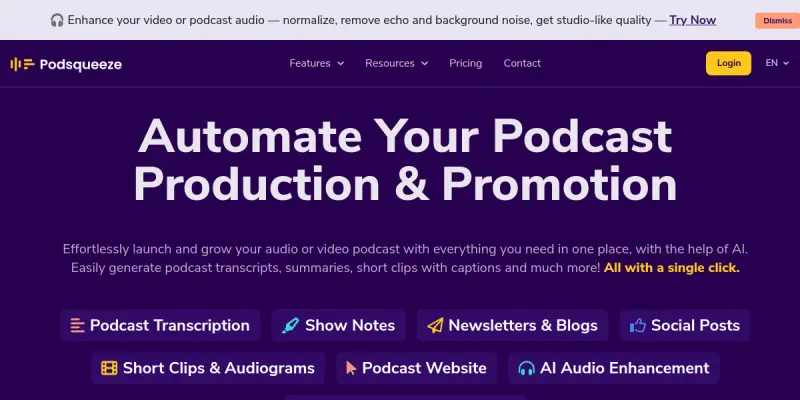
Podsqueeze is an AI-powered tool designed for podcasters who want to streamline their production workflow. It automates transcription, summarization, clip generation, and audio enhancement, enabling creators to focus on content rather than manual editing. The platform aims to reduce the time spent on post-production and content repurposing, making it easier to publish show notes, social media clips, and transcripts.
Key Features
- AI Transcription: Convert podcast episodes into accurate text transcripts with speaker identification.
- Smart Summaries: Automatically generate concise episode summaries that can be used for show notes or social posts.
- Clip Creation: Extract short audio or video clips from longer episodes using AI to identify highlight moments.
- Audio Enhancement: Improve audio quality by reducing background noise, equalizing levels, and removing silence.
- Timestamped Notes: Automatically generate timestamps for key topics and segments within an episode.
- Multi-Format Export: Export transcripts, summaries, and clips in various formats including TXT, SRT, and MP3.
- API Integration: Access Podsqueeze's features programmatically for custom workflows.
- Free Tier Available: Start with a free plan that includes a limited number of processing minutes per month.
Use Cases
Podcast Post-Production
Podsqueeze helps podcasters accelerate the editing and publishing process. Instead of manually transcribing episodes or creating show notes, users can upload their audio and receive a complete package of materials ready for distribution.
Content Repurposing
Creators can use Podsqueeze to turn one long episode into multiple pieces of content. Transcribe the episode to create a blog post, generate a summary for social media, and extract clips for promotional videos on platforms like YouTube or TikTok.
Team Collaboration
Podcast teams can share transcripts and notes generated by Podsqueeze to coordinate episode planning and review. The timestamped summaries make it easy to reference specific segments during discussions.
Accessibility and SEO
Transcribing episodes improves accessibility for hearing-impaired listeners and provides SEO benefits by adding searchable text to podcast websites. Podsqueeze's transcript exports can be directly embedded or used as alt text.
Pricing & Plans
Podsqueeze offers a freemium pricing model. The free tier includes a limited number of monthly processing minutes (exact limits not disclosed publicly). Paid plans start at a monthly subscription that increases the processing cap and unlocks unlimited exports and priority support. Enterprise pricing is available for teams with custom requirements. For the most current pricing, visit the Podsqueeze website.
Integrations & Compatibility
Podsqueeze supports multiple audio and video file formats. It offers a public API for developers to integrate transcription and analysis into their own tools. The platform is web-based and works on any modern browser. Specific integrations with podcast hosting platforms (like Buzzsprout, Anchor, or Libsyn) are not explicitly listed, but the export functionality can be used in conjunction with any hosting service.
Who Is It For?
Podsqueeze is designed for podcasters, content creators, marketers, and teams who produce podcast content regularly. It is especially useful for solo creators who need to save time on administrative tasks and for agencies that manage multiple shows and require consistent, high-quality transcripts and summaries.
Limitations
- No mobile app is available; the tool operates only through a web browser.
- The free tier's processing minutes may be restrictive for longer or frequent episodes.
- The accuracy of transcription depends on audio quality and may struggle with heavy accents or background noise.
- The tool does not offer multi-language transcription or translation features.
Final Verdict
Podsqueeze is a solid all-in-one AI tool for podcasters looking to automate post-production and repurposing. Its transcription, summary, and clip creation features work well for standard podcast use cases. The freemium model makes it accessible, though heavy users will need a paid plan. If you need a single platform to handle transcripts, show notes, and clips, Podsqueeze is worth trying.
Tool Facts
Screenshots & Interface
Pros
- ✓ Automates transcription, summaries, and clip generation to save hours of post-production time.
- ✓ Provides a free tier for podcasters to test the tool before committing to a paid plan.
- ✓ Offers an API for developers to integrate transcription features into custom workflows.
Cons
- × No mobile app is currently available, limiting on-the-go use.
- × The free tier's monthly processing minutes may be insufficient for frequent or long episodes.
- × Transcription accuracy declines with poor audio quality, heavy accents, or background noise.
- × Multi-language transcription and translation are not supported.
How to Use Podsqueeze in Your Workflow
Integrating Podsqueeze into your professional toolkit enhances efficiency by automating manual steps. By configuring it to suit your specific project requirements, you can optimize output quality and reduce project cycle times. Standard workflows involve testing the tool on simple tasks before scaling its use to complex operations.
Frequently Asked Questions
What is Podsqueeze used for?
Podsqueeze is an AI-powered podcast platform that generates transcripts, summaries, clips, and enhances audio. It helps podcasters save time on post-production and content repurposing. The tool offers a free tier to get started.
What is the pricing model for Podsqueeze?
Podsqueeze uses a Freemium pricing model.
What are the main advantages of Podsqueeze?
The key benefits of Podsqueeze include: Automates transcription, summaries, and clip generation to save hours of post-production time., Provides a free tier for podcasters to test the tool before committing to a paid plan., Offers an API for developers to integrate transcription features into custom workflows..
What are the main limitations of Podsqueeze?
Some limitations or cons of Podsqueeze are: No mobile app is currently available, limiting on-the-go use., The free tier's monthly processing minutes may be insufficient for frequent or long episodes., Transcription accuracy declines with poor audio quality, heavy accents, or background noise., Multi-language transcription and translation are not supported..
Alternative AI Tools
Lalals
Lalals is an AI-powered tool that generates music from text prompts and voice inputs. It is designed for musicians, content creators, and producers who want to quickly produce royalty-free tracks. Its key differentiator is support for multiple music genres and vocal styles.

AssemblyAI
AssemblyAI is a speech-to-text API that converts audio and video files into accurate transcriptions using deep learning models. It is designed for developers and businesses who need scalable, real-time voice data processing. The platform offers features like speaker diarization, sentiment analysis, and content moderation.

Scribie
Scribie is an AI-powered transcription platform that delivers human-verified transcripts with 99% accuracy. It serves professionals who need to convert audio from depositions, podcasts, or marketing content into text, with pricing starting at $0.50 per minute.
Rating Details
Based on 0 ratings
Quick Comparisons
Related Tools
More AI tools from the same workflow, industry, or category.
ClipTrend.ai
ClipTrend.ai is an AI image-to-video workspace for creators, marketers, and short-form video teams.
SongR
SongR is a text-to-song app that generates custom music tracks from a few keywords. It is designed for content creators and social media users who need quick, royalty-free songs in genres like pop, rock, hip-hop, and chant. Its key differentiator is instant generation without requiring musical expertise.
Quantum Capture
Quantum Capture generates AI-powered talking head videos from text input. It is designed for content creators and marketers who need quick, studio-quality video clips without expensive equipment. The platform specializes in creating realistic avatars with consistent lip-sync and facial expressions.
Kaltura AI
Kaltura is an enterprise video platform that combines cloud hosting with AI tools for content creation, marketing, and learning management. It helps businesses create branded video experiences for webinars, social media, and internal training.
Reviews
No reviews submitted yet. Be the first to share your experience.
Write a Review
Share Your Experience
Join the community to write reviews, submit ratings, and bookmark your favorite AI tools.