

POEditor AI
Use POEditor AI as the anchor for a real shortlist.
Instead of returning to a broad directory, jump straight into the strongest adjacent matchups for pricing, workflow fit, and differentiation.
Overview
Overview
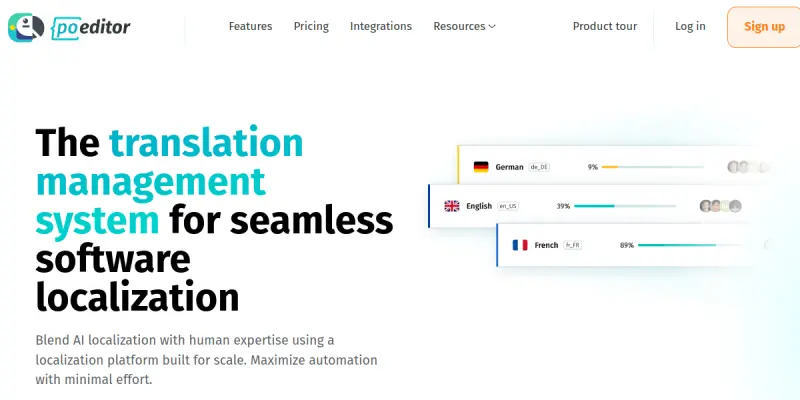
POEditor is a cloud-based localization platform designed to streamline the process of translating software, applications, and websites into multiple languages. It bridges the gap between developers and linguists by combining a user-friendly management interface with advanced AI translation capabilities. The platform is built to help teams scale their localization efforts without sacrificing accuracy or speed.
Key Features
- Translation Memory: Automatically stores and reuses previous translations to ensure consistency and save time.
- Machine Translation Integration: Leverages advanced AI models to provide instant, automated translations for quick workflows.
- File Format Support: Supports a wide range of formats including .po, .json, .xml, Python strings, and Android resource files.
- Developer API: Offers a robust REST API for seamless integration into CI/CD pipelines and development workflows.
- Collaborative Environment: Allows multiple users to review, edit, and approve translations in real-time.
- Terminology Management: Maintains glossaries to ensure specific brand terms and technical vocabulary are translated correctly.
Use Cases
Mobile App Localization
POEditor simplifies the process of localizing mobile applications for different global markets. Developers can upload their source files, and translators can manage the translation process efficiently, ensuring the app feels native to users in different regions.
Website Content Management
For marketing teams and web developers, POEditor offers tools to manage website content, metadata, and SEO elements across various languages, helping to improve global reach.
Software Development
Developers can integrate POEditor directly into their build process, enabling automatic extraction and updating of translatable strings as the software evolves.
Pricing & Plans
POEditor operates on a Freemium model. The free plan allows users to create one project with a limited number of words. Paid plans unlock unlimited projects, higher word limits, and access to premium machine translation engines. Specific pricing varies based on the volume of words translated.
Integrations & Compatibility
POEditor integrates with popular version control systems like Git and offers a REST API for custom integrations. It is compatible with standard web and mobile development file formats.
Who Is It For?
This tool is ideal for software developers, product managers, and localization specialists who need to manage multilingual content efficiently. It is particularly useful for startups and established companies looking to expand their global presence.
Limitations
- Pricing Tiers: Advanced features and high-volume projects require a paid subscription.
- Internet Dependency: Being a cloud-based SaaS, it requires a stable internet connection for all operations.
- AI Accuracy: While powerful, AI translations may require human review for complex or technical content to ensure perfect accuracy.
Final Verdict
POEditor provides a balanced solution for teams that need to move fast. By combining the efficiency of AI with the precision of human linguists, it offers a comprehensive toolset for modern localization challenges.
Tool Facts
Screenshots & Interface
Pros
- ✓ Offers a comprehensive REST API for seamless integration into development workflows.
- ✓ Supports a wide variety of file formats including XML, JSON, and Python strings.
- ✓ Leverages translation memory to ensure consistency across different language pairs.
- ✓ Provides a collaborative interface for teams to review and manage translations.
Cons
- × The free tier has strict limits on the number of projects and word counts.
- × Advanced AI features and higher volume limits require a paid subscription.
- × Relies on an internet connection for all cloud-based operations and syncing.
How to Use POEditor AI in Your Workflow
Integrating POEditor AI into your professional toolkit enhances efficiency by automating manual steps. By configuring it to suit your specific project requirements, you can optimize output quality and reduce project cycle times. Standard workflows involve testing the tool on simple tasks before scaling its use to complex operations.
Frequently Asked Questions
What is POEditor AI used for?
POEditor is a translation management platform combining human expertise with AI localization tools. It supports developers and teams requiring multi-language support.
What is the pricing model for POEditor AI?
POEditor AI uses a Freemium pricing model.
What are the main advantages of POEditor AI?
The key benefits of POEditor AI include: Offers a comprehensive REST API for seamless integration into development workflows., Supports a wide variety of file formats including XML, JSON, and Python strings., Leverages translation memory to ensure consistency across different language pairs., Provides a collaborative interface for teams to review and manage translations..
What are the main limitations of POEditor AI?
Some limitations or cons of POEditor AI are: The free tier has strict limits on the number of projects and word counts., Advanced AI features and higher volume limits require a paid subscription., Relies on an internet connection for all cloud-based operations and syncing..
Alternative AI Tools

MemoQ AI
MemoQ is a translation and localization management platform for enterprises, language service providers, and professional translators. It combines translation memory, terminology management, and AI-powered features to streamline complex multilingual projects.
OneSky AI
OneSky AI is a localization platform that uses AI to translate and quality-check content across over 100 languages. It helps businesses maintain brand consistency in websites, apps, marketing materials, and documents. A key differentiator is its multi-agent system that combines translation with automated QA.

Vocab AI
Vocab AI generates AI voiceovers and dubs for video content. It helps creators and marketers localize videos into multiple languages efficiently.
Rating Details
Based on 0 ratings
Quick Comparisons
Related Tools
More AI tools from the same workflow, industry, or category.
fablepilot
FablePilot is a free AI story generator that turns a single prompt into a complete story — no sign-up required. Add illustrations or generate a plot outline.
Ghosts.app
Ghosts is an AI ghostwriter for agencies, creators, and law firms. It produces researched, cited drafts in a specific voice without requiring prompts. Users brief a specialist agent and approve a finished draft.
GrowthBar
GrowthBar is an AI tool for content generation, designed to boost productivity and streamline workflows for writers and content creators, with features like editing and tone adjustment.
GetGenie AI
GetGenie AI is an AI-powered writing and SEO assistant that helps content creators and marketers generate optimized content quickly. It includes built-in keyword research and SERP analysis to improve organic search performance.
Reviews
No reviews submitted yet. Be the first to share your experience.
Write a Review
Share Your Experience
Join the community to write reviews, submit ratings, and bookmark your favorite AI tools.