

Prezi AI
Use Prezi AI as the anchor for a real shortlist.
Instead of returning to a broad directory, jump straight into the strongest adjacent matchups for pricing, workflow fit, and differentiation.
Overview
Overview
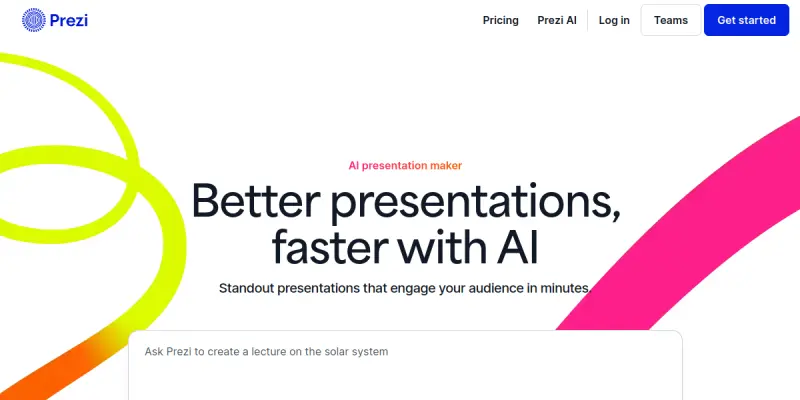
Prezi AI is a generative artificial intelligence tool designed to transform linear text inputs into dynamic, non-linear visual presentations. Unlike traditional slide-based software like PowerPoint, Prezi utilizes a unique "zoomable canvas" interface, allowing users to pan and zoom between topics to create a sense of narrative flow and spatial connection. This approach shifts the focus from static bullet points to a cohesive story arc.
Key Features
- Generative Storyboard: Users can input a topic or text prompt, and the AI generates a visual outline or storyboard.
- Auto-Content Generation: Automatically creates text, images, and transition effects to flesh out the presentation structure.
- Zoomable Canvas: The core interface allows for a fluid navigation experience where users can move between topics and subtopics.
- Template Library: Access to a variety of pre-built visual themes and layouts to match brand guidelines.
- Real-time Collaboration: Multiple team members can edit the presentation simultaneously within the web browser.
- Offline Editing: Create and edit content without an active internet connection, with changes syncing once connection is restored.
- Customization: Adjust fonts, colors, and layout elements to refine the final visual output.
Use Cases
Business Pitching
Sales professionals and entrepreneurs use Prezi AI to create high-impact pitches that capture investor attention. The non-linear format allows for a more persuasive narrative than a standard deck, helping to highlight key value propositions in a spatial context.
Educational Lectures
Teachers and professors utilize the tool to structure lessons as continuous stories rather than disjointed slides. This method helps students follow the logical flow of a topic better, making complex information easier to digest.
Product Launches
Marketing teams leverage the visual storytelling capabilities to showcase new products. By mapping out features and benefits spatially, the presentation can guide the audience through a journey of discovery.
Pricing & Plans
Prezi AI offers a free tier with basic features, allowing users to experiment with the generative capabilities. For more advanced features and storage, standard and premium plans are available. Team plans are also offered for organizations requiring collaboration features and administrative controls. Pricing varies based on the plan selected and the number of users.
Integrations & Compatibility
Prezi integrates seamlessly with Google Drive and Microsoft 365 for easy file management. It is compatible with Zoom and Microsoft Teams for live presentations. The platform supports exporting to PowerPoint (PPTX) and PDF formats for sharing with users who do not have the Prezi viewer.
Who Is It For?
This tool is ideal for marketers, business consultants, educators, and sales teams who require a creative edge in their presentations. It is suitable for individuals and organizations looking to move away from static slides and embrace modern visual storytelling techniques.
Limitations
- The software relies on a stable internet connection for most features, including AI generation and saving.
- The unique zoom interface requires a different design mindset compared to traditional slide software.
- Advanced AI features and higher storage limits are locked behind paid subscription tiers.
- Overuse of animations and zoom effects can distract from the core message of the presentation.
Final Verdict
Prezi AI is a strong contender for anyone looking to create engaging, non-linear presentations. While it may have a learning curve, the ability to generate content from text prompts and the distinct visual style offer a significant advantage over standard slide tools.
Tool Facts
Screenshots & Interface
Pros
- ✓ Visual Storytelling: Enables the creation of non-linear, spatial presentations that engage audiences differently than slides.
- ✓ Generative AI: Rapidly drafts content and layouts from simple text prompts.
- ✓ Collaboration: Built-in tools allow multiple team members to work on a deck simultaneously.
Cons
- × Interface Complexity: The zoom-and-pan mechanics require a different design mindset than PowerPoint.
- × Subscription Model: Advanced AI features and higher storage limits are locked behind paid subscription tiers.
- × Potential Distraction: Overuse of animations and zoom effects can distract from the core message of the presentation.
How to Use Prezi AI in Your Workflow
Integrating Prezi AI into your professional toolkit enhances efficiency by automating manual steps. By configuring it to suit your specific project requirements, you can optimize output quality and reduce project cycle times. Standard workflows involve testing the tool on simple tasks before scaling its use to complex operations.
Frequently Asked Questions
What is Prezi AI used for?
Prezi AI creates non-linear presentations from text prompts. It is designed for dynamic storytelling and visual engagement. The tool differs from PowerPoint by using a zoom-and-pan interface.
What is the pricing model for Prezi AI?
Prezi AI uses a Free pricing model.
What are the main advantages of Prezi AI?
The key benefits of Prezi AI include: Visual Storytelling: Enables the creation of non-linear, spatial presentations that engage audiences differently than slides., Generative AI: Rapidly drafts content and layouts from simple text prompts., Collaboration: Built-in tools allow multiple team members to work on a deck simultaneously..
What are the main limitations of Prezi AI?
Some limitations or cons of Prezi AI are: Interface Complexity: The zoom-and-pan mechanics require a different design mindset than PowerPoint., Subscription Model: Advanced AI features and higher storage limits are locked behind paid subscription tiers., Potential Distraction: Overuse of animations and zoom effects can distract from the core message of the presentation..
Alternative AI Tools

Envato AI
Envato AI offers AI-powered content creation tools alongside a library of unlimited stock assets. It is designed for designers and content creators who need quick, customizable templates for presentations, graphics, and other media. Its key differentiator is the seamless integration of AI generation with a vast, royalty-free asset library.

SlideAI
SlideAI converts text inputs into formatted presentation slides using artificial intelligence. It serves business professionals and students requiring rapid deck creation. The tool distinguishes itself through automated layout and design generation.

Zoho Show AI
Zoho Show AI generates presentations from text prompts. It features real-time collaboration and cloud storage to help teams create professional slides from any device.
Rating Details
Based on 0 ratings
Quick Comparisons
Related Tools
More AI tools from the same workflow, industry, or category.
Mailbutler AI
Mailbutler AI is an email extension that integrates AI-powered writing, scheduling, and tracking features directly into your existing inbox. It helps professionals and teams streamline email workflows and save time on routine communication tasks.
Lucidspark AI
Lucidspark AI is a virtual whiteboard tool that helps teams brainstorm, organize ideas, and move from concept to execution. It is designed for remote and hybrid teams seeking a structured yet flexible collaboration space. Its integration with Lucidchart sets it apart for end-to-end visual workflow planning.
SignNow AI
SignNow AI automates document signing and workflow management for businesses. It uses AI to extract fields, send documents for signature, and track completion. Ideal for HR, legal, and sales teams.
ProtonMail AI
ProtonMail AI is an integrated writing assistant for secure email, leveraging Swiss privacy standards to draft, summarize, and translate messages within the Proton Mail interface.
Reviews
No reviews submitted yet. Be the first to share your experience.
Write a Review
Share Your Experience
Join the community to write reviews, submit ratings, and bookmark your favorite AI tools.