

Recraft AI
Use Recraft AI as the anchor for a real shortlist.
Instead of returning to a broad directory, jump straight into the strongest adjacent matchups for pricing, workflow fit, and differentiation.
Overview
Overview
Recraft AI is a comprehensive design platform that distinguishes itself from standard AI image generators by offering robust vector creation tools alongside photorealistic capabilities. It is designed for users who need to maintain strict brand consistency and generate professional marketing assets without relying on traditional graphic design software. The platform leverages advanced machine learning models to interpret complex text prompts and translate them into visual content.
Key Features
- Vector Generation: Unique ability to generate scalable SVG files directly from text.
- Style Training: Upload reference images to teach the AI your specific brand style.
- Photorealism: Produce ultra-realistic images suitable for product photography.
- Mockups: Instantly place designs onto physical product mockups.
- Brand Kit: Organize and reuse style presets across multiple projects.
- Image-to-Image: Refine existing images with new style directions or compositions.
Use Cases
Marketing Campaigns
Marketing teams can use Recraft to rapidly prototype ad creatives, social media posts, and email banners. The style training feature ensures that every asset aligns perfectly with the company's brand guidelines.
E-commerce Product Shots
Online sellers can generate high-quality product photography without the cost of a physical studio. The platform allows for the generation of realistic lighting and backgrounds to match specific product listings.
Brand Identity Development
Startups and agencies can build a consistent visual language. By training a custom model, they can ensure that all future designs share the same color palette, texture, and aesthetic, saving time on manual editing.
Pricing & Plans
Recraft operates on a Freemium model, allowing users to generate images for free with a limited daily quota. For users requiring higher resolution outputs or more generations, paid subscription tiers are available, offering higher monthly limits and access to advanced vector tools.
Integrations & Compatibility
Recraft offers an API for developers to integrate its generation capabilities into their own websites and applications. It supports standard image formats and exports high-resolution files suitable for professional use.
Who Is It For?
This tool is ideal for graphic designers, marketing managers, content creators, and e-commerce business owners who require precise control over vector art and photorealism.
Limitations
- Browser-Dependent: The tool requires an active internet connection and works entirely within a web browser.
- Style Consistency: While style training is powerful, achieving perfect consistency across thousands of images can be challenging and requires careful tuning.
- Learning Curve: The interface contains many advanced options that may be confusing for users looking for simple point-and-click generation tools.
Final Verdict
Recraft AI stands out as a powerful alternative to Midjourney or DALL-E specifically for users who need vector graphics or strict brand consistency. Its unique blend of vector generation and style training makes it a valuable asset for professional design workflows.
Tool Facts
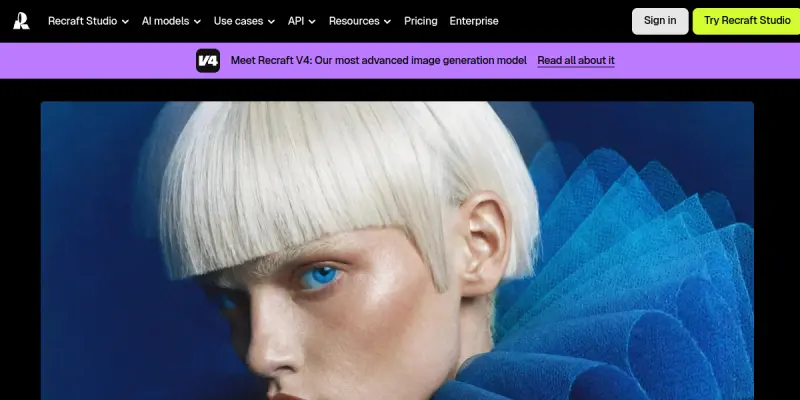
Screenshots & Interface
Pros
- ✓ Generates high-quality SVG vectors directly from text prompts.
- ✓ Allows users to train custom style models for consistent brand aesthetics.
- ✓ Includes integrated mockup tools to place designs on products instantly.
Cons
- × Requires a stable internet connection as the entire application runs in the browser.
- × Style training requires uploading a significant volume of reference images.
- × The interface offers many advanced controls that can be overwhelming for beginners.
How to Use Recraft AI in Your Workflow
Integrating Recraft AI into your professional toolkit enhances efficiency by automating manual steps. By configuring it to suit your specific project requirements, you can optimize output quality and reduce project cycle times. Standard workflows involve testing the tool on simple tasks before scaling its use to complex operations.
Frequently Asked Questions
What is Recraft AI used for?
Recraft is a design platform for photorealistic and vector image generation. It features custom style training and high-quality mockups for marketing teams.
What is the pricing model for Recraft AI?
Recraft AI uses a Freemium pricing model.
What are the main advantages of Recraft AI?
The key benefits of Recraft AI include: Generates high-quality SVG vectors directly from text prompts., Allows users to train custom style models for consistent brand aesthetics., Includes integrated mockup tools to place designs on products instantly..
What are the main limitations of Recraft AI?
Some limitations or cons of Recraft AI are: Requires a stable internet connection as the entire application runs in the browser., Style training requires uploading a significant volume of reference images., The interface offers many advanced controls that can be overwhelming for beginners..
Alternative AI Tools
Magic Eraser
Magic Eraser is an AI photo editing tool for designers and creatives, streamlining workflow with automated editing, and offering advanced AI models for complex tasks.
Anima
Anima is a browser-based prototyping tool that turns static designs into interactive web and mobile apps. It integrates directly with Figma to help designers and developers bridge the gap between design and code.

Locofy
Locofy is an AI-powered tool that converts Figma and Penpot designs into clean, developer-friendly frontend code. It is built for frontend developers and design teams aiming to accelerate prototyping and handoff. A key differentiator is its support for on-premise or cloud deployment with SOC2 and ISO certifications.
Rating Details
Based on 0 ratings
Quick Comparisons
Related Tools
More AI tools from the same workflow, industry, or category.
Createimg.ai
Createimg.ai provides text-to-image generation and photo editing tools including background removal. It is designed for e-commerce sellers and creators needing free visual assets.
JetBrains AI
JetBrains AI is an AI-powered toolset integrated into JetBrains IDEs, offering code completion, debugging assistance, and intelligent suggestions for developers. It leverages large language models to help teams write, understand, and refactor code more efficiently. A key differentiator is its seamless integration with JetBrains' existing development environment.
Stable Diffusion Inpaint
Stable Diffusion Inpaint is an AI-powered tool that uses diffusion models to intelligently fill in or replace parts of an image. It is designed for photographers, designers, and content creators who need precise and context-aware image editing. Its key differentiator is the ability to generate new content that seamlessly blends with the existing image.
Crello AI
VistaCreate (formerly Crello) is a cloud-based design tool using AI to generate graphics from text prompts. It features 100K+ templates for social media and marketing.
Reviews
No reviews submitted yet. Be the first to share your experience.
Write a Review
Share Your Experience
Join the community to write reviews, submit ratings, and bookmark your favorite AI tools.