

REimagineHome AI
Use REimagineHome AI as the anchor for a real shortlist.
Instead of returning to a broad directory, jump straight into the strongest adjacent matchups for pricing, workflow fit, and differentiation.
Overview
REimagineHome AI is an innovative platform designed to revolutionize the way users approach interior design and real estate staging. By leveraging advanced artificial intelligence, the tool allows users to upload photos of empty or existing rooms and instantly generate photorealistic virtual staging and personalized design concepts. Unlike traditional design software which requires extensive manual labor, REimagineHome automates the process of furniture placement, color adjustments, and style transformation, making professional-looking interior design accessible to everyone from real estate agents to homeowners.
Key Features
- Photo Upload & Analysis: Users can upload photos of empty rooms or spaces with existing furniture to initiate the design process.
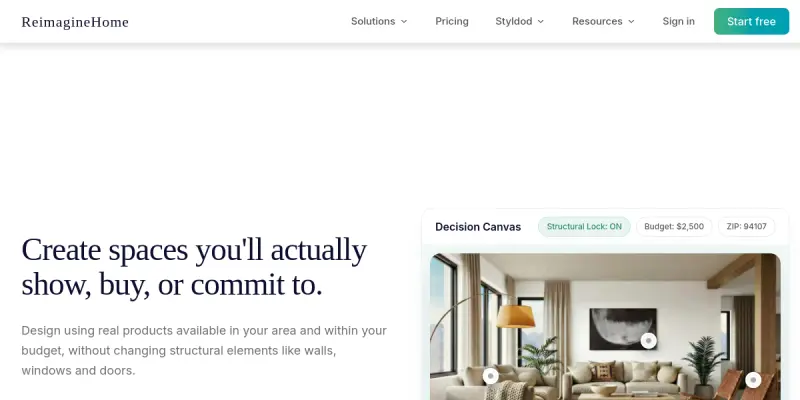
- Virtual Staging: The AI automatically identifies the space and places photorealistic furniture and decor items to visualize the room's potential.
- Style Customization: The tool supports various interior design styles, allowing users to switch between modern, minimalist, classic, and more with a single click.
- Shoppable Catalog: A key differentiator is the integration of a real furniture catalog; users can click on items in the design to view prices and purchase them.
- Budget Estimation: The platform helps users stay within budget by suggesting product options that fit their financial parameters.
- Real-time Rendering: Designs are generated quickly, providing instant feedback on how different changes would look in the physical space.
- Multi-room Support: The tool is capable of processing and redesigning multiple rooms within a single project or home layout.
Use Cases
Real Estate Professionals
Agents can use REimagineHome to quickly stage vacant listings, helping potential buyers visualize the space's potential and increasing the likelihood of a sale without the cost of physical furniture rental.
Homeowners Redecorating
Homeowners looking to renovate can upload photos of their living room or bedroom to experiment with different layouts and furniture styles before making any physical purchases.
Interior Designers
Professional designers can use the tool as a rapid prototyping tool to present multiple concepts to clients, speeding up the initial design phase and reducing material waste.
Rental Property Improvements
Landlords can visualize how to make a rental property more attractive to potential tenants by staging the space virtually, often leading to higher rental income.
Event & Party Planning
While primarily for interiors, the tool can be used to style event spaces virtually to help clients decide on themes and decor arrangements.
Pricing & Plans
REimagineHome operates on a freemium model, allowing users to start designing for free with basic features. To unlock higher resolution exports, more image generations, and access to the full shoppable catalog, users will need to subscribe to one of the paid plans. Specific pricing details are available on their website, but the entry-level tiers are generally accessible for casual users and hobbyists.
Integrations & Compatibility
The tool operates as a standalone web application, requiring no complex software installation. It is compatible with standard modern web browsers on both desktop and mobile devices. Currently, the platform does not list specific integrations with other design software or project management tools, though it functions well as a standalone visualization tool.
Who Is It For?
REimagineHome is ideal for real estate agents, home staging professionals, interior design enthusiasts, and anyone looking to visualize and purchase home decor online. It bridges the gap between purely visual tools and e-commerce, making it a practical utility for anyone involved in property sales or home improvement.
Limitations
- The quality of the generated design heavily relies on the resolution and lighting of the user's input photo; low-quality images may yield inconsistent results.
- The AI may struggle with complex architectural structures or unique furniture pieces that are not part of its standard database.
- Users may need to subscribe to a paid plan to export high-resolution images suitable for professional presentations or large-scale printing.
Final Verdict
REimagineHome AI serves as a powerful and accessible virtual staging tool that effectively combines design visualization with e-commerce. While it may not replace the nuanced eye of a professional interior designer, it provides an excellent value proposition for real estate professionals and casual users looking to experiment with their home's aesthetic. The inclusion of a shoppable catalog adds a layer of utility that sets it apart from purely decorative tools.
Tool Facts
Screenshots & Interface
Pros
- ✓ Generates virtual staging results in seconds, saving significant time compared to manual rendering.
- ✓ Integrates a shoppable catalog of furniture, allowing users to purchase items directly from the generated designs.
- ✓ Supports multiple design styles and allows users to visualize changes to specific rooms or entire homes.
- ✓ Offers a free tier, making it accessible for casual users and hobbyists to experiment with design ideas.
Cons
- × The free version may impose restrictions on the number of images or export quality.
- × The tool requires high-quality input photos; poorly lit or cluttered images can result in inconsistent AI processing.
- × Advanced customization options are often locked behind paid subscriptions.
How to Use REimagineHome AI in Your Workflow
Integrating REimagineHome AI into your professional toolkit enhances efficiency by automating manual steps. By configuring it to suit your specific project requirements, you can optimize output quality and reduce project cycle times. Standard workflows involve testing the tool on simple tasks before scaling its use to complex operations.
Frequently Asked Questions
What is REimagineHome AI used for?
AI-powered interior design tool that transforms room photos into virtual staging and personalized decor suggestions. Upload a photo to visualize different styles and shop curated furniture.
What is the pricing model for REimagineHome AI?
REimagineHome AI uses a Free pricing model.
What are the main advantages of REimagineHome AI?
The key benefits of REimagineHome AI include: Generates virtual staging results in seconds, saving significant time compared to manual rendering., Integrates a shoppable catalog of furniture, allowing users to purchase items directly from the generated designs., Supports multiple design styles and allows users to visualize changes to specific rooms or entire homes., Offers a free tier, making it accessible for casual users and hobbyists to experiment with design ideas..
What are the main limitations of REimagineHome AI?
Some limitations or cons of REimagineHome AI are: The free version may impose restrictions on the number of images or export quality., The tool requires high-quality input photos; poorly lit or cluttered images can result in inconsistent AI processing., Advanced customization options are often locked behind paid subscriptions..
Alternative AI Tools

Notion Meal AI
Notion Meal AI is a meal planning and recipe management tool built inside the Notion workspace. It helps individuals and families organize weekly menus, generate grocery lists, and track nutritional information. Its key differentiator is seamless integration with Notion's existing project management and note-taking capabilities.

Wonderplan AI
Wonderplan AI is a travel planning platform that uses artificial intelligence to help travelers find hotels, create itineraries, and receive personalized trip recommendations. It is designed for leisure travelers seeking a faster, data-driven approach to organizing their trips.
Yummly AI
Yummly AI is a food and recipe discovery platform that uses artificial intelligence to personalize meal recommendations. It caters to home cooks seeking tailored recipe suggestions based on dietary preferences and available ingredients. Its key differentiator is its ability to learn user tastes over time for increasingly accurate matches.
Rating Details
Based on 0 ratings
Related Tools
More AI tools from the same workflow, industry, or category.
fr3n
fr3n is a creator platform that combines a link-in-bio page, digital storefront, community spaces, and newsletters into one hub. It helps creators sell digital products, run memberships, and build an audience with first-party data.
Aveva AI
Aveva AI optimizes industrial processes and predictive maintenance by leveraging AI models to detect anomalies and support risk-based decision-making in manufacturing.
Paddle AI
Paddle AI streamlines billing, tax compliance, and revenue management for digital businesses. This SaaS platform automates financial operations, supporting global revenue generation for apps like n8n and AdGuard. It integrates essential payment processing tools into a single interface.
Honeywell Forge AI
Honeywell Forge is an industrial IoT platform that combines digital twin technology with AI to optimize facility operations. It is designed for industrial manufacturers seeking predictive maintenance and operational efficiency.
Reviews
No reviews submitted yet. Be the first to share your experience.
Write a Review
Share Your Experience
Join the community to write reviews, submit ratings, and bookmark your favorite AI tools.