

Sapling
Use Sapling as the anchor for a real shortlist.
Instead of returning to a broad directory, jump straight into the strongest adjacent matchups for pricing, workflow fit, and differentiation.
Overview
Overview
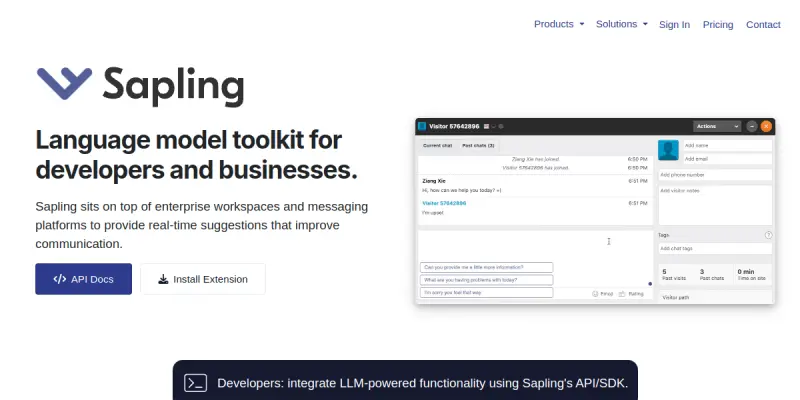
Sapling is an enterprise-grade language model toolkit that provides a developer-friendly API and copilot for a range of natural language understanding tasks. Designed for organizations that need to integrate grammar checking, autocomplete, AI detection, and sentiment analysis into their own applications, Sapling offers both a standalone API and turnkey integrations with popular platforms. By focusing on enterprise reliability and customization, Sapling positions itself as a practical solution for customer support, content creation, and data processing workflows.
Key Features
- Grammar & Spell Checking: Real-time correction of spelling, grammar, and punctuation errors with context-aware suggestions.
- Autocomplete: Predictive text completion that adapts to user input patterns, speeding up typing tasks.
- AI Detection: Identify whether text was generated by an AI model, useful for content moderation and compliance.
- Paraphrasing: Rewrite sentences or paragraphs to improve clarity, tone, or readability while preserving original meaning.
- Sentiment Analysis: Automatically classify text sentiment (positive, negative, neutral) for analyzing customer feedback or social media.
- API & SDK: RESTful API with client SDKs for Python, JavaScript, and other languages, enabling custom integrations.
- Turnkey Integrations: Pre-built plugins for popular platforms like Zendesk, HubSpot, and LiveChat, requiring minimal setup.
- Enterprise Security: SOC 2 compliant, with data encryption in transit and at rest, and options for on-premise deployment.
Use Cases
Customer Support
Sapling can be integrated into help desk software to automatically check agent responses for grammar, suggest completions, and detect AI-generated text. This reduces response time and ensures consistent quality across all customer interactions.
Content Creation
Writers and editors use Sapling’s paraphrasing and grammar capabilities to refine drafts, adjust tone, and eliminate errors. The autocomplete feature accelerates content production for blogs, documentation, and marketing materials.
Compliance & Moderation
Organizations in regulated industries (e.g., finance, healthcare) can leverage Sapling’s AI detection to verify that internal or customer-facing content is not AI-generated, helping meet disclosure requirements.
Pricing & Plans
Sapling offers a free tier with limited usage (100 requests per day) and a paid Pro plan starting at $25 per month for higher limits and advanced features. Enterprise plans with custom pricing, dedicated support, and on-premise options are available upon request. Customers can test the API with a 14-day free trial.
Integrations & Compatibility
- Ticketing & CRM: Zendesk, HubSpot, Intercom, Freshdesk, Salesforce
- Live Chat: LiveChat, Zendesk Chat
- Browser Extensions: Chrome, Firefox, Edge
- API: RESTful endpoints with SDKs for Python, JavaScript, Java, Go, and Ruby
- Platforms: Compatible with any system that supports HTTPS API calls
Who Is It For?
Sapling is ideal for enterprise teams that need to embed NLU capabilities into their software, including support managers, content teams, and compliance officers. Developers will appreciate the well-documented API and multi-language SDKs, while non-technical users can leverage the turnkey integrations.
Limitations
- Precision of AI Detection: AI detection may misclassify human-written text as AI-generated in some cases, requiring human oversight.
- Language Support: While Sapling supports multiple languages, performance is strongest in English; other languages may have reduced accuracy.
- Dependency on Internet: The API requires an active internet connection; offline mode is not supported.
- Learning Curve for Customization: Tailoring the API to specific enterprise workflows may require developer effort.
Final Verdict
Sapling delivers a robust, enterprise-focused language model toolkit that balances ease of use with customization. Its turnkey integrations lower the barrier for non-developers, while the API and SDK offer flexibility for engineering teams. Although some features (like AI detection) need refinement, Sapling remains a strong choice for organizations looking to augment their applications with reliable NLU capabilities.
Tool Facts
Screenshots & Interface
Pros
- ✓ Provides a well-documented RESTful API with SDKs in multiple programming languages for custom integrations.
- ✓ Turnkey integrations with major platforms like Zendesk and HubSpot enable quick deployment without coding.
- ✓ Real-time grammar and spell checking helps maintain professional communication quality across teams.
- ✓ Autocomplete and paraphrasing features accelerate writing tasks, reducing time spent on repetitive edits.
- ✓ Enterprise-grade security with SOC 2 compliance makes it suitable for regulated industries.
Cons
- × AI detection feature can produce false positives, flagging human-written text as AI-generated.
- × Paraphrasing may introduce subtle changes in meaning, requiring human review for technical content.
- × Free tier limits usage to 100 requests per day, which may be insufficient for testing or small projects.
- × Language support is strongest in English; accuracy in other languages is notably lower.
How to Use Sapling in Your Workflow
Integrating Sapling into your professional toolkit enhances efficiency by automating manual steps. By configuring it to suit your specific project requirements, you can optimize output quality and reduce project cycle times. Standard workflows involve testing the tool on simple tasks before scaling its use to complex operations.
Frequently Asked Questions
What is Sapling used for?
Sapling is an enterprise AI toolkit that provides a language model API and copilot for grammar checking, autocomplete, and paraphrasing. It targets developers and customer-facing teams needing custom NLU integrations. A key differentiator is its focus on turnkey enterprise deployment with SDK support.
What is the pricing model for Sapling?
Sapling uses a Paid pricing model.
What are the main advantages of Sapling?
The key benefits of Sapling include: Provides a well-documented RESTful API with SDKs in multiple programming languages for custom integrations., Turnkey integrations with major platforms like Zendesk and HubSpot enable quick deployment without coding., Real-time grammar and spell checking helps maintain professional communication quality across teams., Autocomplete and paraphrasing features accelerate writing tasks, reducing time spent on repetitive edits., Enterprise-grade security with SOC 2 compliance makes it suitable for regulated industries..
What are the main limitations of Sapling?
Some limitations or cons of Sapling are: AI detection feature can produce false positives, flagging human-written text as AI-generated., Paraphrasing may introduce subtle changes in meaning, requiring human review for technical content., Free tier limits usage to 100 requests per day, which may be insufficient for testing or small projects., Language support is strongest in English; accuracy in other languages is notably lower..
Alternative AI Tools

Unbounce
Unbounce is an AI-powered landing page builder that helps marketers create, test, and optimize high-converting pages using Smart Copy and Smart Traffic features.

NeuronWriter
NeuronWriter is an AI-powered content optimization tool that helps marketers and SEO professionals create search-engine-friendly content. It uses NLP-based semantic models and SERP analysis to align writing with user intent and improve rankings.

Simplified
Simplified is an all-in-one content creation platform for marketing teams. It offers AI-powered long and short-form writing in 30+ languages, alongside design templates and a rich media library of free images, videos, and audio clips. The tool includes a content calendar to schedule and publish to social media.
Rating Details
Based on 0 ratings
Quick Comparisons
Related Tools
More AI tools from the same workflow, industry, or category.
fablepilot
FablePilot is a free AI story generator that turns a single prompt into a complete story — no sign-up required. Add illustrations or generate a plot outline.
Ghosts.app
Ghosts is an AI ghostwriter for agencies, creators, and law firms. It produces researched, cited drafts in a specific voice without requiring prompts. Users brief a specialist agent and approve a finished draft.
GrowthBar
GrowthBar is an AI tool for content generation, designed to boost productivity and streamline workflows for writers and content creators, with features like editing and tone adjustment.
GetGenie AI
GetGenie AI is an AI-powered writing and SEO assistant that helps content creators and marketers generate optimized content quickly. It includes built-in keyword research and SERP analysis to improve organic search performance.
Reviews
No reviews submitted yet. Be the first to share your experience.
Write a Review
Share Your Experience
Join the community to write reviews, submit ratings, and bookmark your favorite AI tools.