

Speedwrite
Use Speedwrite as the anchor for a real shortlist.
Instead of returning to a broad directory, jump straight into the strongest adjacent matchups for pricing, workflow fit, and differentiation.
Overview
Overview
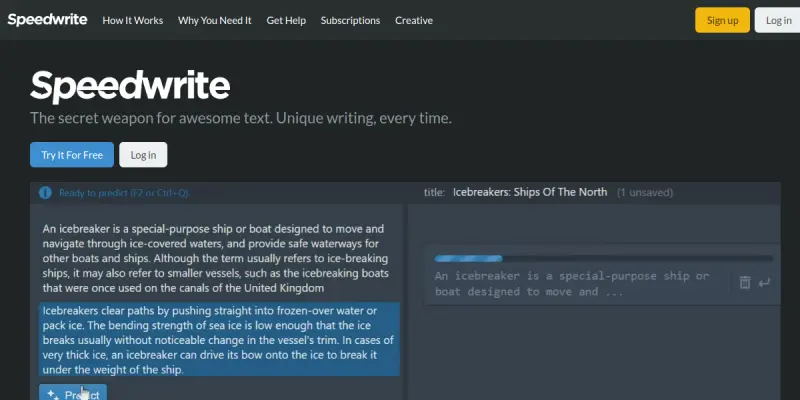
Speedwrite is a web-based AI writing assistant designed to help users generate unique content variations rapidly. Unlike traditional chatbots that converse with users, Speedwrite focuses on a 'generate and paraphrase' workflow where the user inputs a topic, and the tool produces multiple unique versions of text. This approach is particularly useful for avoiding plagiarism detection and creating distinct content for different platforms. The tool is marketed as requiring no account setup for basic usage, allowing users to start writing immediately.
Key Features
- No Account Required: Users can start generating text immediately without creating an account or providing payment details for the basic version.
- Plagiarism-Free Focus: The algorithm is designed to produce unique phrasing to help users avoid duplicate content penalties.
- Multi-Language Support: The tool supports writing in various languages, expanding its utility beyond English.
- Format Versatility: It can handle different content formats, including essays, articles, and blog posts.
- Rapid Generation: The interface is optimized for speed, allowing users to iterate through multiple text variations quickly.
- Browser Integration: Available as a Chrome extension, allowing users to access the tool directly from other web applications.
Use Cases
Academic Writing
Students can use Speedwrite to paraphrase existing sources or generate initial drafts for essays and research papers. The tool helps in rephrasing concepts to ensure originality for submission, though manual fact-checking remains necessary.
Content Marketing
Marketers can leverage Speedwrite to create unique variations of blog post outlines or product descriptions. This is particularly useful for SEO purposes, where distinct content is needed for different landing pages without starting from scratch.
Article Rewriting
Journalists and copywriters can use the tool to refresh older articles or rephrase press releases to give them a fresh perspective. It serves as a starting point for drafting rather than a finished product.
Non-Native English Speakers
Individuals learning English can use the tool to see how different sentence structures are used to express the same idea, serving as a learning aid for language acquisition.
Pricing & Plans
Speedwrite operates on a freemium model. The free tier allows users to generate a limited amount of text without signing up. Paid plans typically remove the limits on word count or offer additional features like longer output generation and priority access. Specific pricing details are available on the official website.
Integrations & Compatibility
Speedwrite is primarily a web-based application. It offers a Chrome extension that integrates directly into the browser, allowing users to open the tool from anywhere on the web. It is compatible with standard web browsers and functions as a standalone tool without native integrations into major word processors like Microsoft Word or Google Docs outside of the browser extension.
Who Is It For?
Speedwrite is best suited for students looking to avoid plagiarism, content marketers needing bulk variations, and writers seeking a tool for brainstorming and drafting. It is not designed for users requiring deep, conversational AI interactions or complex data analysis.
Limitations
- Manual Editing Required: The generated text is often high-level summaries or paraphrases that require significant editing to match a specific brand voice or detailed accuracy.
- Repetitive Output: Depending on the prompt, the tool may generate repetitive phrasing or generic sentences that lack depth.
- Fact-Checking Necessary: As with all AI models, the tool can hallucinate or generate incorrect information that must be verified by the user.
- Limited Context: The tool does not maintain long-term memory of previous conversations, requiring users to restate context for every new session.
Final Verdict
Speedwrite offers a distinct approach to AI writing by focusing on variation and paraphrasing rather than conversational generation. Its 'no signup' feature makes it highly accessible for quick tasks. However, users should treat the output as a draft that requires refinement. While it excels at helping users overcome writer's block and avoiding plagiarism, it lacks the nuance and depth of more advanced content creation tools.
Tool Facts
Screenshots & Interface
Pros
- ✓ No account setup required to begin writing immediately
- ✓ Generates unique content variations to help avoid plagiarism detection
- ✓ Supports multiple languages and content formats including essays and articles
Cons
- × Generated text may lack nuance and require significant manual editing
- × The tool focuses on paraphrasing rather than deep content generation
- × Fact-checking is essential as the AI does not verify information accuracy
How to Use Speedwrite in Your Workflow
Integrating Speedwrite into your professional toolkit enhances efficiency by automating manual steps. By configuring it to suit your specific project requirements, you can optimize output quality and reduce project cycle times. Standard workflows involve testing the tool on simple tasks before scaling its use to complex operations.
Frequently Asked Questions
What is Speedwrite used for?
Speedwrite is a web-based writing assistant that generates unique content variations from a single prompt. It helps users create original text for essays, articles, and blog posts without requiring account setup. The tool supports multiple languages and offers a freemium pricing model.
What is the pricing model for Speedwrite?
Speedwrite uses a Freemium pricing model.
What are the main advantages of Speedwrite?
The key benefits of Speedwrite include: No account setup required to begin writing immediately, Generates unique content variations to help avoid plagiarism detection, Supports multiple languages and content formats including essays and articles.
What are the main limitations of Speedwrite?
Some limitations or cons of Speedwrite are: Generated text may lack nuance and require significant manual editing, The tool focuses on paraphrasing rather than deep content generation, Fact-checking is essential as the AI does not verify information accuracy.
Alternative AI Tools

OmniChat
OmniChat is an AI-native social CRM that automates customer journeys across WhatsApp, Instagram, and Facebook. It allows businesses to manage support, sales, and marketing from a unified inbox without coding.

NeuronWriter
NeuronWriter is an AI-powered content optimization tool that helps marketers and SEO professionals create search-engine-friendly content. It uses NLP-based semantic models and SERP analysis to align writing with user intent and improve rankings.

Craftly.AI
Craftly.AI is an AI writing assistant designed to generate blog posts, social media copy, and marketing copy. It focuses on SEO optimization and content rewriting to speed up workflows for marketers and writers.
Rating Details
Based on 0 ratings
Quick Comparisons
Related Tools
More AI tools from the same workflow, industry, or category.
fablepilot
FablePilot is a free AI story generator that turns a single prompt into a complete story — no sign-up required. Add illustrations or generate a plot outline.
Ghosts.app
Ghosts is an AI ghostwriter for agencies, creators, and law firms. It produces researched, cited drafts in a specific voice without requiring prompts. Users brief a specialist agent and approve a finished draft.
GrowthBar
GrowthBar is an AI tool for content generation, designed to boost productivity and streamline workflows for writers and content creators, with features like editing and tone adjustment.
GetGenie AI
GetGenie AI is an AI-powered writing and SEO assistant that helps content creators and marketers generate optimized content quickly. It includes built-in keyword research and SERP analysis to improve organic search performance.
Reviews
No reviews submitted yet. Be the first to share your experience.
Write a Review
Share Your Experience
Join the community to write reviews, submit ratings, and bookmark your favorite AI tools.