

Sunsama AI
Use Sunsama AI as the anchor for a real shortlist.
Instead of returning to a broad directory, jump straight into the strongest adjacent matchups for pricing, workflow fit, and differentiation.
Overview
Overview
Sunsama is a digital daily planner designed for professionals, remote workers, and teams who want to bring structure to their workday without feeling overwhelmed. Unlike traditional task managers that simply list todos, Sunsama integrates time blocking, daily planning rituals, and an AI-powered prioritization engine to help users focus on what truly matters each day. The tool is built around the principle of meaningful productivity — completing the right tasks rather than just more tasks.
Key Features
- AI Daily Prioritization: Sunsama’s AI analyzes your upcoming tasks, deadlines, and calendar events to suggest a realistic and focused plan for the day.
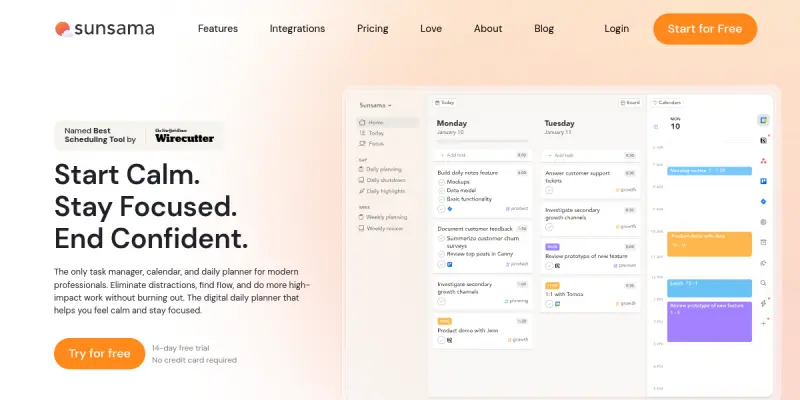
- Time Blocking: Drag and drop tasks directly onto your calendar to allocate specific time slots, ensuring you have enough time for deep work.
- Daily Planning Ritual: Start each day with a guided planning session where you review priorities, set intentions, and break down large projects into manageable steps.
- Integrations with Team Tools: Sync with Slack, Gmail, Notion, Asana, Linear, Trello, Jira, GitHub, Outlook Calendar, and Google Calendar to pull in tasks automatically.
- Focus Mode: A distraction-free interface that hides everything except your current task, helping you stay in the flow.
- Workload Management: Set daily work limits to avoid overscheduling and maintain a sustainable pace across the week.
- Weekly Reviews & Reflection: End the week with a summary of accomplishments and a chance to plan the next week, reinforcing healthy work habits.
- Email Integration: Turn emails into tasks directly from Gmail or Outlook without switching apps.
Use Cases
Improving Daily Focus for Knowledge Workers
Professionals juggling multiple projects and constant notifications can use Sunsama to prioritize their day. By time-blocking tasks and using the AI’s suggestions, they can reduce context switching and protect time for deep work.
Balancing Remote Team Workloads
Team leads can assign tasks through integrated project management tools and monitor the team’s capacity. Sunsama’s workload view helps prevent burnout by showing when a team member’s day is full.
Reducing Overwhelm for Freelancers
Freelancers often struggle with inconsistent schedules and too many loose tasks. Sunsama’s daily planning ritual and focus mode provide a structured routine that separates planning from doing.
Establishing Healthy Work Habits
Anyone looking to build a sustainable productivity routine can use Sunsama’s built-in rituals—daily planning, weekly reviews, and time blocking—to set boundaries between work and personal time.
Pricing & Plans
Sunsama operates on a freemium model. The free tier offers basic planning features with limited integrations and a daily task limit. The premium subscription (typically $12–16/month) unlocks unlimited integrations, AI prioritization, team collaboration, and advanced reporting. An annual plan is available at a discount. Pricing for enterprise teams with custom requirements can be obtained by contacting sales. Sunsama does not offer a fully free unlimited plan.
Integrations & Compatibility
Sunsama integrates natively with Google Calendar, Outlook Calendar, Slack, Gmail, Outlook Email, Notion, Asana, Linear, Trello, Jira, and GitHub. It is available as a web app and has desktop versions for macOS, Windows, and Linux. Mobile apps for iOS and Android are available for on-the-go access.
Who Is It For?
Sunsama is ideal for professionals, remote workers, freelancers, team leads, and anyone who feels overwhelmed by traditional task managers. It suits individuals who want to adopt a time-blocking workflow and build consistent daily planning habits. Teams that rely on project management tools like Asana or Jira will benefit from seamless synchronization.
Limitations
- No Native Video Conferencing or Notes App: Sunsama focuses strictly on planning and does not include built-in note-taking or video call features, requiring users to rely on external tools.
- Limited Free Tier: The free version restricts integrations and does not include AI features, making the full value accessible only on the paid plan.
- Mobile App Functionality: While available, the mobile experience is less feature-rich than the desktop version, with some users reporting limited offline access.
- Demands Daily Commitment: To get the most out of Sunsama, users must engage with its daily planning and review rituals consistently, which may not suit everyone.
Final Verdict
Sunsama stands out as a thoughtful daily planner that goes beyond simple task management by incorporating AI-driven prioritization and time blocking. It is particularly effective for individuals and teams who struggle with focus and work-life balance. While the free tier offers a taste, the premium subscription provides the full productivity ecosystem. For those willing to adopt its daily rituals, Sunsama can significantly improve how they structure their workday.
Tool Facts
Screenshots & Interface
Pros
- ✓ Integrates with over 10 popular tools including Asana, Slack, and Google Calendar
- ✓ AI daily prioritization suggests a realistic plan based on your calendar and deadlines
- ✓ Time blocking with drag-and-drop directly on the calendar improves focus
- ✓ Guided daily planning ritual helps build consistent productivity habits
- ✓ Focus mode hides distractions to support deep work sessions
Cons
- × The free tier is very limited, restricting integrations and omitting AI features
- × No native note-taking or video conferencing, requiring external tools for those needs
- × Mobile app is less feature-rich than the desktop version, with limited offline functionality
- × Requires daily commitment to planning rituals to fully realize benefits
How to Use Sunsama AI in Your Workflow
Integrating Sunsama AI into your professional toolkit enhances efficiency by automating manual steps. By configuring it to suit your specific project requirements, you can optimize output quality and reduce project cycle times. Standard workflows involve testing the tool on simple tasks before scaling its use to complex operations.
Frequently Asked Questions
What is Sunsama AI used for?
Sunsama AI is a digital daily planner designed for professionals and remote teams. It combines task management with time blocking and an AI-powered daily prioritization engine. The tool helps users plan their day realistically and maintain focus without burnout.
What is the pricing model for Sunsama AI?
Sunsama AI uses a Freemium pricing model.
What are the main advantages of Sunsama AI?
The key benefits of Sunsama AI include: Integrates with over 10 popular tools including Asana, Slack, and Google Calendar, AI daily prioritization suggests a realistic plan based on your calendar and deadlines, Time blocking with drag-and-drop directly on the calendar improves focus, Guided daily planning ritual helps build consistent productivity habits, Focus mode hides distractions to support deep work sessions.
What are the main limitations of Sunsama AI?
Some limitations or cons of Sunsama AI are: The free tier is very limited, restricting integrations and omitting AI features, No native note-taking or video conferencing, requiring external tools for those needs, Mobile app is less feature-rich than the desktop version, with limited offline functionality, Requires daily commitment to planning rituals to fully realize benefits.
Alternative AI Tools
PandaDoc AI
PandaDoc uses AI to streamline the creation, approval, and e-signature of business documents like proposals and contracts. It is designed for sales, legal, and operations teams. Its key differentiator is deep integration with CRM and payment platforms.

PDF24 AI
PDF24 AI is a web-based PDF editor that provides tools for converting, merging, and compressing PDF files. It uses AI to enhance document processing, making it suitable for professionals and businesses who need efficient file management. Its key differentiator is a free tier with unlimited usage for basic tasks.

Logseq AI
Logseq AI is a privacy-first, open-source knowledge management platform that integrates artificial intelligence features. It helps users organize notes, build a knowledge graph, and collaborate securely. A key differentiator is its local-first architecture that prioritizes user data ownership.
Rating Details
Based on 0 ratings
Quick Comparisons
Related Tools
More AI tools from the same workflow, industry, or category.
Mailbutler AI
Mailbutler AI is an email extension that integrates AI-powered writing, scheduling, and tracking features directly into your existing inbox. It helps professionals and teams streamline email workflows and save time on routine communication tasks.
Lucidspark AI
Lucidspark AI is a virtual whiteboard tool that helps teams brainstorm, organize ideas, and move from concept to execution. It is designed for remote and hybrid teams seeking a structured yet flexible collaboration space. Its integration with Lucidchart sets it apart for end-to-end visual workflow planning.
SignNow AI
SignNow AI automates document signing and workflow management for businesses. It uses AI to extract fields, send documents for signature, and track completion. Ideal for HR, legal, and sales teams.
ProtonMail AI
ProtonMail AI is an integrated writing assistant for secure email, leveraging Swiss privacy standards to draft, summarize, and translate messages within the Proton Mail interface.
Reviews
No reviews submitted yet. Be the first to share your experience.
Write a Review
Share Your Experience
Join the community to write reviews, submit ratings, and bookmark your favorite AI tools.