

TimeCamp AI
Use TimeCamp AI as the anchor for a real shortlist.
Instead of returning to a broad directory, jump straight into the strongest adjacent matchups for pricing, workflow fit, and differentiation.
Overview
Overview
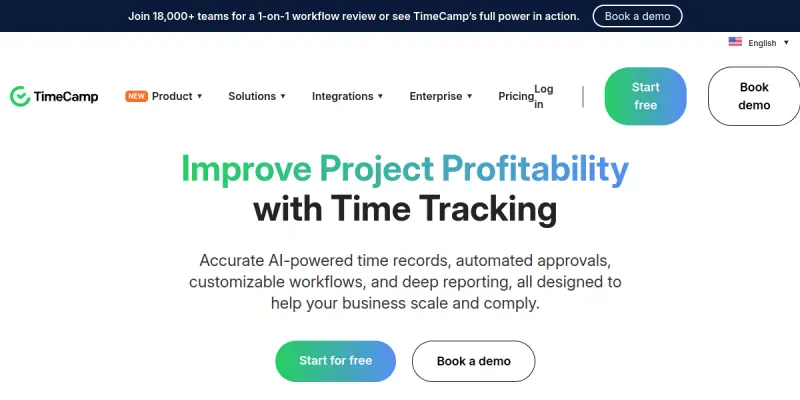
TimeCamp AI is an AI-powered time tracking solution designed to help businesses automate the logging of work hours and convert that data into actionable project insights, invoices, and budget alerts. Developed by the team behind TimeCamp, this tool is built for freelancers, small businesses, and enterprises aiming to improve project profitability and workflow efficiency. Its native integrations with Jira, Asana, and over 50 other popular tools make it a versatile addition to any tech stack.
Key Features
- AI-Powered Time Tracking: Automatically captures time spent on activities using machine learning, reducing manual entry errors and saving time.
- Project Profitability Dashboard: Provides real-time visibility into project budgets, billing rates, and overall profitability.
- Automated Invoicing: Generates invoices directly from logged hours and sends them to clients, streamlining the billing process.
- Budget Alerts: Sends notifications when projects approach or exceed budget limits, helping managers stay on top of costs.
- Integration Hub: Offers native, two-way synchronization with over 50 tools, including Jira, Asana, Trello, and more.
- Reporting and Analytics: Delivers detailed reports on team productivity, time allocation, and project performance.
- Mobile and Desktop Apps: Supports time tracking on the go via mobile apps (iOS/Android) and a desktop timer.
- Attendance and Absence Management: Tracks employee attendance, vacations, and sick leave, integrating with payroll systems.
Use Cases
Freelancers Managing Multiple Clients
Freelancers can use TimeCamp AI to automatically track time spent on different projects and generate client-ready invoices without manual data entry. The budget alerts help them avoid overwork and ensure projects remain profitable.
Small to Medium Business Teams
Teams with project-based workflows benefit from the AI-driven insights that highlight which tasks consume the most time and resources. Managers can reallocate efforts early to stay on schedule and within budget.
Enterprise Resource Planning
Large organizations can deploy TimeCamp AI across departments to standardize time tracking practices. The integration with Jira and Asana ensures seamless data flow from project management tools to billing and payroll systems.
Remote Workforce Monitoring
With mobile and desktop apps, remote teams can log time from anywhere. The attendance management feature gives HR teams visibility into employee work patterns while respecting privacy.
Pricing & Plans
TimeCamp AI follows a Freemium model. A free tier is available with basic time tracking and reporting features. Paid plans (Pro, Enterprise) unlock advanced capabilities such as AI automation, unlimited integrations, priority support, and custom reporting. Exact pricing is not disclosed on the website; users must contact sales for a quote or start with the free trial.
Integrations & Compatibility
The tool integrates natively with over 50 apps, including:
- Project Management: Jira, Asana, Trello, Monday.com, Basecamp
- Communication: Slack, Microsoft Teams
- CRM: Salesforce, HubSpot
- Accounting: QuickBooks, Xero
- Productivity: Google Calendar, Outlook
An API is available for custom integrations, but details are limited.
Who Is It For?
TimeCamp AI is suitable for freelancers, SMBs, and enterprises that need reliable time tracking and project profitability analysis. It is especially useful for teams already using tools like Jira or Asana who want to automate time capture without switching platforms.
Limitations
- The accuracy of AI time tracking depends on consistent user behavior and environment (e.g., stable internet connection).
- Some advanced features, such as unlimited integrations and AI automation, require a paid subscription.
- The tool may not suit teams that need highly customizable, non-standard time tracking workflows.
- User reviews indicate a low satisfaction rating (2.7/5), suggesting potential issues with reliability or user experience.
Final Verdict
TimeCamp AI offers a compelling automation layer for time tracking, especially for existing users of popular project management tools. While its free tier lowers the entry barrier, the mixed user feedback and reliance on paid upgrades for full functionality are factors to consider. It is a solid option for teams looking to reduce manual time entry and gain better project financial oversight.
Tool Facts
Screenshots & Interface
Pros
- ✓ AI automation reduces manual time entry, saving users hours per week.
- ✓ Native integrations with Jira and Asana allow seamless data syncing without extra setup.
- ✓ Free tier offers basic time tracking and reporting at no cost.
- ✓ Mobile and desktop apps enable time tracking from anywhere, supporting remote teams.
Cons
- × AI time tracking accuracy can be inconsistent without consistent user habits or stable internet.
- × Advanced features like unlimited integrations and AI automation require a paid plan.
- × User reviews indicate a low satisfaction rating (2.7/5), pointing to potential reliability or UX issues.
- × Limited customization options for non-standard time tracking workflows.
How to Use TimeCamp AI in Your Workflow
Integrating TimeCamp AI into your professional toolkit enhances efficiency by automating manual steps. By configuring it to suit your specific project requirements, you can optimize output quality and reduce project cycle times. Standard workflows involve testing the tool on simple tasks before scaling its use to complex operations.
Frequently Asked Questions
What is TimeCamp AI used for?
TimeCamp AI uses AI to automate time tracking, converting logged hours into project insights, invoices, and budget alerts. It integrates natively with Jira, Asana, and over 50 other tools, and offers a free tier for new users.
What is the pricing model for TimeCamp AI?
TimeCamp AI uses a Freemium pricing model.
What are the main advantages of TimeCamp AI?
The key benefits of TimeCamp AI include: AI automation reduces manual time entry, saving users hours per week., Native integrations with Jira and Asana allow seamless data syncing without extra setup., Free tier offers basic time tracking and reporting at no cost., Mobile and desktop apps enable time tracking from anywhere, supporting remote teams..
What are the main limitations of TimeCamp AI?
Some limitations or cons of TimeCamp AI are: AI time tracking accuracy can be inconsistent without consistent user habits or stable internet., Advanced features like unlimited integrations and AI automation require a paid plan., User reviews indicate a low satisfaction rating (2.7/5), pointing to potential reliability or UX issues., Limited customization options for non-standard time tracking workflows..
Alternative AI Tools

Mavenlink AI
Mavenlink AI provides professional services automation (PSA) and resource management for services organizations. It leverages AI to optimize project planning, resource allocation, and financial forecasting. The platform is designed to help teams deliver projects on time and on budget.
Resource Management AI
Resource Management AI is a platform that uses artificial intelligence to help project managers allocate resources, track team availability, and optimize workloads. It is designed for teams that need to balance multiple projects and avoid overburdening team members. Its key differentiator is predictive resource forecasting based on historical project data.

RescueTime AI
RescueTime AI automatically tracks digital activities to provide insights on productivity habits. It features goal-setting tools and live focus sessions for individuals and teams. The platform categorizes time spent on different projects to help users optimize their workflow.
Rating Details
Based on 0 ratings
Related Tools
More AI tools from the same workflow, industry, or category.
10,000ft AI
10,000ft AI is a resource management platform that uses artificial intelligence to help project managers plan, allocate, and track team resources. It offers real-time visibility into capacity and utilization for service-based organizations. The tool integrates with popular project management software to streamline workforce planning.
Kantree AI
Kantree AI is a flexible project management platform that enables teams to collaborate in real-time and visually manage workflows. It offers both self-hosted and cloud versions to suit different organizational needs. The platform leverages AI to automate tasks and improve planning efficiency.
Portfolio Management AI
Portfolio Management AI helps project managers allocate resources, track tasks, and optimize workflows using artificial intelligence. It is designed for teams managing multiple projects who need real-time portfolio visibility. The tool stands out with its AI-driven resource forecasting.
Wrike AI
Wrike AI is an enterprise project management platform that uses artificial intelligence to automate workflows, improve collaboration, and provide real-time project visibility. It is designed for teams and organizations looking to streamline task management and increase operational efficiency.
Reviews
No reviews submitted yet. Be the first to share your experience.
Write a Review
Share Your Experience
Join the community to write reviews, submit ratings, and bookmark your favorite AI tools.