

Typeform AI
Use Typeform AI as the anchor for a real shortlist.
Instead of returning to a broad directory, jump straight into the strongest adjacent matchups for pricing, workflow fit, and differentiation.
Overview
Overview
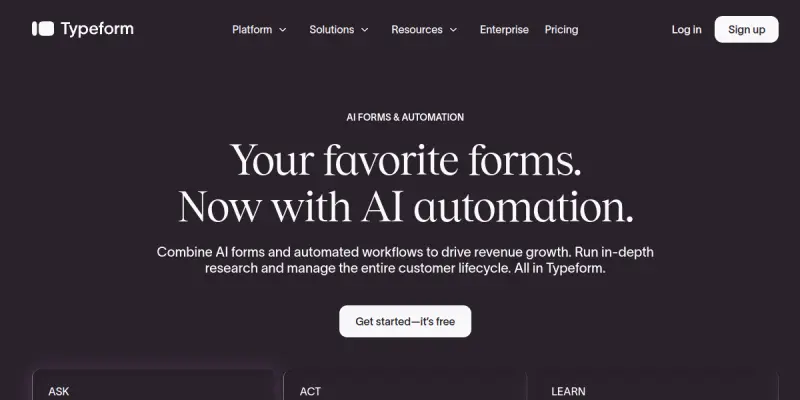
Typeform AI is an advanced evolution of the Typeform platform, designed to enhance the creation of conversational forms and surveys. By integrating artificial intelligence, it moves beyond static questionnaires to create dynamic, user-centric experiences that drive higher engagement and more accurate data collection. It is ideal for professionals who prioritize user experience and conversational design.
Key Features
- Conversational UI: Asks one question at a time to reduce respondent fatigue and improve completion rates.
- AI-Assisted Questioning: Leverages AI models to suggest or auto-generate relevant questions based on user context and flow.
- Dynamic Branching: Creates personalized paths through the form based on real-time user answers using smart logic.
- Smart Templates: Provides pre-built templates specifically designed for quizzes, market research, and customer feedback loops.
- No-Code Visual Builder: Offers a drag-and-drop interface for designing forms without any programming knowledge.
- Analytics Dashboard: Provides real-time insights into response quality and engagement metrics.
Use Cases
Lead Generation
Marketing teams use Typeform AI to capture high-quality leads. By asking qualifying questions first, the AI helps filter leads before they provide contact details, ensuring sales teams receive only the most relevant prospects.
Customer Feedback
Customer support and product teams utilize the conversational format to gather qualitative feedback. The dynamic nature of the form makes users feel heard, leading to more honest and detailed responses compared to standard surveys.
Market Research
Researchers benefit from the ability to adapt questions on the fly or analyze sentiment in real-time. The AI features help streamline the research process by reducing the time spent designing static survey structures.
Pricing & Plans
Typeform operates on a Freemium pricing model. The free tier allows users to create up to 10 forms and collect 100 responses per month. Paid plans, including Starter, Growth, and Enterprise tiers, unlock unlimited forms, higher response limits, and access to advanced Typeform AI generation features.
Integrations & Compatibility
Typeform AI integrates seamlessly with popular CRM tools like HubSpot, Salesforce, and Mailchimp. It also connects with automation platforms such as Zapier, allowing users to send data to thousands of other applications instantly.
Who Is It For?
This tool is best suited for marketing professionals, customer success managers, and researchers who need to gather data through engaging, non-intrusive means. It is particularly valuable for teams looking to improve conversion rates and user satisfaction.
Limitations
- The conversational format limits the ability to collect complex quantitative data or large datasets efficiently.
- Advanced customization options are more restricted compared to raw HTML/CSS form builders.
- The pricing structure is based on response volume, which can become costly for high-traffic campaigns.
Final Verdict
Typeform AI is a powerful tool for creating engaging, user-friendly forms. Its AI integration helps streamline the creation process, making it an excellent choice for teams that prioritize user experience and want to reduce the friction associated with traditional data collection methods.
Tool Facts
Screenshots & Interface
Pros
- ✓ Enables conversational flows that significantly increase response rates by asking one question at a time.
- ✓ Leverages AI to auto-generate relevant questions and context-aware logic jumps.
- ✓ Offers a no-code visual builder for rapid form deployment without programming skills.
Cons
- × The pricing model is based on response volume, which can scale quickly and become expensive for high-traffic campaigns.
- × The conversational interface limits the ability to collect complex quantitative data or large datasets efficiently.
- × Limited customization options for developers compared to raw HTML/CSS form builders.
How to Use Typeform AI in Your Workflow
Integrating Typeform AI into your professional toolkit enhances efficiency by automating manual steps. By configuring it to suit your specific project requirements, you can optimize output quality and reduce project cycle times. Standard workflows involve testing the tool on simple tasks before scaling its use to complex operations.
Frequently Asked Questions
What is Typeform AI used for?
Typeform AI generates conversational forms and surveys using artificial intelligence. It transforms standard questionnaires into dynamic, engaging interactions for users. Available with a free plan for testing.
What is the pricing model for Typeform AI?
Typeform AI uses a Freemium pricing model.
What are the main advantages of Typeform AI?
The key benefits of Typeform AI include: Enables conversational flows that significantly increase response rates by asking one question at a time., Leverages AI to auto-generate relevant questions and context-aware logic jumps., Offers a no-code visual builder for rapid form deployment without programming skills..
What are the main limitations of Typeform AI?
Some limitations or cons of Typeform AI are: The pricing model is based on response volume, which can scale quickly and become expensive for high-traffic campaigns., The conversational interface limits the ability to collect complex quantitative data or large datasets efficiently., Limited customization options for developers compared to raw HTML/CSS form builders..
Alternative AI Tools

Brandwatch AI
Brandwatch AI is a social media management platform that helps businesses monitor brand mentions, analyze consumer sentiment, and schedule content across social networks. It is designed for marketing teams seeking data-driven insights to improve audience engagement and campaign performance.

RankMath AI
RankMath AI is a WordPress SEO plugin that streamlines on-page optimization with structured data support. It features an AI assistant to generate meta descriptions and offers detailed keyword tracking for better search rankings.

GutCheck AI
GutCheck AI automates AI Market Research for marketers by generating insights and competitive analysis. It streamlines SEO workflows with automated reporting and trend identification.
Rating Details
Based on 0 ratings
Quick Comparisons
Related Tools
More AI tools from the same workflow, industry, or category.
RankOrg
RankOrg automates the creation and daily publication of SEO-optimized blog posts directly to your website. It helps startups, small businesses, and lean content teams grow organic traffic without the burden of manual content production. A key differentiator is its closed-loop system from keyword selection to live publishing.
Constant Contact AI
Constant Contact AI simplifies email marketing campaigns with automated content creation and audience segmentation. It serves small business owners and marketers needing reliable email automation. Differentiator: Integrated CRM features within a familiar email platform.
Moz AI
Moz AI is a suite of AI-powered SEO tools designed for marketers and SEO professionals. It helps users optimize content, conduct keyword research, and analyze search performance to improve organic rankings. The platform leverages machine learning to provide data-driven insights.
RankMath AI
RankMath AI is a WordPress SEO plugin that streamlines on-page optimization with structured data support. It features an AI assistant to generate meta descriptions and offers detailed keyword tracking for better search rankings.
Reviews
No reviews submitted yet. Be the first to share your experience.
Write a Review
Share Your Experience
Join the community to write reviews, submit ratings, and bookmark your favorite AI tools.