

Visual Crossing AI
Use Visual Crossing AI as the anchor for a real shortlist.
Instead of returning to a broad directory, jump straight into the strongest adjacent matchups for pricing, workflow fit, and differentiation.
Overview
Overview
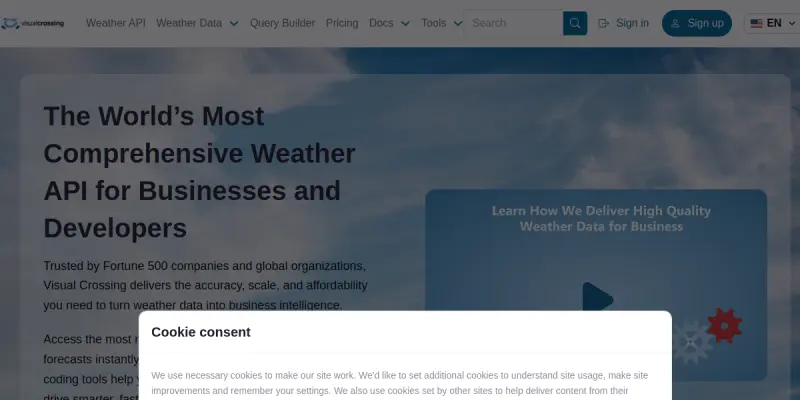
Visual Crossing AI is a weather data platform that offers global historical and real-time weather data through easy-to-use APIs. It serves developers, data scientists, and businesses who need accurate weather information for applications ranging from logistics optimization to agricultural planning. The platform is designed to be developer-friendly and offers a freemium pricing model, making it accessible to small teams while scaling to enterprise needs.
Key Features
- Global Weather Data Coverage: Access historical weather data for any location worldwide, going back several decades, along with real-time observations and forecasts.
- RESTful API: A simple, RESTful API that returns data in JSON, CSV, or XML formats, making integration straightforward for developers.
- Affordable Pricing: A freemium tier allows free access to a limited number of requests per day, with paid plans that are competitive compared to other weather data providers.
- No Contracts or Commitments: Pay-as-you-go pricing with no long-term contracts, allowing users to start small and scale as needed.
- Enterprise Reliability: The platform is used by Fortune 500 companies and offers high uptime and data accuracy guarantees.
- Data Export Options: Users can download weather data directly from the web interface without needing to code, using the Query Builder tool.
- Flexible Query Parameters: Filter data by date range, location, weather variables (temperature, precipitation, wind, etc.), and aggregation level.
- API Key Management: Easy-to-manage API keys with usage tracking and rate limiting controls in the account dashboard.
Use Cases
Agricultural Planning
Farmers and agribusinesses can use historical weather data to analyze growing seasons, predict crop yields, and plan irrigation schedules. Real-time data helps in making day-to-day operational decisions, such as applying fertilizers or protecting crops from frost.
Logistics and Supply Chain
Logistics companies can integrate Visual Crossing’s weather APIs to optimize delivery routes based on current and forecasted weather conditions. This reduces delays, fuel costs, and the risk of accidents due to adverse weather.
Energy and Utilities
Energy companies rely on accurate weather data to forecast demand, manage renewable energy sources like solar and wind, and plan maintenance schedules. Historical data is valuable for risk assessment and infrastructure planning.
Insurance and Risk Assessment
Insurance companies use historical weather data to assess risk for property and crop insurance policies. Real-time weather monitoring helps in early warning and claims management during extreme weather events.
Academic and Scientific Research
Researchers can access decades of weather data for climate studies, environmental modeling, and data analysis projects without needing to pay large licensing fees.
Pricing & Plans
Visual Crossing operates on a freemium model. The free tier provides a limited number of API calls per day, sufficient for testing and small projects. Paid plans start at a low monthly rate for higher usage limits, with additional options for enterprise customers requiring dedicated support and custom data volumes. Pricing is transparent and listed on the website without the need to contact sales.
Integrations & Compatibility
The platform offers a standard RESTful API that can be integrated with any programming language or tool that supports HTTP requests. Example code is provided in Python, JavaScript, and other common languages. Data can be exported in CSV format for use in spreadsheets and analytics software like Excel, Tableau, or Google Sheets.
Who Is It For?
Visual Crossing AI is ideal for developers, data analysts, and businesses that need reliable, affordable weather data without complex contracts. It is particularly well-suited for startups, small to medium-sized enterprises, and departments within larger organizations that need to add weather data to their applications or decision-making processes.
Limitations
- API Call Limits on Free Tier: The free tier has a relatively low daily request limit, which may not be sufficient for continuous production use.
- No Mobile SDK: There is no dedicated mobile SDK, so developers building mobile apps must use the REST API, which may add complexity.
- Limited Weather Variables on Free Plan: Some advanced weather variables, such as air quality or pollen data, may only be available on paid plans.
Final Verdict
Visual Crossing AI is a solid choice for anyone needing access to global weather data without the high costs or complexity of enterprise weather services. Its freemium model, straightforward API, and focus on developer experience make it a valuable tool for a wide range of industries. While it may not offer the same depth of features as some premium competitors, its balance of affordability, reliability, and ease of use makes it a strong contender for small to medium-scale weather data needs.
Tool Facts
Screenshots & Interface
Pros
- ✓ Provides a simple RESTful API that returns weather data in multiple formats including JSON, CSV, and XML.
- ✓ Offers a generous free tier for testing and small-scale projects with no time limit.
- ✓ Allows users to download historical data directly via a web query builder without coding.
- ✓ Has transparent, pay-as-you-go pricing without long-term contracts.
Cons
- × Free tier has a relatively low daily API call limit, which may be insufficient for production use.
- × No dedicated mobile SDK is available, requiring mobile developers to use the REST API directly.
- × Some advanced weather variables such as air quality data are only accessible on paid plans.
- × Documentation could be more extensive for advanced query parameters and error handling.
How to Use Visual Crossing AI in Your Workflow
Integrating Visual Crossing AI into your professional toolkit enhances efficiency by automating manual steps. By configuring it to suit your specific project requirements, you can optimize output quality and reduce project cycle times. Standard workflows involve testing the tool on simple tasks before scaling its use to complex operations.
Frequently Asked Questions
What is Visual Crossing AI used for?
Visual Crossing AI provides global historical and real-time weather data through APIs. It is designed for developers and businesses that require reliable weather data for analytics, logistics, and planning. Its key differentiator is a freemium model with straightforward pricing.
What is the pricing model for Visual Crossing AI?
Visual Crossing AI uses a Freemium pricing model.
What are the main advantages of Visual Crossing AI?
The key benefits of Visual Crossing AI include: Provides a simple RESTful API that returns weather data in multiple formats including JSON, CSV, and XML., Offers a generous free tier for testing and small-scale projects with no time limit., Allows users to download historical data directly via a web query builder without coding., Has transparent, pay-as-you-go pricing without long-term contracts..
What are the main limitations of Visual Crossing AI?
Some limitations or cons of Visual Crossing AI are: Free tier has a relatively low daily API call limit, which may be insufficient for production use., No dedicated mobile SDK is available, requiring mobile developers to use the REST API directly., Some advanced weather variables such as air quality data are only accessible on paid plans., Documentation could be more extensive for advanced query parameters and error handling..
Alternative AI Tools

Greenscope AI
Greenscope AI automates ESG data collection and reporting for private market investors. It transforms sustainability insights into measurable performance metrics for institutional stakeholders.

Earth Networks AI
Earth Networks AI offers specialized weather forecasting tools designed for the agricultural sector. The platform delivers hyper-localized data to support farming decisions. It combines meteorological science with artificial intelligence to predict weather patterns.

Sphera AI
Sphera AI offers a suite of intelligent software products for Industry 4.0, integrating artificial intelligence and business intelligence. It is designed for businesses in the agriculture and environmental sectors seeking to automate operations and gain data-driven insights. The platform differentiates itself with a focus on sustainability and custom AI/BI integration.
Rating Details
Based on 0 ratings
Related Tools
More AI tools from the same workflow, industry, or category.
fr3n
fr3n is a creator platform that combines a link-in-bio page, digital storefront, community spaces, and newsletters into one hub. It helps creators sell digital products, run memberships, and build an audience with first-party data.
Aveva AI
Aveva AI optimizes industrial processes and predictive maintenance by leveraging AI models to detect anomalies and support risk-based decision-making in manufacturing.
Paddle AI
Paddle AI streamlines billing, tax compliance, and revenue management for digital businesses. This SaaS platform automates financial operations, supporting global revenue generation for apps like n8n and AdGuard. It integrates essential payment processing tools into a single interface.
Honeywell Forge AI
Honeywell Forge is an industrial IoT platform that combines digital twin technology with AI to optimize facility operations. It is designed for industrial manufacturers seeking predictive maintenance and operational efficiency.
Reviews
No reviews submitted yet. Be the first to share your experience.
Write a Review
Share Your Experience
Join the community to write reviews, submit ratings, and bookmark your favorite AI tools.