

Zoho Desk AI
Use Zoho Desk AI as the anchor for a real shortlist.
Instead of returning to a broad directory, jump straight into the strongest adjacent matchups for pricing, workflow fit, and differentiation.
Overview
Overview
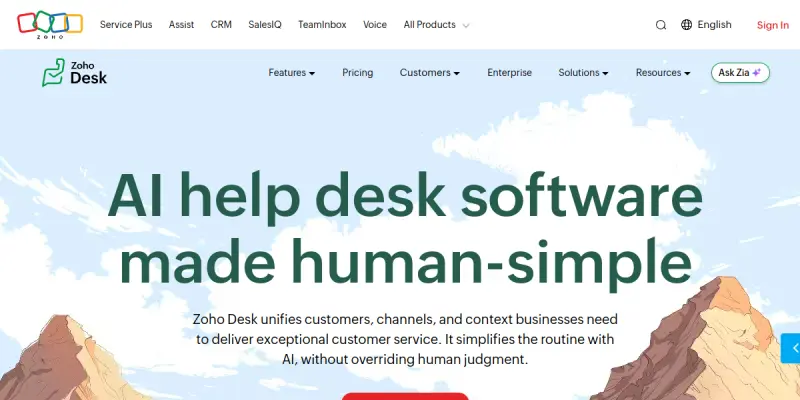
Zoho Desk AI is a cloud-based help desk solution powered by Zoho Corporation that integrates artificial intelligence with traditional customer support workflows. It enables service teams to manage requests from multiple channels—email, chat, phone, social media, and self-service portals—while leveraging AI to automate repetitive tasks, suggest responses, and analyze ticket trends. Designed for growing businesses, Zoho Desk AI aims to reduce response times and improve customer satisfaction without requiring a large support staff.
Key Features
- Zia AI Assistant: Zia provides intelligent suggestions for ticket responses, automates workflows, and helps prioritize urgent issues based on sentiment analysis and past interactions.
- Multi-Channel Ticketing: Consolidate inquiries from email, live chat, phone, social media, and help center into a single unified dashboard for streamlined management.
- Automation Rules: Create customizable rules to automatically assign tickets, trigger email notifications, and escalate issues based on predefined conditions.
- Self-Service Portal: Build a branded knowledge base and community forum where customers can find answers without contacting support, reducing ticket volume.
- Omnichannel Reporting: Real-time dashboards and pre-built reports track key metrics such as response time, resolution rate, and agent performance across all channels.
- Sentiment Analysis: Automatically detect customer sentiment from incoming messages and flag negative interactions for priority attention.
- Mobile App: Agents can manage tickets, respond to customers, and access knowledge articles from iOS and Android devices.
- Integration Hub: Connect Zoho Desk with over 200 third-party apps including Slack, Microsoft Teams, Salesforce, and Jira, plus custom integrations via Zoho Flow.
Use Cases
E-commerce Customer Support
An online retailer uses Zoho Desk AI to handle order inquiries, returns, and shipping questions. Zia assists agents by suggesting answers from the knowledge base, and automated rules route VIP customers to a dedicated team, ensuring high-priority issues are resolved quickly.
SaaS Company Technical Support
A software-as-a-service provider deploys Zoho Desk AI to manage technical support tickets from users across different plans. The AI analyzes ticket content to identify common bugs, and the self-service portal allows users to troubleshoot known issues, reducing the load on the support team.
Small Business General Support
A boutique agency with a small support team uses Zoho Desk AI to centralize client communication from email and social media. The affordable freemium plan allows them to start without upfront costs, and the automation rules help ensure no client query goes unanswered.
Pricing & Plans
Zoho Desk AI offers a Freemium pricing model, with a free tier that includes basic ticketing and limited AI features. Paid plans start at approximately $14 per agent per month (billed annually) for the Standard plan, $23 per agent per month for the Professional plan, and $40 per agent per month for the Enterprise plan. Each tier adds more advanced AI capabilities, customization options, and integrations. A flexible free trial is available for the paid plans.
Integrations & Compatibility
Zoho Desk AI integrates with the broader Zoho ecosystem (CRM, Books, Projects) as well as popular third-party tools like Slack, Microsoft Teams, Google Workspace, Salesforce, Jira, Mailchimp, and Zapier. It also offers a REST API for custom integrations and supports Zoho Flow for building no-code automation workflows.
Who Is It For?
Zoho Desk AI is designed for customer support teams in small to medium-sized businesses that want to adopt AI without a major investment. It is also suitable for larger organizations that need a scalable, multi-channel help desk with advanced analytics and automation.
Limitations
- AI Accuracy Depends on Training Data: The effectiveness of Zia’s suggestions relies on the quality and quantity of historical ticket data; new teams may see limited AI benefits initially.
- Advanced Features Require Paid Plans: Key AI functionalities such as sentiment analysis and advanced automation are only available on Professional and Enterprise plans.
- Limited Offline Capabilities: The platform requires a stable internet connection to function, which may be a drawback for teams in areas with unreliable connectivity.
- Learning Curve for Customization: Setting up complex automation rules and integrations may require some technical knowledge or training.
Final Verdict
Zoho Desk AI is a robust, AI-enhanced help desk platform that offers strong value for businesses seeking to modernize their customer service operations. Its freemium entry point and extensive integrations make it accessible, while features like Zia AI and omnichannel reporting provide meaningful productivity gains. The main trade-offs are that the most powerful AI tools are gated behind higher-tier subscriptions, and AI effectiveness improves over time with data. Overall, Zoho Desk AI is a solid choice for teams that want to blend automation with human touch without a large budget.
Tool Facts
Screenshots & Interface
Pros
- ✓ Zia AI provides real-time ticket suggestions and sentiment analysis, reducing manual effort for agents.
- ✓ Multi-channel ticketing consolidates email, chat, phone, and social media inquiries into one dashboard.
- ✓ Freemium model allows small teams to try core features without upfront payment.
- ✓ Extensive integration library with over 200 apps and an open API enables seamless workflow automation.
- ✓ Self-service portal and knowledge base help reduce ticket volume by empowering customers to find answers.
Cons
- × Advanced AI features like sentiment analysis and advanced automation are locked behind Professional and Enterprise plans.
- × Effectiveness of Zia AI improves over time with training data, so new accounts may experience limited benefits initially.
- × No offline mode; full functionality requires a continuous internet connection.
- × Some complex automation and integration setups may require technical expertise to configure.
How to Use Zoho Desk AI in Your Workflow
Integrating Zoho Desk AI into your professional toolkit enhances efficiency by automating manual steps. By configuring it to suit your specific project requirements, you can optimize output quality and reduce project cycle times. Standard workflows involve testing the tool on simple tasks before scaling its use to complex operations.
Frequently Asked Questions
What is Zoho Desk AI used for?
Zoho Desk AI is a help desk platform that combines artificial intelligence with human agents to manage customer inquiries across email, chat, phone, and social media. It helps support teams automate routine tasks and resolve issues faster, making it suitable for businesses of all sizes seeking smarter customer service.
What is the pricing model for Zoho Desk AI?
Zoho Desk AI uses a Freemium pricing model.
What are the main advantages of Zoho Desk AI?
The key benefits of Zoho Desk AI include: Zia AI provides real-time ticket suggestions and sentiment analysis, reducing manual effort for agents., Multi-channel ticketing consolidates email, chat, phone, and social media inquiries into one dashboard., Freemium model allows small teams to try core features without upfront payment., Extensive integration library with over 200 apps and an open API enables seamless workflow automation., Self-service portal and knowledge base help reduce ticket volume by empowering customers to find answers..
What are the main limitations of Zoho Desk AI?
Some limitations or cons of Zoho Desk AI are: Advanced AI features like sentiment analysis and advanced automation are locked behind Professional and Enterprise plans., Effectiveness of Zia AI improves over time with training data, so new accounts may experience limited benefits initially., No offline mode; full functionality requires a continuous internet connection., Some complex automation and integration setups may require technical expertise to configure..
Alternative AI Tools

Tidio AI
Tidio AI provides an AI-powered customer service agent integrated with live chat and helpdesk tools. It helps businesses automate support responses while maintaining a human touch. The platform is used by over 300,000 companies worldwide.

Amazon Lex
Amazon Lex is an AWS service for building conversational chatbots and voice assistants. It uses deep learning models for speech recognition and natural language understanding.

Spiceworks AI
Spiceworks AI is a helpdesk and IT management platform that provides AI-powered automation for ticketing, workflows, and incident resolution. It helps IT teams reduce manual tasks and improve response times. A key differentiator is its integrated community, forums, and tech news for IT professionals.
Rating Details
Based on 0 ratings
Quick Comparisons
Related Tools
More AI tools from the same workflow, industry, or category.
Inspectlet AI
Inspectlet records videos of website visitors to show every mouse movement, scroll, click, and keypress. It helps product teams, marketers, and UX researchers understand user behavior through session replays and heatmaps. Unlike traditional analytics, it provides visual, play-by-play insights into how people interact with your site.
Chatfuel
Chatfuel is a no-code platform for building AI chatbots on Instagram, WhatsApp, and TikTok. It enables businesses to automate customer support and sales workflows directly on social media. The tool integrates with Meta business tools to manage customer interactions at scale.
Amazon Lex
Amazon Lex is an AWS service for building conversational chatbots and voice assistants. It uses deep learning models for speech recognition and natural language understanding.
Whatfix AI
Whatfix AI is a digital adoption platform that helps users navigate enterprise software through simulation training and personalized guidance, designed for businesses of all sizes.
Reviews
No reviews submitted yet. Be the first to share your experience.
Write a Review
Share Your Experience
Join the community to write reviews, submit ratings, and bookmark your favorite AI tools.