

Zoho Inventory AI
Use Zoho Inventory AI as the anchor for a real shortlist.
Instead of returning to a broad directory, jump straight into the strongest adjacent matchups for pricing, workflow fit, and differentiation.
Overview
Overview
Zoho Inventory is a comprehensive cloud-based inventory management platform designed to help businesses track stock levels, manage sales channels, and streamline order fulfillment. It serves as a central hub for businesses to handle inventory from a single place.
Key Features
- Multi-channel Selling: Manage sales across Amazon, eBay, Shopify, and other marketplaces from a unified dashboard.
- Warehouse Management: Track inventory across multiple warehouses with stock transfer capabilities.
- Automated Purchase Orders: Generate purchase orders automatically based on reorder points and stock levels.
- Shipping Integration: Connect with major shipping carriers like FedEx, UPS, DHL, and USPS for real-time label generation.
- Customizable Workflows: Create custom fields and workflows to match specific business processes.
- Advanced Reporting: Access detailed reports on sales, stock levels, and order status.
Use Cases
E-commerce Sellers
For online retailers, Zoho Inventory helps synchronize product listings and manage orders across different e-commerce platforms, ensuring stock availability is always up to date.
Wholesale Distributors
The platform supports tier-based pricing and large-scale inventory tracking, making it suitable for businesses dealing with bulk orders and complex product catalogs.
Retail Businesses
Brick-and-mortar stores can use the app to track in-store inventory while managing online sales, providing a seamless omnichannel experience.
Pricing & Plans
Zoho Inventory operates on a Freemium model. The Starter plan is free and includes basic inventory management. The Standard and Premium plans offer advanced features like multi-channel selling, barcode scanning, and branded invoices. Pricing is based on the number of users and modules selected.
Integrations & Compatibility
The tool integrates deeply with the Zoho ecosystem, including Zoho CRM and Zoho Books. It also connects with popular e-commerce platforms and shipping carriers, allowing for seamless data synchronization.
Who Is It For?
Zoho Inventory is designed for small to medium-sized businesses (SMBs) and growing enterprises that need to manage their inventory, orders, and shipping operations efficiently.
Limitations
- Mobile App Limitations: The mobile application is primarily a mobile web view, which can feel less native than dedicated apps.
- Advanced Features: High-level inventory analytics and complex automation are locked behind the Premium plan.
Final Verdict
Zoho Inventory offers a robust suite of tools for inventory management, particularly strong for users already invested in the Zoho ecosystem. While it may have a learning curve for beginners, its comprehensive feature set makes it a reliable choice for scaling businesses.
Tool Facts
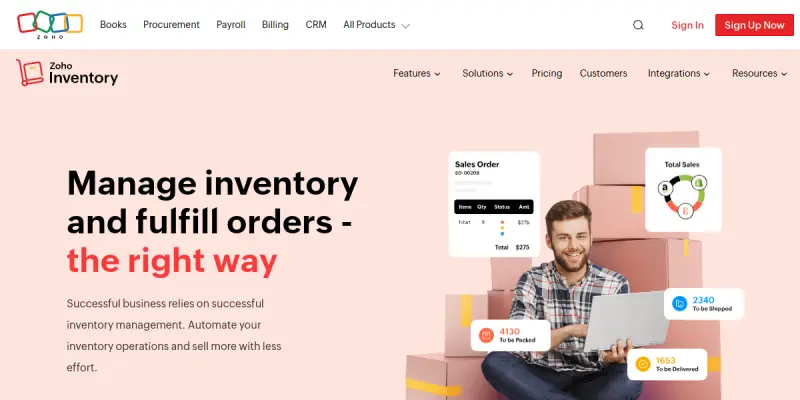
Screenshots & Interface
Pros
- ✓ Automates purchase orders based on reorder point thresholds
- ✓ Seamlessly integrates with other Zoho products like CRM and Books
- ✓ Supports multi-channel selling from a single dashboard
Cons
- × Mobile application is limited to a web-based interface
- × Advanced inventory analytics and reporting are reserved for premium plans
- × Setup process can be complex for users unfamiliar with inventory systems
How to Use Zoho Inventory AI in Your Workflow
Integrating Zoho Inventory AI into your professional toolkit enhances efficiency by automating manual steps. By configuring it to suit your specific project requirements, you can optimize output quality and reduce project cycle times. Standard workflows involve testing the tool on simple tasks before scaling its use to complex operations.
Frequently Asked Questions
What is Zoho Inventory AI used for?
Inventory management platform that automates order processing, shipping, and warehouse operations. Includes AI features for demand forecasting and inventory optimization.
What is the pricing model for Zoho Inventory AI?
Zoho Inventory AI uses a Freemium pricing model.
What are the main advantages of Zoho Inventory AI?
The key benefits of Zoho Inventory AI include: Automates purchase orders based on reorder point thresholds, Seamlessly integrates with other Zoho products like CRM and Books, Supports multi-channel selling from a single dashboard.
What are the main limitations of Zoho Inventory AI?
Some limitations or cons of Zoho Inventory AI are: Mobile application is limited to a web-based interface, Advanced inventory analytics and reporting are reserved for premium plans, Setup process can be complex for users unfamiliar with inventory systems.
Alternative AI Tools

Intelligence Node AI
Intelligence Node AI monitors competitor pricing and digital shelf analytics for e-commerce brands.
Recurly AI
Recurly AI automates subscription management and recurring billing for digital commerce businesses. It simplifies complex financial workflows using AI to handle billions in annual transactions.

Feedvisor AI
Feedvisor AI automates dynamic pricing for online marketplaces. It helps e-commerce brands maximize revenue by adjusting prices in real-time.
Rating Details
Based on 0 ratings
Related Tools
More AI tools from the same workflow, industry, or category.
EroLove
An AI companion chat for adults (18+), with hand-written characters who remember you and a page where you can see and correct what they remember. Scenes, group rooms, photos and voice notes in the chat. Free to start.
AskMed
AskMed answers clinical questions with citations from medical journals, guidelines and drug labels. Built for doctors, residents, medical students and researchers.
LawAsked
LawAsked is a free AI legal-information site: ask a legal question in plain language and get a clear general explanation of the law, with answers organized by topic. Informational only, not legal advice.
ImageHub
Use ImageHub free AI image tools to generate images, remove backgrounds and objects, upscale photos, restore old pictures, and try on outfits online.
Reviews
No reviews submitted yet. Be the first to share your experience.
Write a Review
Share Your Experience
Join the community to write reviews, submit ratings, and bookmark your favorite AI tools.