

Zoho Social AI
Use Zoho Social AI as the anchor for a real shortlist.
Instead of returning to a broad directory, jump straight into the strongest adjacent matchups for pricing, workflow fit, and differentiation.
Overview
Overview
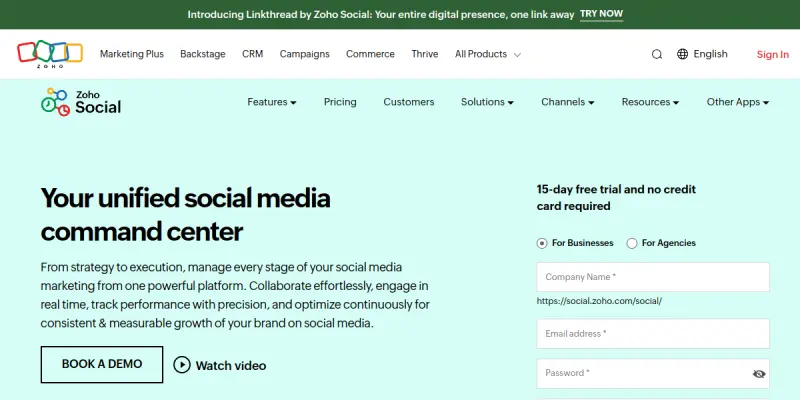
Zoho Social is a comprehensive social media management platform designed to help businesses and agencies effectively manage their online presence. It combines publishing, engagement, analytics, and listening tools in a single dashboard, with AI-powered enhancements to streamline workflows and improve content strategy.
Key Features
- AI-Powered Post Suggestions: Zoho Social uses AI to recommend content topics and optimal posting times based on audience behavior and engagement patterns.
- Unified Social Inbox: Manage all incoming messages, comments, and mentions from multiple networks in one centralized inbox, enabling faster response times.
- Publishing & Scheduling: Create, schedule, and automatically publish posts across Facebook, Twitter, LinkedIn, Instagram, and other platforms from a single calendar view.
- Advanced Analytics: Track key performance metrics such as engagement rates, reach, follower growth, and sentiment with customizable reports and dashboards.
- Social Listening: Monitor keywords, hashtags, and brand mentions across social platforms to gain insights into audience conversations and trends.
- Team Collaboration: Assign tasks, set permissions, and collaborate with team members on content approval workflows and campaign management.
- Content Calendar: Visualize your entire social media schedule with a drag-and-drop calendar that supports bulk scheduling and recurring posts.
- Mobile App: Stay connected and manage your social accounts on the go with dedicated mobile apps for iOS and Android.
Use Cases
Small Business Social Management
Small business owners can use Zoho Social to maintain an active social presence without dedicating full-time staff. The AI suggestions help generate post ideas, while the analytics dashboard tracks which content drives engagement and conversions.
Agency Multi-Client Management
Digital agencies handling multiple client accounts benefit from Zoho Social’s team collaboration features. They can assign different team members to specific clients, manage approval workflows, and generate white-label reports to demonstrate ROI.
Enterprise Brand Reputation Management
Large organizations use the social listening and unified inbox capabilities to monitor brand mentions across channels, respond to customer queries promptly, and analyze sentiment to protect brand reputation.
Content Marketing Strategy
Marketing teams leverage the content calendar and AI-driven insights to plan themed campaigns, schedule posts during peak audience times, and measure content performance against KPIs.
Pricing & Plans
Zoho Social offers a free tier with basic features including one brand profile and limited posts per day. Paid plans start at $10 per month (billed annually) for the Standard plan, which adds multiple brand profiles, advanced analytics, and team collaboration. The Professional and Agency plans offer additional features like social listening, white-label reports, and unlimited brand profiles. Pricing is transparent on the Zoho website.
Integrations & Compatibility
Zoho Social integrates natively with Facebook, Twitter, LinkedIn, Instagram, YouTube, and Google My Business. It also connects with other Zoho applications such as Zoho CRM, Zoho Desk, and Zoho Projects. For extended functionality, it supports Zapier integrations and provides a REST API for custom workflows.
Who Is It For?
This tool is designed for social media managers, marketing teams, small business owners, and digital agencies who need to streamline their social media operations. It suits both beginners looking for an intuitive interface and experienced marketers requiring advanced analytics and team collaboration.
Limitations
- AI features are limited to content suggestions and optimal time recommendations; the tool lacks generative AI for creating full post copy or images.
- Advanced capabilities such as social listening and white-label reports are only available on higher-tier paid plans.
- The free tier has restrictions on post volume and brand profiles, which may not be sufficient for active accounts.
- Some users may find the interface less visually polished compared to competitors like Hootsuite or Buffer.
Final Verdict
Zoho Social is a capable social media management platform that offers a good balance of features and affordability, especially for users already within the Zoho ecosystem. Its AI-powered enhancements, while not groundbreaking, provide practical assistance for content planning and scheduling. The free tier makes it accessible for small businesses to test the waters, while paid plans offer enough depth for growing teams. It is a solid choice for those prioritizing a unified workflow across Zoho apps and who need reliable publishing and analytics tools.
Tool Facts
Screenshots & Interface
Pros
- ✓ The unified social inbox allows teams to manage all messages from multiple platforms in one place.
- ✓ AI-powered post suggestions help reduce the time spent on content ideation by recommending topics and optimal posting times.
- ✓ Integrates natively with other Zoho applications, creating a seamless workflow for CRM, customer support, and project management.
- ✓ The drag-and-drop content calendar makes bulk scheduling and campaign planning straightforward.
- ✓ Provides a free tier that includes basic features, allowing small businesses to get started without financial commitment.
Cons
- × AI features are limited to content suggestions and posting time recommendations, lacking generative AI for full post creation.
- × Advanced analytics and social listening are gated behind higher-priced plans, which may be costly for small teams.
- × The free tier restricts users to one brand profile and a limited number of scheduled posts per day, which may not serve active accounts.
- × Some teams may find the user interface less modern compared to competitors like Hootsuite or Sprout Social.
How to Use Zoho Social AI in Your Workflow
Integrating Zoho Social AI into your professional toolkit enhances efficiency by automating manual steps. By configuring it to suit your specific project requirements, you can optimize output quality and reduce project cycle times. Standard workflows involve testing the tool on simple tasks before scaling its use to complex operations.
Frequently Asked Questions
What is Zoho Social AI used for?
Zoho Social is a social media management platform that helps businesses and agencies schedule posts, engage with audiences, and track performance across multiple networks. Its AI-powered features assist with content suggestions and optimal posting times. The tool offers a free tier to get started without upfront costs.
What is the pricing model for Zoho Social AI?
Zoho Social AI uses a Freemium pricing model.
What are the main advantages of Zoho Social AI?
The key benefits of Zoho Social AI include: The unified social inbox allows teams to manage all messages from multiple platforms in one place., AI-powered post suggestions help reduce the time spent on content ideation by recommending topics and optimal posting times., Integrates natively with other Zoho applications, creating a seamless workflow for CRM, customer support, and project management., The drag-and-drop content calendar makes bulk scheduling and campaign planning straightforward., Provides a free tier that includes basic features, allowing small businesses to get started without financial commitment..
What are the main limitations of Zoho Social AI?
Some limitations or cons of Zoho Social AI are: AI features are limited to content suggestions and posting time recommendations, lacking generative AI for full post creation., Advanced analytics and social listening are gated behind higher-priced plans, which may be costly for small teams., The free tier restricts users to one brand profile and a limited number of scheduled posts per day, which may not serve active accounts., Some teams may find the user interface less modern compared to competitors like Hootsuite or Sprout Social..
Alternative AI Tools

GatherContent AI
GatherContent AI is a content workflow platform for teams to plan, create, and approve marketing content. It helps marketing teams streamline content production and maintain brand consistency.

Skyword AI
Skyword AI is a content marketing platform that helps brands manage content creation and distribution. It combines a proven methodology with AI tools to streamline workflows and optimize content for SEO.
Sendible AI
Sendible AI is a social media marketing assistant that uses artificial intelligence to help businesses schedule posts and analyze performance. It is designed for marketing teams looking to automate repetitive tasks and improve campaign results. Its key differentiator is a unified dashboard for managing multiple social profiles.
Rating Details
Based on 0 ratings
Related Tools
More AI tools from the same workflow, industry, or category.
RankOrg
RankOrg automates the creation and daily publication of SEO-optimized blog posts directly to your website. It helps startups, small businesses, and lean content teams grow organic traffic without the burden of manual content production. A key differentiator is its closed-loop system from keyword selection to live publishing.
Constant Contact AI
Constant Contact AI simplifies email marketing campaigns with automated content creation and audience segmentation. It serves small business owners and marketers needing reliable email automation. Differentiator: Integrated CRM features within a familiar email platform.
Moz AI
Moz AI is a suite of AI-powered SEO tools designed for marketers and SEO professionals. It helps users optimize content, conduct keyword research, and analyze search performance to improve organic rankings. The platform leverages machine learning to provide data-driven insights.
RankMath AI
RankMath AI is a WordPress SEO plugin that streamlines on-page optimization with structured data support. It features an AI assistant to generate meta descriptions and offers detailed keyword tracking for better search rankings.
Reviews
No reviews submitted yet. Be the first to share your experience.
Write a Review
Share Your Experience
Join the community to write reviews, submit ratings, and bookmark your favorite AI tools.