

Appointlet AI
Use Appointlet AI as the anchor for a real shortlist.
Instead of returning to a broad directory, jump straight into the strongest adjacent matchups for pricing, workflow fit, and differentiation.
Overview
Overview
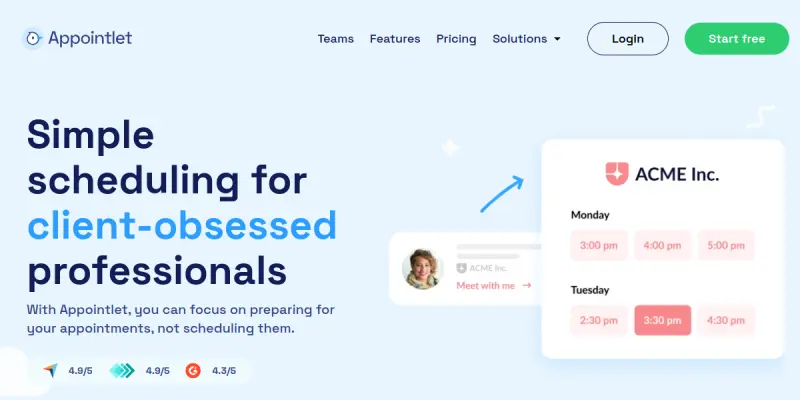
Appointlet is an automated scheduling solution designed to remove the friction of booking meetings. It allows users to create customizable booking pages that integrate directly with their calendars, enabling clients to book time slots that fit both parties' schedules without manual coordination.
Key Features
- Smart Scheduling Widget: Provides a customizable, embeddable link to place on websites or emails.
- Calendar Integration: Connects natively with Google Calendar and Microsoft Outlook to sync availability in real-time.
- Time Zone Detection: Automatically adjusts for different time zones, crucial for global teams.
- Automated Reminders: Sends notifications to both the host and the client before the meeting.
- Payment Integration: Allows booking fee collection directly through the scheduling page.
- Branding Customization: Enables users to match the booking page appearance to their brand identity.
- Meeting Links: Generates unique meeting links for each appointment to ensure security and organization.
Use Cases
Freelancers and Consultants
Professionals in consulting or creative fields use Appointlet to manage client calls and project check-ins efficiently. The tool ensures that no time is wasted on scheduling logistics, allowing the freelancer to focus on the work itself.
Sales Teams
Sales representatives utilize the platform to book demos and discovery calls with prospects. The ability to customize the booking page with company branding and collect payments upfront helps streamline the sales pipeline.
Agencies and Teams
Internal teams use the software to schedule internal stand-ups, review meetings, and client onboarding sessions. The shared calendar view and integration with project management tools help maintain organizational efficiency.
Pricing & Plans
Appointlet offers a robust free tier that includes essential scheduling features such as calendar connections and basic customization. Paid plans are available for teams requiring advanced features like custom branding, payment processing, and higher limits on booking pages.
Integrations & Compatibility
The tool integrates seamlessly with major calendar providers including Google Calendar and Outlook. It also connects with popular automation platforms like Zapier, allowing users to trigger workflows based on new bookings, and payment gateways like Stripe.
Who Is It For?
This tool is best suited for freelancers, solopreneurs, and small businesses that rely on client meetings. It is particularly valuable for anyone who experiences frequent email chains regarding meeting times and seeks a frictionless alternative.
Limitations
- The free plan restricts access to custom branding and premium integrations.
- Users must maintain an active internet connection for the booking widget to function correctly.
- Advanced AI-driven scheduling insights are reserved for the paid subscription tiers.
Final Verdict
Appointlet serves as a reliable and efficient solution for anyone looking to automate their scheduling process. By removing the need for email back-and-forth, it saves significant time for both hosts and guests. While the free plan is powerful, users requiring full customization will need to upgrade to the paid plans.
Tool Facts
Screenshots & Interface
Pros
- ✓ Automates the entire booking process, eliminating the need for email back-and-forth.
- ✓ Offers a highly customizable booking page that matches the user's website design.
- ✓ Seamlessly integrates with major calendar providers like Google Calendar and Outlook.
- ✓ Includes built-in payment processing to collect fees at the time of booking.
Cons
- × The free plan restricts access to advanced features like custom branding and multi-page setups.
- × Relies on a stable internet connection to ensure real-time availability updates.
- × Support for highly complex meeting types, such as multi-part workshops, is limited.
How to Use Appointlet AI in Your Workflow
Integrating Appointlet AI into your professional toolkit enhances efficiency by automating manual steps. By configuring it to suit your specific project requirements, you can optimize output quality and reduce project cycle times. Standard workflows involve testing the tool on simple tasks before scaling its use to complex operations.
Frequently Asked Questions
What is Appointlet AI used for?
Automated scheduling platform that eliminates email back-and-forth. Ideal for teams seeking frictionless booking and calendar integration.
What is the pricing model for Appointlet AI?
Appointlet AI uses a Free pricing model.
What are the main advantages of Appointlet AI?
The key benefits of Appointlet AI include: Automates the entire booking process, eliminating the need for email back-and-forth., Offers a highly customizable booking page that matches the user's website design., Seamlessly integrates with major calendar providers like Google Calendar and Outlook., Includes built-in payment processing to collect fees at the time of booking..
What are the main limitations of Appointlet AI?
Some limitations or cons of Appointlet AI are: The free plan restricts access to advanced features like custom branding and multi-page setups., Relies on a stable internet connection to ensure real-time availability updates., Support for highly complex meeting types, such as multi-part workshops, is limited..
Alternative AI Tools

When2meet AI
When2meet AI is a scheduling assistant that analyzes team availability and compares schedules to find optimal meeting times. It targets busy professionals and teams seeking to reduce scheduling friction. Its key differentiator is AI-driven optimization of group time slots.
PandaDoc AI
PandaDoc uses AI to streamline the creation, approval, and e-signature of business documents like proposals and contracts. It is designed for sales, legal, and operations teams. Its key differentiator is deep integration with CRM and payment platforms.

Pipedream AI
Pipedream AI is a serverless integration platform that connects apps and APIs to run AI workflows. It enables developers to build, deploy, and manage AI agents without backend infrastructure. The tool supports local execution and event-driven triggers for automated tasks.
Rating Details
Based on 0 ratings
Related Tools
More AI tools from the same workflow, industry, or category.
Mailbutler AI
Mailbutler AI is an email extension that integrates AI-powered writing, scheduling, and tracking features directly into your existing inbox. It helps professionals and teams streamline email workflows and save time on routine communication tasks.
Lucidspark AI
Lucidspark AI is a virtual whiteboard tool that helps teams brainstorm, organize ideas, and move from concept to execution. It is designed for remote and hybrid teams seeking a structured yet flexible collaboration space. Its integration with Lucidchart sets it apart for end-to-end visual workflow planning.
SignNow AI
SignNow AI automates document signing and workflow management for businesses. It uses AI to extract fields, send documents for signature, and track completion. Ideal for HR, legal, and sales teams.
ProtonMail AI
ProtonMail AI is an integrated writing assistant for secure email, leveraging Swiss privacy standards to draft, summarize, and translate messages within the Proton Mail interface.
Reviews
No reviews submitted yet. Be the first to share your experience.
Write a Review
Share Your Experience
Join the community to write reviews, submit ratings, and bookmark your favorite AI tools.