

HelloSign AI
Use HelloSign AI as the anchor for a real shortlist.
Instead of returning to a broad directory, jump straight into the strongest adjacent matchups for pricing, workflow fit, and differentiation.
Overview
Overview
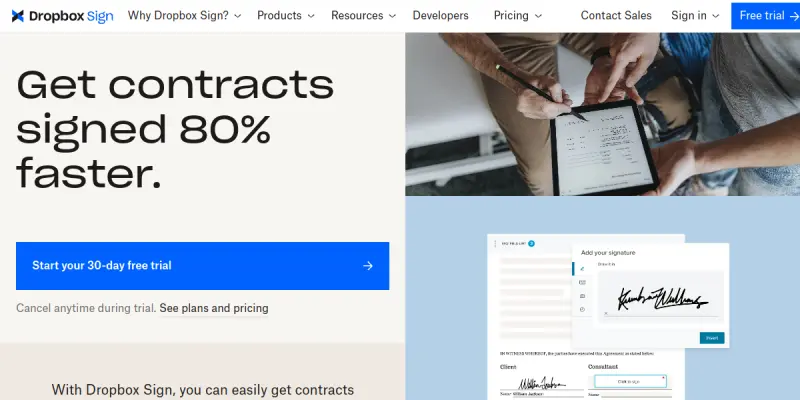
Dropbox Sign (formerly HelloSign) is a cloud-based electronic signature solution designed to facilitate the digital signing of documents. It streamlines the agreement process by replacing traditional wet ink signatures with secure, legally binding digital ones, making it easier for businesses and individuals to finalize contracts and forms.
Key Features
- Reusable Templates: Create and save document templates for frequent use to save time on repetitive tasks.
- Document Assembly: Automatically populate signature fields from data in spreadsheets or other documents.
- In-Person Signing: Sign documents on the go using a mobile device or tablet at a meeting.
- API Integration: Offers robust APIs for developers to integrate signature workflows directly into existing software.
- Legal Compliance: Meets major global standards for legally binding electronic signatures, including ESIGN, UETA, and eIDAS.
- Team Management: Centralized dashboard to manage team members, permissions, and audit trails.
Use Cases
HR and Recruitment
Streamline the onboarding process by sending employment contracts, offer letters, and tax forms for electronic signature, significantly reducing turnaround time for hiring.
Sales and Contracts
Accelerate deal closure by sending sales quotes, non-disclosure agreements (NDAs), and service agreements instantly to clients who can sign from any device.
Real Estate and Property Management
Simplify the signing of leases and rental agreements, ensuring both landlords and tenants have legally binding records without meeting in person.
Legal and Compliance
Maintain a secure, audit-ready history of all signed documents with detailed tracking and retention policies to support legal compliance.
Pricing & Plans
Dropbox Sign offers a tiered pricing structure based on the number of users and features required:
- Free Plan: Limited to 3 signed documents per month. Suitable for occasional use.
- Standard Plan: $15 per user per month. Includes advanced features like templates and document assembly.
- Business Plan: $25 per user per month. Offers team management and priority support.
- Enterprise Plan: Custom pricing. Includes dedicated support, SSO, and advanced security controls.
Integrations & Compatibility
Dropbox Sign integrates with over 200 popular apps including Slack, Salesforce, HubSpot, Google Docs, Microsoft Word, and Salesforce. It is compatible with any device with a web browser or via native mobile apps for iOS and Android.
Who Is It For?
This tool is best suited for small businesses, freelancers, legal teams, HR departments, and real estate professionals who need a reliable and legally compliant method to execute digital agreements.
Limitations
- Internet Dependency: The service requires a stable internet connection to access and sign documents, which can be a drawback in offline environments.
- Paid Features: Advanced automation and API features are locked behind paid subscription tiers.
- Complex Workflow Setup: Setting up complex document assembly workflows can require technical knowledge or additional configuration.
Final Verdict
Dropbox Sign is a solid, established choice for standard e-signature needs. While it lacks the advanced generative AI features of newer competitors, its reliability, legal compliance, and integration capabilities make it a preferred tool for businesses prioritizing security and ease of use.
Tool Facts
Screenshots & Interface
Pros
- ✓ User-friendly interface reduces setup time for new users
- ✓ Robust API allows seamless integration with existing business workflows
- ✓ Legally binding signatures meet international compliance standards
- ✓ Template feature speeds up repetitive document workflows
Cons
- × Relies on stable internet connectivity for all operations
- × Advanced automation features are restricted to paid plans
- × Complex document assembly workflows require technical setup
How to Use HelloSign AI in Your Workflow
Integrating HelloSign AI into your professional toolkit enhances efficiency by automating manual steps. By configuring it to suit your specific project requirements, you can optimize output quality and reduce project cycle times. Standard workflows involve testing the tool on simple tasks before scaling its use to complex operations.
Frequently Asked Questions
What is HelloSign AI used for?
Dropbox Sign (formerly HelloSign) offers secure e-signatures and document workflow automation. It is ideal for businesses needing legally binding agreements with minimal setup.
What is the pricing model for HelloSign AI?
HelloSign AI uses a Paid pricing model.
What are the main advantages of HelloSign AI?
The key benefits of HelloSign AI include: User-friendly interface reduces setup time for new users, Robust API allows seamless integration with existing business workflows, Legally binding signatures meet international compliance standards, Template feature speeds up repetitive document workflows.
What are the main limitations of HelloSign AI?
Some limitations or cons of HelloSign AI are: Relies on stable internet connectivity for all operations, Advanced automation features are restricted to paid plans, Complex document assembly workflows require technical setup.
Alternative AI Tools

OneNote AI
OneNote AI is Microsoft's cloud-based note-taking application that helps users capture ideas, organize notes, clip web content, and collaborate in real time. It is designed for students, professionals, and teams who need a flexible digital notebook with cross-device syncing. A key differentiator is its deep integration with the Microsoft 365 ecosystem.

Instabase AI
Instabase AI automates document processing and data extraction tasks. It streamlines enterprise workflows for handling unstructured data.
Celigo AI
Celigo AI is an integration platform as a service (iPaaS) that unifies data, applications, and AI workflows. It helps businesses automate processes by connecting SaaS tools and enabling custom integrations. The platform was recognized as a 2025 Gartner Customers' Choice for iPaaS software.
Rating Details
Based on 0 ratings
Quick Comparisons
Related Tools
More AI tools from the same workflow, industry, or category.
Mailbutler AI
Mailbutler AI is an email extension that integrates AI-powered writing, scheduling, and tracking features directly into your existing inbox. It helps professionals and teams streamline email workflows and save time on routine communication tasks.
Lucidspark AI
Lucidspark AI is a virtual whiteboard tool that helps teams brainstorm, organize ideas, and move from concept to execution. It is designed for remote and hybrid teams seeking a structured yet flexible collaboration space. Its integration with Lucidchart sets it apart for end-to-end visual workflow planning.
SignNow AI
SignNow AI automates document signing and workflow management for businesses. It uses AI to extract fields, send documents for signature, and track completion. Ideal for HR, legal, and sales teams.
ProtonMail AI
ProtonMail AI is an integrated writing assistant for secure email, leveraging Swiss privacy standards to draft, summarize, and translate messages within the Proton Mail interface.
Reviews
No reviews submitted yet. Be the first to share your experience.
Write a Review
Share Your Experience
Join the community to write reviews, submit ratings, and bookmark your favorite AI tools.