

BeFunky AI
Use BeFunky AI as the anchor for a real shortlist.
Instead of returning to a broad directory, jump straight into the strongest adjacent matchups for pricing, workflow fit, and differentiation.
Overview
Overview
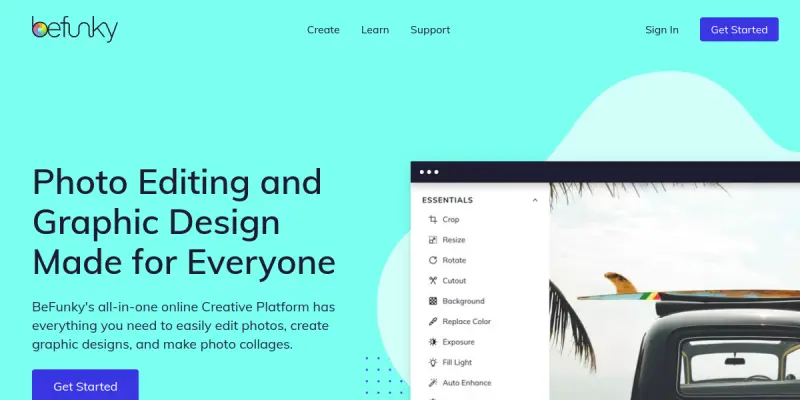
BeFunky AI is a web-based photo editing platform designed for users who want to enhance images, apply artistic effects, and build collages without installing desktop software. The tool integrates artificial intelligence to simplify tasks such as background removal, object retouching, and portrait enhancement. It caters to social media managers, bloggers, and casual users who need quick, visually appealing results.
Key Features
- AI Background Remover: Automatically detects and removes backgrounds from photos with a single click.
- Photo Effects Library: Offers hundreds of artistic filters, frames, and textures to stylize images.
- Collage Maker: Provides customizable grid and freeform layouts for creating photo collages.
- Object Retouching: Uses AI to remove unwanted objects or blemishes from images.
- Batch Editing: Allows applying effects and adjustments to multiple photos at once for efficiency.
- Text and Graphics Overlay: Adds captions, stickers, and shapes to images for social media content.
- Touch Up Tools: Includes red-eye removal, teeth whitening, and skin smoothing features.
- Direct Export: Saves edited images in formats like JPEG, PNG, and PDF, and shares directly to social platforms.
Use Cases
Social Media Content Creation
Social media managers can quickly resize and style images for different platforms, add branded overlays, and create collages for engaging posts.
Personal Photo Enhancement
Casual users can retouch family photos, remove unwanted backgrounds, and apply creative filters to share with friends and family.
Blog and Website Imagery
Bloggers can edit header images, create featured image collages, and apply consistent visual themes without needing professional design software.
Marketing Materials
Small business owners can produce simple promotional graphics and collages for email newsletters and online ads.
Pricing & Plans
BeFunky AI operates on a freemium model. The free tier provides basic editing tools and a limited selection of effects. The paid subscription unlocks AI-powered features (like background remover), full effect library, batch editing, and ad-free experience. Specific pricing tiers are disclosed on the website; enterprise or team plans are not publicly listed.
Integrations & Compatibility
BeFunky AI runs entirely in a web browser and is compatible with Windows, macOS, Linux, and Chrome OS. It supports file uploads in common image formats (JPEG, PNG, GIF, BMP) and exports to multiple formats. No native integrations with third-party platforms are available, but direct sharing to Facebook, Twitter, and Pinterest is supported.
Who Is It For?
BeFunky AI is aimed at non-designers—bloggers, social media marketers, small business owners, and casual users—who need fast, accessible photo editing without a steep learning curve.
Limitations
- Requires a stable internet connection to function; no offline mode is available.
- Advanced AI features (background removal, object retouch) are locked behind a paid subscription.
- Not suitable for professional-grade photo retouching or raw file editing.
- Limited collaboration and team features compared to enterprise solutions.
Final Verdict
BeFunky AI is a capable entry-level photo editor that leverages AI to simplify common tasks. Its strength lies in ease of use and a generous free tier for basic edits. However, users seeking advanced editing capabilities or offline access may need to look elsewhere. It serves its target audience well for quick, online image manipulation.
Tool Facts
Screenshots & Interface
Pros
- ✓ One-click AI background removal saves time on repetitive tasks.
- ✓ Intuitive drag-and-drop interface allows fast onboarding for non-designers.
- ✓ Batch editing feature enables applying effects to multiple photos at once.
- ✓ Free tier provides sufficient tools for basic photo editing needs.
Cons
- × Requires a stable internet connection; no offline mode is available.
- × Advanced AI features like background removal are locked behind a paid subscription.
- × Does not support raw image files or professional-grade color grading.
- × Limited collaboration and multi-user features compared to competitors.
How to Use BeFunky AI in Your Workflow
Integrating BeFunky AI into your professional toolkit enhances efficiency by automating manual steps. By configuring it to suit your specific project requirements, you can optimize output quality and reduce project cycle times. Standard workflows involve testing the tool on simple tasks before scaling its use to complex operations.
Frequently Asked Questions
What is BeFunky AI used for?
BeFunky AI is an online photo editing tool that enables users to apply effects, retouch images, and create collages. It is designed for casual users and social media content creators who need quick edits without desktop software.
What is the pricing model for BeFunky AI?
BeFunky AI uses a Paid pricing model.
What are the main advantages of BeFunky AI?
The key benefits of BeFunky AI include: One-click AI background removal saves time on repetitive tasks., Intuitive drag-and-drop interface allows fast onboarding for non-designers., Batch editing feature enables applying effects to multiple photos at once., Free tier provides sufficient tools for basic photo editing needs..
What are the main limitations of BeFunky AI?
Some limitations or cons of BeFunky AI are: Requires a stable internet connection; no offline mode is available., Advanced AI features like background removal are locked behind a paid subscription., Does not support raw image files or professional-grade color grading., Limited collaboration and multi-user features compared to competitors..
Alternative AI Tools

Limnr AI
Limnr AI generates images from text prompts using AI. It provides a free tier for creators and designers to produce visual assets quickly.

Framer AI
Framer AI helps designers and teams create fully custom websites using a no-code visual builder. It offers a powerful CMS, built-in SEO tools, and real-time collaboration features. The platform combines design freedom with AI-powered layout generation for faster workflows.

Topaz Photo AI
Topaz Photo AI uses deep learning to denoise, sharpen, and upscale photos and videos. It is designed for photographers and editors who need professional-grade image quality. Its key differentiator is a single AI model that handles multiple enhancement tasks simultaneously.
Rating Details
Based on 0 ratings
Quick Comparisons
Related Tools
More AI tools from the same workflow, industry, or category.
Createimg.ai
Createimg.ai provides text-to-image generation and photo editing tools including background removal. It is designed for e-commerce sellers and creators needing free visual assets.
JetBrains AI
JetBrains AI is an AI-powered toolset integrated into JetBrains IDEs, offering code completion, debugging assistance, and intelligent suggestions for developers. It leverages large language models to help teams write, understand, and refactor code more efficiently. A key differentiator is its seamless integration with JetBrains' existing development environment.
Stable Diffusion Inpaint
Stable Diffusion Inpaint is an AI-powered tool that uses diffusion models to intelligently fill in or replace parts of an image. It is designed for photographers, designers, and content creators who need precise and context-aware image editing. Its key differentiator is the ability to generate new content that seamlessly blends with the existing image.
Crello AI
VistaCreate (formerly Crello) is a cloud-based design tool using AI to generate graphics from text prompts. It features 100K+ templates for social media and marketing.
Reviews
No reviews submitted yet. Be the first to share your experience.
Write a Review
Share Your Experience
Join the community to write reviews, submit ratings, and bookmark your favorite AI tools.