

Logopony
Use Logopony as the anchor for a real shortlist.
Instead of returning to a broad directory, jump straight into the strongest adjacent matchups for pricing, workflow fit, and differentiation.
Overview
Overview
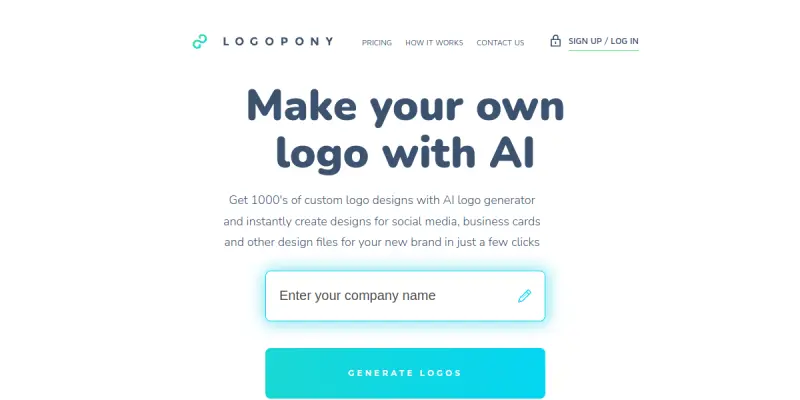
Logopony is an AI-powered logo generation platform designed for entrepreneurs, small business owners, and freelancers who need a professional logo quickly and affordably. It provides a straightforward online interface where users can describe their brand or select from templates, then refine the design with unlimited edits. The tool aims to simplify the logo creation process without requiring graphic design skills.
Key Features
- AI-Powered Logo Generation: Enter a business name and tagline, and Logopony’s AI produces multiple logo concepts based on your input.
- Unlimited Customization: Adjust colors, fonts, icons, and layouts with no restrictions on the number of revisions.
- Template Library: Access a collection of pre-designed logo templates organized by industry and style.
- High-Resolution Exports: Download your final logo in commonly used formats such as PNG, JPG, SVG, and EPS.
- Free Tier: Create and preview logos at no cost; pay only when you are satisfied and want to download high-resolution files.
- Brand Kit Integration: Save your selected colors and fonts for consistent branding across other materials (if available).
Use Cases
New Business Branding
Entrepreneurs launching a startup can quickly generate and refine a logo that reflects their brand identity, without the expense of hiring a designer.
Freelancer Portfolio
Freelancers and solopreneurs can create a polished logo for their personal brand or for client projects, with the flexibility to iterate until the design is perfect.
Event or Project Logos
Organizers of events, conferences, or temporary projects can use Logopony to produce a one-off logo that looks professional without a long-term commitment.
Non-Designers Needing a Logo
Individuals with no graphic design background can rely on the AI to propose aesthetic combinations, then tweak until satisfied — all within an intuitive interface.
Pricing & Plans
Logopony operates on a freemium model. The free tier allows users to generate and customize logos, but downloading final high-resolution files requires payment. Specific pricing tiers (e.g., one-time download fee vs. subscription) are not publicly detailed on the website. Users should check the site for the latest pricing options.
Integrations & Compatibility
Logopony is a web-based tool accessible through modern browsers on desktop and mobile devices. It does not list native integrations with other design platforms or marketing tools. Exported files (PNG, JPEG, SVG, EPS) can be used across most software and print channels.
Who Is It For?
Logopony is ideal for small business owners, freelancers, startup founders, and non-designers who need a quick, affordable logo. It is less suited for large agencies requiring advanced vector editing or collaborative workflows.
Limitations
- Limited Advanced Editing: Users cannot edit individual vector nodes or fine-tune complex paths directly within Logopony.
- Dependent on Web Access: The tool requires an internet connection; no offline version is available.
- No Team Collaboration Features: Multi-user editing or approval workflows are not supported.
- Asset Control: Final logo files are only accessible after payment, which may be a drawback for users wanting to test extensively before committing.
Final Verdict
Logopony serves its target audience well by offering a fast, AI-assisted logo creation process with unlimited customization. The freemium model lowers the barrier to entry, making it a practical choice for budget-conscious users. However, the lack of advanced vector editing and collaboration tools limits its use for professional designers or larger teams. Overall, it is a solid option for anyone needing a simple, professional logo without a steep learning curve.
Tool Facts
Screenshots & Interface
Pros
- ✓ AI generates multiple logo concepts from a brief business description, saving time on brainstorming.
- ✓ Unlimited customization allows users to tweak colors, fonts, and layouts until satisfied.
- ✓ Free tier lets users create and preview logos before any payment is required.
Cons
- × No offline mode is available; an internet connection is required throughout the design process.
- × Advanced vector editing or node-level control is not supported.
- × Team collaboration and multi-user workflows are not built into the platform.
How to Use Logopony in Your Workflow
Integrating Logopony into your professional toolkit enhances efficiency by automating manual steps. By configuring it to suit your specific project requirements, you can optimize output quality and reduce project cycle times. Standard workflows involve testing the tool on simple tasks before scaling its use to complex operations.
Frequently Asked Questions
What is Logopony used for?
Logopony is an AI-powered logo generator that helps small businesses and entrepreneurs create professional logos online. It offers unlimited customization options and a free tier to get started.
What is the pricing model for Logopony?
Logopony uses a Freemium pricing model.
What are the main advantages of Logopony?
The key benefits of Logopony include: AI generates multiple logo concepts from a brief business description, saving time on brainstorming., Unlimited customization allows users to tweak colors, fonts, and layouts until satisfied., Free tier lets users create and preview logos before any payment is required..
What are the main limitations of Logopony?
Some limitations or cons of Logopony are: No offline mode is available; an internet connection is required throughout the design process., Advanced vector editing or node-level control is not supported., Team collaboration and multi-user workflows are not built into the platform..
Alternative AI Tools

RenderNet
RenderNet is an AI video generation tool designed for e-commerce businesses and marketers. It enables users to create studio-quality video ads for platforms like TikTok, Instagram Reels, and YouTube Shorts, without requiring a production crew. Its key differentiator is its focus on product-centric ad creation with automated editing and scripting.
Erase.bg
Erase.bg uses AI to automatically remove image backgrounds for humans, animals, and products. It delivers high-resolution PNGs for free, suitable for e-commerce and design projects.
Magic Eraser
Magic Eraser is an AI photo editing tool for designers and creatives, streamlining workflow with automated editing, and offering advanced AI models for complex tasks.
Rating Details
Based on 0 ratings
Quick Comparisons
Related Tools
More AI tools from the same workflow, industry, or category.
Createimg.ai
Createimg.ai provides text-to-image generation and photo editing tools including background removal. It is designed for e-commerce sellers and creators needing free visual assets.
JetBrains AI
JetBrains AI is an AI-powered toolset integrated into JetBrains IDEs, offering code completion, debugging assistance, and intelligent suggestions for developers. It leverages large language models to help teams write, understand, and refactor code more efficiently. A key differentiator is its seamless integration with JetBrains' existing development environment.
Stable Diffusion Inpaint
Stable Diffusion Inpaint is an AI-powered tool that uses diffusion models to intelligently fill in or replace parts of an image. It is designed for photographers, designers, and content creators who need precise and context-aware image editing. Its key differentiator is the ability to generate new content that seamlessly blends with the existing image.
Crello AI
VistaCreate (formerly Crello) is a cloud-based design tool using AI to generate graphics from text prompts. It features 100K+ templates for social media and marketing.
Reviews
No reviews submitted yet. Be the first to share your experience.
Write a Review
Share Your Experience
Join the community to write reviews, submit ratings, and bookmark your favorite AI tools.