
Bigjpg
Use Bigjpg as the anchor for a real shortlist.
Instead of returning to a broad directory, jump straight into the strongest adjacent matchups for pricing, workflow fit, and differentiation.
Overview
Overview
Bigjpg is a web-based artificial intelligence tool designed for image super-resolution and upscaling. Utilizing deep convolutional neural networks (DCNN), the platform helps users enlarge images by 2x, 4x, 6x, or 8x while attempting to preserve fine details and prevent pixelation. While it is particularly renowned for enhancing anime and manga artwork, it also supports standard photographic images, making it a versatile utility for designers and content creators.
Key Features
- Deep Convolutional Neural Networks: The tool employs advanced AI algorithms specifically trained to recognize and reconstruct fine details in images.
- Anime-Enhanced Models: Dedicated algorithms that specialize in preserving the aesthetic quality of anime-style art, preventing the 'washed out' look common in other upscalers.
- Multiple Scale Options: Users can select from upscaling ratios of 2x, 4x, 6x, and 8x, allowing for significant resolution increases suitable for various use cases.
- Lossless Upscaling: The system is designed to process images without introducing visible artifacts or blur.
- Batch Processing: The web interface allows users to upload and process multiple images sequentially.
Use Cases
Anime and Manga Restoration
Artists and fans often need to upscale older or low-resolution manga pages for printing or digital display. Bigjpg’s specialized models are particularly effective at restoring the original line work and colors in these styles without the distortion typical of standard interpolation.
Social Media Content Creation
Content creators frequently need to resize images for different platform requirements (e.g., Instagram vs. Twitter). Bigjpg allows users to increase the pixel dimensions of their photos significantly, ensuring that high-resolution assets can be cropped or edited later without losing clarity.
Game Asset Development
Indie developers and designers working with 2D game assets can use Bigjpg to upscale sprites or textures, providing a cost-effective alternative to manual vectorization or high-end rendering for prototyping stages.
Pricing & Plans
Bigjpg operates on a Freemium pricing model. Users can access the basic upscaling features for free, though there are likely limitations on the number of images that can be processed per day or the maximum file size. For users requiring higher upscaling ratios or processing more files, a paid subscription is required to remove these restrictions and unlock priority processing.
Integrations & Compatibility
Bigjpg is a browser-based SaaS tool, meaning it runs entirely in the cloud. It is compatible with all modern web browsers (Chrome, Firefox, Safari, Edge) and does not require local software installation. It supports common image formats suitable for web use.
Who Is It For?
This tool is ideal for graphic designers, anime enthusiasts, photographers, and social media managers who need to quickly enhance the resolution of images without using complex photo editing software. It is also useful for hobbyists working with digital art.
Limitations
- Browser-Dependent: The tool requires a stable internet connection and runs entirely within the browser, which may limit performance compared to desktop applications.
- File Size Limits: The free tier often imposes strict limits on the file size of images that can be processed.
- Processing Speed: During peak hours, processing times can increase due to server load.
Final Verdict
Bigjpg offers a straightforward and effective solution for AI-powered image upscaling. Its strength lies in its specific focus on anime-style enhancement, where it performs better than generic tools. While the reliance on a web browser and potential costs for heavy users are limitations, it remains a strong candidate for anyone looking to quickly enlarge images without complex software.
Tool Facts
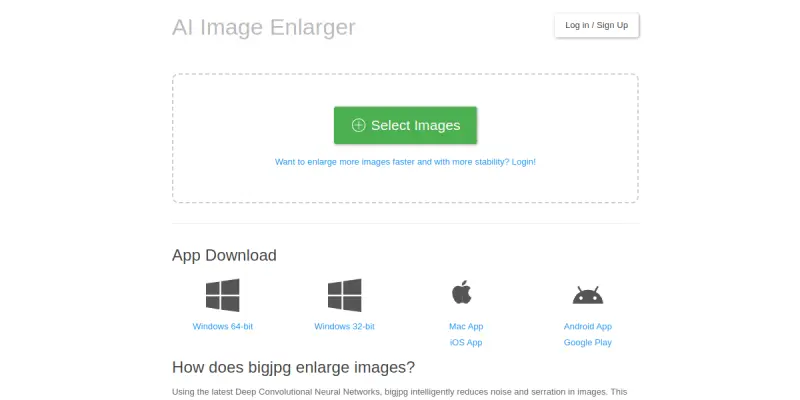
Screenshots & Interface
Pros
- ✓ Preserves fine details in anime-style artwork during upscaling
- ✓ Simple, drag-and-drop interface suitable for non-technical users
- ✓ Supports multiple upscaling ratios (2x, 4x, 6x, 8x) for significant size increases
Cons
- × Strict file size limits on the free tier restrict usage volume
- × Web-based platform requires a constant internet connection
- × Processing speed can be slow during peak usage hours
How to Use Bigjpg in Your Workflow
Integrating Bigjpg into your professional toolkit enhances efficiency by automating manual steps. By configuring it to suit your specific project requirements, you can optimize output quality and reduce project cycle times. Standard workflows involve testing the tool on simple tasks before scaling its use to complex operations.
Frequently Asked Questions
What is Bigjpg used for?
Bigjpg uses deep convolutional neural networks to upscale anime and photo images without noticeable quality loss.
What is the pricing model for Bigjpg?
Bigjpg uses a Freemium pricing model.
What are the main advantages of Bigjpg?
The key benefits of Bigjpg include: Preserves fine details in anime-style artwork during upscaling, Simple, drag-and-drop interface suitable for non-technical users, Supports multiple upscaling ratios (2x, 4x, 6x, 8x) for significant size increases.
What are the main limitations of Bigjpg?
Some limitations or cons of Bigjpg are: Strict file size limits on the free tier restrict usage volume, Web-based platform requires a constant internet connection, Processing speed can be slow during peak usage hours.
Alternative AI Tools

Infogram AI
Infogram AI helps users turn data into interactive charts, maps, infographics, and reports. It is designed for marketers, journalists, and educators who need visual storytelling tools with AI-powered chart creation and easy sharing options.

Remove.bg
Remove.bg automatically removes image backgrounds using artificial intelligence in seconds. It eliminates the need for manual clipping paths in photo editing. The tool is suitable for e-commerce and graphic design projects.

Drawtify AI
Drawtify AI is an online design platform combining vector graphics and AI image generation. It provides a drag-and-drop editor with pre-made templates for creating marketing materials and social media posts.
Rating Details
Based on 0 ratings
Quick Comparisons
Related Tools
More AI tools from the same workflow, industry, or category.
Createimg.ai
Createimg.ai provides text-to-image generation and photo editing tools including background removal. It is designed for e-commerce sellers and creators needing free visual assets.
JetBrains AI
JetBrains AI is an AI-powered toolset integrated into JetBrains IDEs, offering code completion, debugging assistance, and intelligent suggestions for developers. It leverages large language models to help teams write, understand, and refactor code more efficiently. A key differentiator is its seamless integration with JetBrains' existing development environment.
Stable Diffusion Inpaint
Stable Diffusion Inpaint is an AI-powered tool that uses diffusion models to intelligently fill in or replace parts of an image. It is designed for photographers, designers, and content creators who need precise and context-aware image editing. Its key differentiator is the ability to generate new content that seamlessly blends with the existing image.
Crello AI
VistaCreate (formerly Crello) is a cloud-based design tool using AI to generate graphics from text prompts. It features 100K+ templates for social media and marketing.
Reviews
No reviews submitted yet. Be the first to share your experience.
Write a Review
Share Your Experience
Join the community to write reviews, submit ratings, and bookmark your favorite AI tools.