

Krea AI
Use Krea AI as the anchor for a real shortlist.
Instead of returning to a broad directory, jump straight into the strongest adjacent matchups for pricing, workflow fit, and differentiation.
Overview
Overview
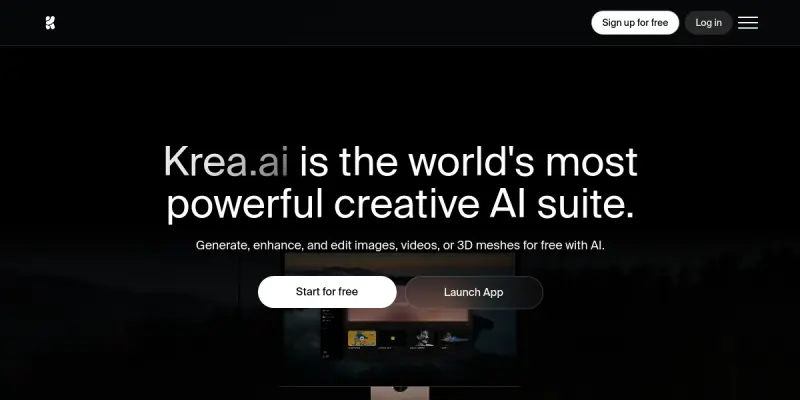
Krea AI is a creative suite designed to assist artists, designers, and content creators in generating, editing, and enhancing images, videos, and 3D assets. By leveraging real-time AI tools, the platform enables users to iterate quickly and produce high-quality visual content. Krea supports collaborative workflows, making it suitable for both individual professionals and teams working on creative projects.
Key Features
- Real-Time Image Generation: Users can create and modify images instantly based on text prompts and style references.
- Video Editing and Enhancement: The suite includes tools for upscaling, color grading, and adding effects to video content.
- 3D Asset Creation: Krea offers features for generating 3D models and textures suitable for games, visualizations, and design.
- AI Upscaling: Enhance the resolution of images and videos without significant quality loss.
- Style Transfer: Apply the artistic style of one image to another, enabling unique visual effects.
- Collaborative Workspaces: Teams can work together on projects, share assets, and maintain version control.
- Prompt Library: Access pre-built prompts and templates to accelerate the creative process.
- Live Preview: See changes in real time as parameters are adjusted, reducing the trial-and-error cycle.
Use Cases
Digital Art and Illustration
Artists can use Krea to generate concept art, backgrounds, and character designs, then refine them through iterative editing tools.
Marketing and Social Media Content
Marketers can produce engaging visuals for campaigns, including custom images, short video clips, and animated graphics, directly from text descriptions.
Game Development
Game designers can prototype textures, 3D objects, and UI elements rapidly, speeding up the pre-production phase.
Video Production
Video editors can enhance footage with AI-powered upscaling, color correction, and style filters without needing advanced technical skills.
Pricing & Plans
Krea AI operates on a freemium model. The free tier provides limited credits and basic features, while paid subscriptions (monthly or annual) unlock higher usage limits, priority rendering, and advanced capabilities such as full HD video export and commercial licensing. Specific pricing details are available on the official website.
Integrations & Compatibility
Krea AI is a web-based platform accessible via modern browsers (Chrome, Firefox, Safari, Edge). It does not require dedicated software installation. The platform supports common file formats for images (JPEG, PNG, WebP) and videos (MP4, MOV). There is no official API or plugin ecosystem currently public.
Who Is It For?
Krea AI is designed for creative professionals including graphic designers, illustrators, video editors, game developers, and marketing teams who need a fast, AI-assisted content creation workflow. Beginners can also benefit from the intuitive interface and prompt templates.
Limitations
- Internet Dependency: The suite requires a stable internet connection; offline usage is not supported.
- Learning Curve for Advanced Features: While basic functions are easy to use, mastering all tools may take time.
- Limited Output Resolution on Free Tier: High-resolution exports and commercial use require a paid plan.
- No Desktop Application: Users must rely on the web interface, which may be less convenient for some.
Final Verdict
Krea AI delivers a robust set of AI-powered creative tools that can significantly speed up visual content production. Its real-time capabilities and collaborative features make it a strong choice for teams and individual creators alike. However, the reliance on internet connectivity and the limited free tier may be drawbacks for some users. Overall, Krea is a practical option for anyone looking to integrate AI into their visual content workflow.
Tool Facts
Screenshots & Interface
Pros
- ✓ Real-time image and video generation allows for rapid iteration during creative work.
- ✓ Collaborative workspaces enable teams to share assets and manage projects efficiently.
- ✓ AI upscaling and style transfer produce high-quality results without manual effort.
- ✓ The free tier provides a risk-free way to evaluate the platform's core capabilities.
Cons
- × The platform requires a reliable internet connection and does not support offline usage.
- × Advanced features such as high-resolution exports and commercial licenses are locked behind paid plans.
- × Output quality is heavily influenced by the specificity and clarity of user-provided prompts.
- × No native desktop app is available, limiting use to web browsers.
How to Use Krea AI in Your Workflow
Integrating Krea AI into your professional toolkit enhances efficiency by automating manual steps. By configuring it to suit your specific project requirements, you can optimize output quality and reduce project cycle times. Standard workflows involve testing the tool on simple tasks before scaling its use to complex operations.
Frequently Asked Questions
What is Krea AI used for?
Krea AI enables creators to generate, edit, and enhance images, videos, and 3D assets using real-time AI tools. It provides a collaborative platform for designers and artists to streamline creative workflows. A free tier allows users to explore core features before upgrading.
What is the pricing model for Krea AI?
Krea AI uses a Freemium pricing model.
What are the main advantages of Krea AI?
The key benefits of Krea AI include: Real-time image and video generation allows for rapid iteration during creative work., Collaborative workspaces enable teams to share assets and manage projects efficiently., AI upscaling and style transfer produce high-quality results without manual effort., The free tier provides a risk-free way to evaluate the platform's core capabilities..
What are the main limitations of Krea AI?
Some limitations or cons of Krea AI are: The platform requires a reliable internet connection and does not support offline usage., Advanced features such as high-resolution exports and commercial licenses are locked behind paid plans., Output quality is heavily influenced by the specificity and clarity of user-provided prompts., No native desktop app is available, limiting use to web browsers..
Alternative AI Tools

Deep Image AI
Deep Image AI enhances photo quality for eCommerce and design. Features include image upscaling, background removal, and AI avatar generation.

Figma AI
Figma AI is an AI-powered collaborative design platform that helps teams create, prototype, and iterate on UI/UX projects. It offers intelligent design suggestions, automated layout adjustments, and real-time collaboration for designers and product teams.
Waifu2x
Waifu2x is an open-source AI image upscaler that enhances resolution and reduces noise for anime and photo images.
Rating Details
Based on 0 ratings
Quick Comparisons
Related Tools
More AI tools from the same workflow, industry, or category.
Createimg.ai
Createimg.ai provides text-to-image generation and photo editing tools including background removal. It is designed for e-commerce sellers and creators needing free visual assets.
JetBrains AI
JetBrains AI is an AI-powered toolset integrated into JetBrains IDEs, offering code completion, debugging assistance, and intelligent suggestions for developers. It leverages large language models to help teams write, understand, and refactor code more efficiently. A key differentiator is its seamless integration with JetBrains' existing development environment.
Stable Diffusion Inpaint
Stable Diffusion Inpaint is an AI-powered tool that uses diffusion models to intelligently fill in or replace parts of an image. It is designed for photographers, designers, and content creators who need precise and context-aware image editing. Its key differentiator is the ability to generate new content that seamlessly blends with the existing image.
Crello AI
VistaCreate (formerly Crello) is a cloud-based design tool using AI to generate graphics from text prompts. It features 100K+ templates for social media and marketing.
Reviews
No reviews submitted yet. Be the first to share your experience.
Write a Review
Share Your Experience
Join the community to write reviews, submit ratings, and bookmark your favorite AI tools.