

Connected Papers
Use Connected Papers as the anchor for a real shortlist.
Instead of returning to a broad directory, jump straight into the strongest adjacent matchups for pricing, workflow fit, and differentiation.
Overview
Overview
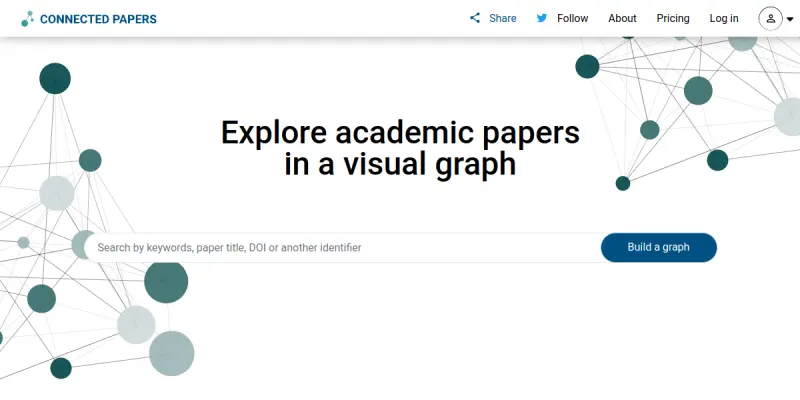
Connected Papers is a free-to-use visual tool that helps researchers and applied scientists discover and explore academic papers related to their field. Unlike traditional search engines that return a list of results, Connected Papers generates an interactive graph where each node represents a paper, and the connections between nodes indicate similarity based on co-citation and bibliographic coupling. This allows users to quickly grasp the landscape of a research topic, find seminal works, and identify recent papers that build upon them.
Key Features
- Interactive Graph Visualization: Generates a dynamic, interactive graph of related papers, where nodes represent papers and edges represent similarity. Users can click on any node to see details and open the paper.
- Prior and Derivative Works: For any selected paper, the tool shows both the "prior works" (papers cited by the selected paper that are also closely related) and "derivative works" (later papers that cite the selected paper and are closely related), helping users trace the evolution of ideas.
- Custom Seed Papers: Users can start a graph with any paper by searching by title, URL, or DOI. This flexibility allows exploration from a known starting point or a newly discovered paper.
- Paper Details Panel: Clicking on a node brings up a side panel with the paper's title, authors, abstract, publication year, citation count, and links to external sources like arXiv, PubMed, and Semantic Scholar.
- Built-in Search: An integrated search bar lets users find papers by title or keywords. The search results can be used as seeds for new graphs.
- Graph Filters and Layout: Users can adjust the graph layout (e.g., force-directed) and apply filters based on year range or similarity threshold to refine the visual network.
- Export and Share: Graphs can be exported as PNG images or shared via a unique URL, making it easy to collaborate with colleagues or include in presentations.
- API Access (Paid Plan): For power users and developers, a paid API is available to programmatically access the graph data and integrate it into custom workflows.
Use Cases
Literature Review and Discovery
Researchers starting a new project or entering a new domain can use Connected Papers to get a comprehensive overview of the key papers and their relationships. By seeding with a few foundational papers, they can quickly uncover the most important works and see how ideas have evolved.
Finding Related Work for Publications
When writing a paper, authors often need to cite related work. Connected Papers helps identify papers that are closely related to a given study, ensuring that the literature review is thorough and relevant. The graph visualisation highlights clusters of related work, making it easy to spot gaps.
Teaching and Mentoring
Professors and supervisors can use Connected Papers to help graduate students understand the structure of a research field. The visual graph provides an intuitive way to explain how different papers connect, which can be especially useful in seminar settings or one-on-one mentoring.
Conference and Journal Exploration
Researchers can quickly explore the papers from a specific conference or journal by searching for a representative paper from that venue. The resulting graph will show other papers from the same venue and those that are highly related, aiding in trend analysis and conference browsing.
Staying Current in a Fast-Moving Field
For researchers in fast-moving fields like machine learning, Connected Papers can be used periodically to discover the latest papers that build upon or are related to a known set of key works. This helps in staying up-to-date without manually scanning dozens of journals.
Pricing & Plans
Connected Papers offers a Freemium model. The free tier allows users to create a limited number of graphs per month (typically 5), with access to basic features. The paid "Pro" subscription (priced at around $5/month) removes the monthly graph limit, provides priority support, and unlocks access to the API. There is also an institutional plan for universities and labs. Exact pricing may vary; please check the official website for the most current information.
Integrations & Compatibility
Connected Papers is a web-based tool that works in any modern browser. It does not offer native integrations with reference managers like Zotero or Mendeley, but papers can be opened directly on external sites such as arXiv, PubMed, Semantic Scholar, and CrossRef. The API (available on Pro plan) allows integration with custom applications and scripts.
Who Is It For?
Connected Papers is designed for researchers, scientists, and academics in any field who need to explore related academic literature. It is also useful for librarians, graduate students, and anyone involved in systematic reviews or meta-analyses. The tool's simplicity makes it accessible even to those not familiar with complex bibliometric methods.
Limitations
- Graph Size and Coverage: The graph is built from a precomputed corpus of papers, which may not cover the very newest papers or those from niche, less-cited sources. The depth of the graph depends on the citation network of the seed paper.
- No Full-Text Access: Connected Papers does not provide the full text of papers; it only shows metadata and abstracts. Users must access the full paper through external links, which may require a subscription or institutional access.
- Dependence on Seed Paper: The quality and relevance of the graph heavily depend on the chosen seed paper. If the seed paper is not well-cited or is from a highly specialized subfield, the resulting graph may be sparse or less useful.
- Limited Analysis Features: The tool is primarily a discovery and visualisation tool; it does not perform in-depth bibliometric analysis or provide citation counts over time, which some researchers may need.
Final Verdict
Connected Papers is an excellent, easy-to-use visual discovery tool that solves the problem of finding related academic literature in a highly intuitive way. Its interactive graph makes it easy to see the landscape of a research topic at a glance. While it has some limitations, such as reliance on a precomputed corpus and no full-text access, its freemium pricing and clean interface make it a valuable addition to any researcher's toolkit. Ideal for literature reviews, teaching, and staying current in one's field, Connected Papers is recommended for anyone who regularly needs to explore academic papers.
Tool Facts
Screenshots & Interface
Pros
- ✓ Interactive graph visualization provides an intuitive overview of related papers and their connections.
- ✓ Prior and derivative works view helps trace the evolution of a research topic from foundational to recent papers.
- ✓ Free tier allows up to 5 graphs per month, making it accessible for casual or exploratory use.
- ✓ Built-in search and DOI/URL seeding makes it easy to start from any known paper.
- ✓ Easy graph export as PNG and shareable URLs facilitate collaboration and presentations.
Cons
- × Free tier limits users to only 5 graphs per month, which may be restrictive for heavy users.
- × Graph quality and coverage depend on the seed paper's citation network, which can be sparse for niche topics.
- × No full-text access is provided; users must rely on external links that may require paid subscriptions.
- × The tool does not integrate with popular reference managers like Zotero or Mendeley.
How to Use Connected Papers in Your Workflow
Integrating Connected Papers into your professional toolkit enhances efficiency by automating manual steps. By configuring it to suit your specific project requirements, you can optimize output quality and reduce project cycle times. Standard workflows involve testing the tool on simple tasks before scaling its use to complex operations.
Frequently Asked Questions
What is Connected Papers used for?
Connected Papers generates interactive visual graphs of related academic papers, helping researchers and scientists discover relevant literature. It builds a similarity graph based on co-citation and bibliographic coupling, enabling users to quickly see how papers connect and explore surrounding work.
What is the pricing model for Connected Papers?
Connected Papers uses a Freemium pricing model.
What are the main advantages of Connected Papers?
The key benefits of Connected Papers include: Interactive graph visualization provides an intuitive overview of related papers and their connections., Prior and derivative works view helps trace the evolution of a research topic from foundational to recent papers., Free tier allows up to 5 graphs per month, making it accessible for casual or exploratory use., Built-in search and DOI/URL seeding makes it easy to start from any known paper., Easy graph export as PNG and shareable URLs facilitate collaboration and presentations..
What are the main limitations of Connected Papers?
Some limitations or cons of Connected Papers are: Free tier limits users to only 5 graphs per month, which may be restrictive for heavy users., Graph quality and coverage depend on the seed paper's citation network, which can be sparse for niche topics., No full-text access is provided; users must rely on external links that may require paid subscriptions., The tool does not integrate with popular reference managers like Zotero or Mendeley..
Alternative AI Tools

Mathway AI
Mathway AI is a step-by-step math problem solver that covers algebra, calculus, and more. It provides instant solutions and explanations for students from high school through college. The tool also offers a photo-based input option for quick problem entry.

Quetext AI
Quetext AI is a plagiarism and AI content detection tool for educators, students, and professionals. It uses DeepSearch technology to scan billions of web pages and academic sources for copied or AI-generated text.

Byju's AI
BYJU's AI offers adaptive learning programs for students from K3 to K12 and competitive exams like NEET, JEE, UPSC, and Bank Exams. It uses personalized tutoring to help learners master subjects at their own pace. The platform is designed for students in India seeking structured, curriculum-aligned education.
Rating Details
Based on 0 ratings
Related Tools
More AI tools from the same workflow, industry, or category.
fr3n
fr3n is a creator platform that combines a link-in-bio page, digital storefront, community spaces, and newsletters into one hub. It helps creators sell digital products, run memberships, and build an audience with first-party data.
Aveva AI
Aveva AI optimizes industrial processes and predictive maintenance by leveraging AI models to detect anomalies and support risk-based decision-making in manufacturing.
Paddle AI
Paddle AI streamlines billing, tax compliance, and revenue management for digital businesses. This SaaS platform automates financial operations, supporting global revenue generation for apps like n8n and AdGuard. It integrates essential payment processing tools into a single interface.
Honeywell Forge AI
Honeywell Forge is an industrial IoT platform that combines digital twin technology with AI to optimize facility operations. It is designed for industrial manufacturers seeking predictive maintenance and operational efficiency.
Reviews
No reviews submitted yet. Be the first to share your experience.
Write a Review
Share Your Experience
Join the community to write reviews, submit ratings, and bookmark your favorite AI tools.