

Nearpod AI
Use Nearpod AI as the anchor for a real shortlist.
Instead of returning to a broad directory, jump straight into the strongest adjacent matchups for pricing, workflow fit, and differentiation.
Overview
Overview
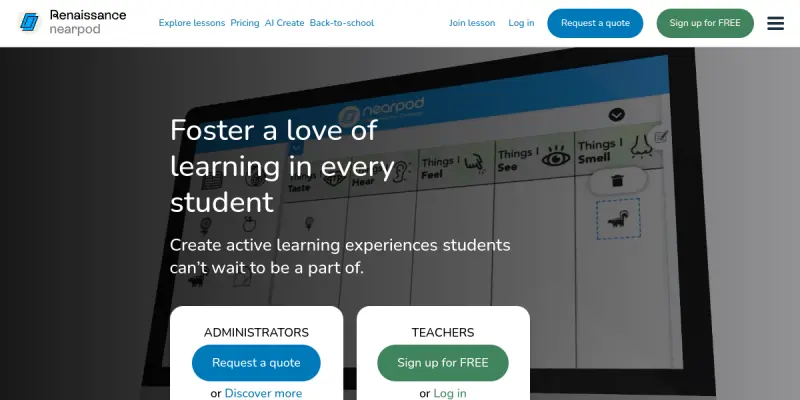
Nearpod AI is an artificial intelligence-powered extension of the Nearpod platform, designed to help educators quickly create interactive lessons, assessments, and activities. By leveraging generative AI, teachers can generate standards-aligned content, customize slides, and embed formative assessments in minutes rather than hours. The tool aims to reduce lesson planning time while increasing student engagement through gamification, polls, virtual reality (VR) field trips, and real-time collaboration.
Key Features
- AI Lesson Generation: Produce complete Nearpod lessons from a simple text prompt or by specifying a topic, grade level, and learning objective.
- Standards Alignment: Automatically align generated content to Common Core, state standards, or custom curricular frameworks.
- Interactive Media Integration: Embed 3D objects, VR tours, simulations, and videos directly into lessons without leaving the editor.
- Real-Time Student Feedback: Use polls, quizzes, open-ended questions, and draw-it activities to gauge understanding during the lesson.
- Differentiation Tools: Create multiple versions of the same activity to meet varied reading levels or learning preferences.
- Collaborative Features: Enable students to contribute to a shared board, respond to prompts, or work in breakout groups within a single lesson.
- Library of Pre-Made Activities: Access thousands of teacher-created and publisher-vetted resources that can be customized with AI.
- Reporting and Analytics: View individual and class-wide performance data to inform instruction.
Use Cases
K-12 Classroom Instruction
Teachers can use Nearpod AI to build daily lessons that include checks for understanding and multimedia elements. For example, a 5th-grade science teacher can generate a lesson on ecosystems complete with a video, a quiz, and a virtual field trip to a rainforest.
Test Prep and Review
Quickly generate practice quizzes and review games aligned to upcoming assessments. The AI can produce multiple-choice, true/false, and drag-and-drop questions from a list of topics or a provided text.
Sub Plans and Emergency Lessons
When a substitute teacher is needed, an educator can create a complete, self-contained lesson in minutes. The lesson runs on student devices with minimal facilitation, ensuring continuity of learning.
Professional Development and Training
School districts can use Nearpod AI to build training modules for staff. The AI can transform a PDF of policies or a training video script into an interactive presentation with embedded quizzes.
Pricing & Plans
Nearpod AI follows a Freemium model. The free tier includes limited lesson creation and access to a library of pre-made activities. Paid plans (Gold, Platinum, and School/District licenses) unlock full AI generation capabilities, advanced reporting, unlimited storage, and priority support. Exact pricing is not publicly disclosed by Nearpod and varies based on the number of teachers and students.
Integrations & Compatibility
Nearpod AI integrates with major Learning Management Systems (LMS) including Google Classroom, Canvas, Schoology, and Microsoft Teams. It runs in any modern web browser and requires only a projector or screen for the teacher and individual devices (Chromebooks, tablets, phones) for students. The platform supports single sign-on (SSO) via Google and Microsoft accounts.
Who Is It For?
Nearpod AI is primarily designed for K-12 educators, instructional coaches, and school administrators. It is also suitable for higher education instructors who want to create interactive lectures or for corporate trainers building engaging workshops.
Limitations
- Internet Dependency: Both the teacher and student devices must maintain a stable internet connection for real-time activities to function.
- AI Content Quality: Generated content may require review and editing to ensure accuracy, depth, and appropriateness for the intended grade level.
- Free Tier Constraints: The free plan limits the number of AI-generated lessons per month and does not include advanced analytics or storage features.
- Learning Curve: While the interface is intuitive, teachers new to Nearpod may need some time to explore all features and integrate them into daily routines.
Final Verdict
Nearpod AI is a powerful tool for educators who want to save time on lesson planning while increasing student interactivity. Its AI lesson generation is fast and convenient, and the platform's existing interactive features are well-tested in classrooms. However, the full value is locked behind a paid subscription, and the quality of AI output depends on the clarity of the teacher's prompts. It is best suited for schools with reliable technology infrastructure and a commitment to student-centered learning.
Tool Facts
Screenshots & Interface
Pros
- ✓ Generates complete Nearpod lessons from a text prompt in under a minute.
- ✓ Aligns content to Common Core and state standards automatically.
- ✓ Includes built-in interactive features like polls, VR field trips, and collaborative boards.
- ✓ Integrates seamlessly with Google Classroom, Canvas, Schoology, and Microsoft Teams.
- ✓ Offers a free tier with access to a library of thousands of pre-made activities.
Cons
- × Requires a stable internet connection for both teachers and students during real-time activities.
- × Full AI lesson generation and advanced analytics are only available on paid plans.
- × AI-generated content may need manual review for accuracy and grade-level appropriateness.
- × Free tier limits the number of AI-generated lessons per month.
- × Teachers new to Nearpod may face a learning curve to fully utilize all features.
How to Use Nearpod AI in Your Workflow
Integrating Nearpod AI into your professional toolkit enhances efficiency by automating manual steps. By configuring it to suit your specific project requirements, you can optimize output quality and reduce project cycle times. Standard workflows involve testing the tool on simple tasks before scaling its use to complex operations.
Frequently Asked Questions
What is Nearpod AI used for?
Nearpod AI helps educators create interactive lessons, quizzes, and presentations using artificial intelligence. It is designed for K-12 teachers seeking to engage students with real-time feedback and gamified activities. A key differentiator is its ability to generate standards-aligned content from prompts in seconds.
What is the pricing model for Nearpod AI?
Nearpod AI uses a Freemium pricing model.
What are the main advantages of Nearpod AI?
The key benefits of Nearpod AI include: Generates complete Nearpod lessons from a text prompt in under a minute., Aligns content to Common Core and state standards automatically., Includes built-in interactive features like polls, VR field trips, and collaborative boards., Integrates seamlessly with Google Classroom, Canvas, Schoology, and Microsoft Teams., Offers a free tier with access to a library of thousands of pre-made activities..
What are the main limitations of Nearpod AI?
Some limitations or cons of Nearpod AI are: Requires a stable internet connection for both teachers and students during real-time activities., Full AI lesson generation and advanced analytics are only available on paid plans., AI-generated content may need manual review for accuracy and grade-level appropriateness., Free tier limits the number of AI-generated lessons per month., Teachers new to Nearpod may face a learning curve to fully utilize all features..
Alternative AI Tools

Mathway AI
Mathway AI is a step-by-step math problem solver that covers algebra, calculus, and more. It provides instant solutions and explanations for students from high school through college. The tool also offers a photo-based input option for quick problem entry.
Formative AI
Formative AI is a real-time assessment platform that helps K-12 teachers create, assign, and grade formative assessments with AI assistance. It provides instant feedback to students and data-driven insights to educators.

Thinkific AI
Thinkific AI is a course creation platform that uses artificial intelligence to help educators and businesses build, market, and sell online courses. It automates content generation, curriculum design, and student management. Its key differentiator is the seamless integration of AI directly into Thinkific's existing course-building ecosystem.
Rating Details
Based on 0 ratings
Quick Comparisons
Related Tools
More AI tools from the same workflow, industry, or category.
fr3n
fr3n is a creator platform that combines a link-in-bio page, digital storefront, community spaces, and newsletters into one hub. It helps creators sell digital products, run memberships, and build an audience with first-party data.
Aveva AI
Aveva AI optimizes industrial processes and predictive maintenance by leveraging AI models to detect anomalies and support risk-based decision-making in manufacturing.
Paddle AI
Paddle AI streamlines billing, tax compliance, and revenue management for digital businesses. This SaaS platform automates financial operations, supporting global revenue generation for apps like n8n and AdGuard. It integrates essential payment processing tools into a single interface.
Honeywell Forge AI
Honeywell Forge is an industrial IoT platform that combines digital twin technology with AI to optimize facility operations. It is designed for industrial manufacturers seeking predictive maintenance and operational efficiency.
Reviews
No reviews submitted yet. Be the first to share your experience.
Write a Review
Share Your Experience
Join the community to write reviews, submit ratings, and bookmark your favorite AI tools.