

Copper AI
Use Copper AI as the anchor for a real shortlist.
Instead of returning to a broad directory, jump straight into the strongest adjacent matchups for pricing, workflow fit, and differentiation.
Overview
Overview
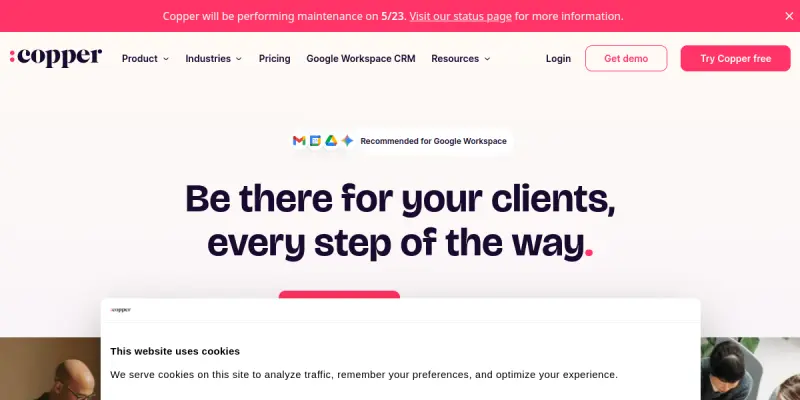
Copper is a customer relationship management (CRM) platform specifically designed for Google Workspace users. Unlike traditional CRMs that require a separate interface, Copper brings sales data directly into Gmail and Google Drive. It allows teams to manage contacts, track deals, and automate workflows without leaving their existing Google ecosystem.
Key Features
- Gmail Integration: View and manage deals, contacts, and tasks directly within the Gmail interface.
- Google Calendar Sync: Automatically sync scheduled meetings and tasks with Google Calendar.
- Visual Pipeline Management: Utilize Kanban-style boards to visualize sales stages and progress.
- Drive Integration: Attach documents and files to specific deals or contacts stored in Google Drive.
- Automation: Set up triggers to automate repetitive tasks, such as logging emails or updating deal stages.
- AI Assistant: Leverage AI to draft emails, summarize conversations, and suggest next steps.
- Reporting: Access built-in reports to track team performance and sales metrics.
- Mobile App: Manage your pipeline on the go with a dedicated mobile application.
Use Cases
Service-Based Sales Teams
For agencies and consultancies, Copper provides a structured way to track client projects and billing status alongside sales opportunities. The integration with Google Drive ensures all project deliverables are easily accessible within the deal context.
Remote Teams
Teams working remotely benefit from the centralized data stored in Google Workspace. Since the CRM lives where the team already works, it reduces friction and ensures everyone has access to the latest customer information.
Tech-Forward Startups
Startups that prioritize a unified digital ecosystem find Copper ideal because it avoids the fragmentation of switching between multiple tools. It streamlines the sales process for early-stage companies that need to scale quickly.
Pricing & Plans
Copper operates on a Freemium model, offering a free version for small teams to get started. The Professional plan is available at $25 per user per month, providing advanced features and support. An Enterprise plan is available for larger organizations requiring custom solutions and dedicated support. Detailed pricing can be found on their official website.
Integrations & Compatibility
Copper is deeply integrated with the Google Workspace suite, including Gmail, Google Calendar, Google Drive, Google Sheets, and Google Meet. It also integrates with popular third-party apps like Zapier, Slack, and Trello, allowing for a broader workflow automation.
Who Is It For?
This tool is best suited for sales teams, account managers, and business development professionals who rely on Google Workspace for their daily operations. It is particularly valuable for service-based businesses, small to medium-sized enterprises (SMEs), and agile teams that need a lightweight but powerful CRM solution.
Limitations
- Google Ecosystem Dependency: Users must be using Google Workspace to utilize the core features effectively.
- Limited Customization: The UI and workflow options are somewhat limited compared to open-source or highly customizable CRMs.
- Pricing Structure: The per-user pricing model can be cost-prohibitive for very large sales teams.
Final Verdict
Copper is a strong contender for teams that are already deeply embedded in the Google ecosystem. It offers a seamless experience that bridges the gap between email communication and sales management. While it lacks the deep customization of some competitors, its ease of use and integration capabilities make it a top choice for productivity-focused sales teams.
Tool Facts
Screenshots & Interface
Pros
- ✓ Deep integration with Google Workspace allows users to manage deals directly from Gmail and Google Drive without switching contexts.
- ✓ Visual pipeline management provides a clear view of sales stages and progress.
- ✓ Automation features reduce manual data entry by syncing actions between CRM and Google apps.
- ✓ Intuitive interface lowers the learning curve for teams familiar with Google's ecosystem.
Cons
- × Functionality is heavily tied to the Google ecosystem, making it unsuitable for teams that do not use Google Workspace.
- × Customization options are limited compared to standalone, open-source CRM solutions.
- × Pricing can become expensive for larger teams due to the per-user subscription model.
How to Use Copper AI in Your Workflow
Integrating Copper AI into your professional toolkit enhances efficiency by automating manual steps. By configuring it to suit your specific project requirements, you can optimize output quality and reduce project cycle times. Standard workflows involve testing the tool on simple tasks before scaling its use to complex operations.
Frequently Asked Questions
What is Copper AI used for?
Copper integrates with Google Workspace to manage sales pipelines directly from Gmail and Drive. It targets service-based businesses seeking native Google integration.
What is the pricing model for Copper AI?
Copper AI uses a Freemium pricing model.
What are the main advantages of Copper AI?
The key benefits of Copper AI include: Deep integration with Google Workspace allows users to manage deals directly from Gmail and Google Drive without switching contexts., Visual pipeline management provides a clear view of sales stages and progress., Automation features reduce manual data entry by syncing actions between CRM and Google apps., Intuitive interface lowers the learning curve for teams familiar with Google's ecosystem..
What are the main limitations of Copper AI?
Some limitations or cons of Copper AI are: Functionality is heavily tied to the Google ecosystem, making it unsuitable for teams that do not use Google Workspace., Customization options are limited compared to standalone, open-source CRM solutions., Pricing can become expensive for larger teams due to the per-user subscription model..
Alternative AI Tools

Autoklose AI
Autoklose AI automates sales outreach emails using artificial intelligence. It helps sales teams personalize communication at scale. The tool integrates directly into Gmail and Outlook to manage campaigns.

Mediafly AI
Mediafly is an AI-driven revenue enablement platform that centralizes sales content and automates distribution. It helps GTM teams ensure their content reaches the right audience at the right time.

Anymail Finder AI
Anymail Finder AI is a B2B email finding tool that locates verified professional email addresses by name, domain, or company. It offers a 97%+ delivery guarantee and charges only for verified results, making it suitable for sales teams, recruiters, and marketers who need accurate contact data.
Rating Details
Based on 0 ratings
Quick Comparisons
Related Tools
More AI tools from the same workflow, industry, or category.
KalTalk
KalTalk is an AI-powered sales and support tool for businesses that centralizes customer interactions into a shared inbox. It offers visitor intent tracking and a grounded knowledge base to help teams respond faster and more accurately across multiple channels.
SimilarTech AI
SimilarTech identifies the technologies websites use, including web servers and CMS platforms. It provides traffic data and competitor insights for B2B research.
Mailshake AI
Mailshake automates sales outreach via email, phone, and social campaigns. It helps users build automated cadences to improve response rates. The platform integrates with CRMs like Salesforce and HubSpot.
Agile CRM AI
Agile CRM AI is a freemium customer relationship management platform that uses artificial intelligence to help sales teams automate workflows, prioritize leads, and manage contacts. It is ideal for small to medium businesses seeking an affordable AI-powered CRM.
Reviews
No reviews submitted yet. Be the first to share your experience.
Write a Review
Share Your Experience
Join the community to write reviews, submit ratings, and bookmark your favorite AI tools.