

Cutout.pro
Use Cutout.pro as the anchor for a real shortlist.
Instead of returning to a broad directory, jump straight into the strongest adjacent matchups for pricing, workflow fit, and differentiation.
Overview
Overview
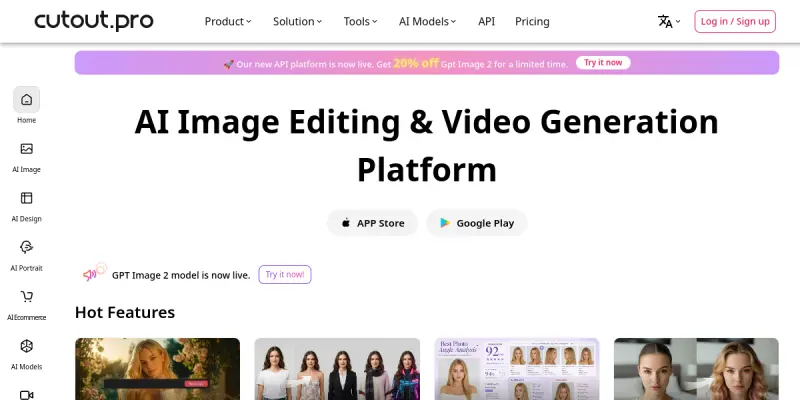
Cutout.pro is a comprehensive AI-powered visual design platform that brings together a wide array of tools for photo and video editing, graphic design, and content generation. Founded in 2022, this SaaS solution aims to streamline creative workflows by offering advanced features such as automatic background removal, image restoration, text-to-speech, AI image generation, and even digital human avatars. Whether you're a professional designer or a casual content creator, Cutout.pro promises to simplify complex tasks and accelerate the production of high-quality visual assets.
Key Features
- AI Background Removal: Instantly remove or replace backgrounds in images and videos with high accuracy.
- Image Restoration: Repair old or damaged photos using AI-driven enhancement and colorization tools.
- AI Image Generation: Create unique images from text prompts using generative AI models.
- Text-to-Speech: Convert written text into natural-sounding speech, supporting multiple languages and voices.
- Digital Humans: Generate realistic AI avatars that can speak and gesture, ideal for virtual presentations and customer interactions.
- Graphic Design Templates: Access a library of templates for social media posts, banners, flyers, and more.
- Video Editing: Perform basic video editing tasks with AI assistance, including object removal and scene creation.
- Content Generation: Produce marketing copy, captions, and other written content using integrated AI writing tools.
Use Cases
Social Media Content Creation
Social media managers and marketers can use Cutout.pro to quickly generate eye-catching visuals, remove backgrounds from product photos, and create short promotional videos with AI-generated voiceovers.
E-commerce Product Photography
Online sellers can efficiently edit product images, remove distracting backgrounds, and restore or enhance low-quality photos to present their items professionally without hiring a graphic designer.
Marketing and Advertising Campaigns
Marketing teams can leverage Cutout.pro's AI generation and design templates to produce ad creatives, banners, and video ads in minutes, testing different variations rapidly.
Educational and Training Videos
Educators and trainers can use the text-to-speech and digital human features to create engaging instructional videos without needing a studio setup or on-camera talent.
Personal Photo Enhancement
Individuals can restore old family photos, remove unwanted objects, or apply artistic filters to their personal image collection with minimal effort.
Pricing & Plans
Cutout.pro operates on a freemium model. A free tier provides limited access to basic tools with watermarks or reduced resolution. Paid subscription plans offer higher resolution exports, additional credits, and access to premium features like 4K video export and commercial usage rights. Specific pricing tiers and costs are available on the official website.
Integrations & Compatibility
Cutout.pro is primarily a web-based SaaS platform, accessible through modern web browsers. It does not offer native desktop or mobile apps but is compatible with all major operating systems including Windows, macOS, and Linux. Integration with other platforms is limited to exporting files in standard formats (PNG, JPG, MP4) for use in popular design tools like Canva, Adobe Photoshop, and video editors.
Who Is It For?
Cutout.pro is designed for a broad audience ranging from individual content creators and small business owners to marketing professionals and educators. Its intuitive interface makes it accessible to users with no prior design experience, while the depth of AI features appeals to advanced users looking to automate repetitive tasks.
Limitations
- Dependence on Internet Connectivity: As a cloud-based tool, stable internet access is required for all functions, which may be limiting in low-connectivity environments.
- Learning Curve for Advanced Features: While basic tools are easy to use, mastering features like AI generation and digital humans may require some experimentation and learning.
- Output Quality Variability: The accuracy of AI-powered outputs, especially background removal and image generation, can vary depending on the quality and complexity of the input.
- Limited Integrations: Cutout.pro lacks direct integrations with popular design software and project management platforms, requiring manual import/export of files.
Final Verdict
Cutout.pro is a versatile AI visual design platform that packs an impressive range of features into a single subscription. Its strengths lie in the combination of editing, generation, and multimedia capabilities, making it a useful tool for anyone involved in content production. However, its effectiveness depends on connectivity and input quality, and the absence of robust integrations may be a drawback for team workflows. Overall, it is a solid choice for individuals and small teams looking for an all-in-one AI creative solution.
Tool Facts
Screenshots & Interface
Pros
- ✓ Offers a comprehensive suite of AI tools including background removal, image generation, and text-to-speech in one platform.
- ✓ Freemium pricing model allows users to test basic features before committing to a paid plan.
- ✓ Intuitive web interface enables quick onboarding for users with no design experience.
- ✓ Digital human and text-to-speech features provide unique capabilities not commonly found in competing AI design tools.
Cons
- × Requires a stable internet connection for all functionality, limiting offline use.
- × The free tier includes watermarks and limited resolution, which may not suit professional needs.
- × No native desktop or mobile apps are available, restricting flexibility for some workflows.
- × Output quality for AI generation can be inconsistent depending on the complexity of the input prompt or image.
How to Use Cutout.pro in Your Workflow
Integrating Cutout.pro into your professional toolkit enhances efficiency by automating manual steps. By configuring it to suit your specific project requirements, you can optimize output quality and reduce project cycle times. Standard workflows involve testing the tool on simple tasks before scaling its use to complex operations.
Frequently Asked Questions
What is Cutout.pro used for?
Cutout.pro is a freemium visual design platform offering AI-powered photo and video editing tools. It serves designers and content creators who need background removal, image restoration, and AI generation capabilities. Its key differentiator is the integration of text-to-speech and digital human features alongside traditional editing.
What is the pricing model for Cutout.pro?
Cutout.pro uses a Freemium pricing model.
What are the main advantages of Cutout.pro?
The key benefits of Cutout.pro include: Offers a comprehensive suite of AI tools including background removal, image generation, and text-to-speech in one platform., Freemium pricing model allows users to test basic features before committing to a paid plan., Intuitive web interface enables quick onboarding for users with no design experience., Digital human and text-to-speech features provide unique capabilities not commonly found in competing AI design tools..
What are the main limitations of Cutout.pro?
Some limitations or cons of Cutout.pro are: Requires a stable internet connection for all functionality, limiting offline use., The free tier includes watermarks and limited resolution, which may not suit professional needs., No native desktop or mobile apps are available, restricting flexibility for some workflows., Output quality for AI generation can be inconsistent depending on the complexity of the input prompt or image..
Alternative AI Tools

Tailor Brands
Tailor Brands offers an AI-powered platform for creating logos, branding materials, and business assets. It guides entrepreneurs through business formation and brand identity development. The service combines design automation with legal business setup tools.

Looka
Looka is an AI graphic design tool that simplifies complex tasks for businesses and individuals, offering a freemium pricing model and intuitive interface.

Stable Diffusion
Stable Diffusion is an open-source text-to-image model that generates photorealistic visuals from natural language prompts. It is widely used by artists, designers, and developers for creative and commercial projects, and runs locally on consumer hardware.
Rating Details
Based on 0 ratings
Quick Comparisons
Related Tools
More AI tools from the same workflow, industry, or category.
Createimg.ai
Createimg.ai provides text-to-image generation and photo editing tools including background removal. It is designed for e-commerce sellers and creators needing free visual assets.
JetBrains AI
JetBrains AI is an AI-powered toolset integrated into JetBrains IDEs, offering code completion, debugging assistance, and intelligent suggestions for developers. It leverages large language models to help teams write, understand, and refactor code more efficiently. A key differentiator is its seamless integration with JetBrains' existing development environment.
Stable Diffusion Inpaint
Stable Diffusion Inpaint is an AI-powered tool that uses diffusion models to intelligently fill in or replace parts of an image. It is designed for photographers, designers, and content creators who need precise and context-aware image editing. Its key differentiator is the ability to generate new content that seamlessly blends with the existing image.
Crello AI
VistaCreate (formerly Crello) is a cloud-based design tool using AI to generate graphics from text prompts. It features 100K+ templates for social media and marketing.
Reviews
No reviews submitted yet. Be the first to share your experience.
Write a Review
Share Your Experience
Join the community to write reviews, submit ratings, and bookmark your favorite AI tools.