

Ecrett Music
Use Ecrett Music as the anchor for a real shortlist.
Instead of returning to a broad directory, jump straight into the strongest adjacent matchups for pricing, workflow fit, and differentiation.
Overview
Overview
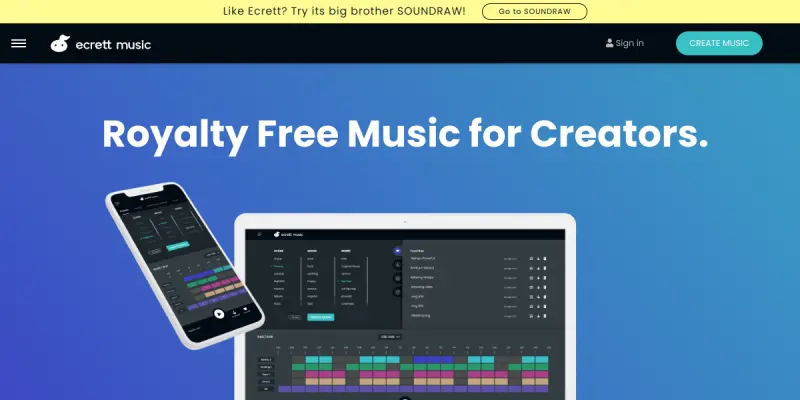
Ecrett Music is an AI-powered platform designed to generate royalty-free background music for various media projects. Unlike traditional stock music libraries, it uses artificial intelligence to create new tracks tailored to specific moods, genres, and tempos, simplifying the music selection process for content creators.
Key Features
- Mood & Genre Selection: Filter and generate tracks based on specific emotional tones such as 'Calm', 'Energetic', or 'Dark' and genres like 'Ambient', 'Pop', or 'Jazz'.
- Royalty-Free Licensing: All generated music is cleared for commercial use, including video production, advertising, and social media content.
- Customizable Tracks: Users can adjust the tempo and length of tracks to perfectly fit the timing of their projects without manual editing.
- AI Generation Engine: The core technology learns from vast music libraries to produce unique compositions that sound professionally produced.
- Easy Search: A user-friendly interface allows for quick filtering to find the perfect backing track for any video or presentation.
Use Cases
Video Production
Video editors and YouTubers can use Ecrett Music to find or generate background scores that match the visual mood of their footage, ensuring the audio enhances the storytelling without distracting from the content.
Marketing and Advertising
Marketers can create custom jingles or background scores for ads that align perfectly with brand identity, using the royalty-free license to avoid copyright strikes on major platforms like YouTube and Facebook.
Podcasts and Audiobooks
Content creators producing long-form audio can utilize the tool to generate transitional music or thematic intros and outros that maintain audience engagement without requiring expensive audio production skills.
Pricing & Plans
Ecrett Music operates on a Freemium model. Users can access a limited library of tracks and basic generation features for free. To unlock the full library, advanced customization options, and higher resolution downloads, a paid subscription is required. Specific pricing tiers are available on their website.
Integrations & Compatibility
Ecrett Music offers a Web Player for direct usage and an API integration that allows developers to incorporate their music generation capabilities into custom applications and workflows.
Who Is It For?
This tool is ideal for video editors, social media managers, content creators, and marketers who need high-quality, royalty-free background music but lack the time or budget to hire composers or browse through endless stock music libraries.
Limitations
- No Manual Editing: Users cannot manually edit the generated tracks; they must select from available outputs or regenerate them.
- Subscription Required for Full Library: The free tier restricts access to a portion of the music library and features.
- Genre Limitations: While it supports many genres, highly specific or niche music styles might not be perfectly generated by the AI model.
Final Verdict
Ecrett Music is a powerful solution for anyone needing quick, professional-sounding background music. Its AI-driven approach to music generation saves time and ensures compliance with licensing regulations, making it a valuable asset for content creators.
Tool Facts
Screenshots & Interface
Pros
- ✓ Generates unique, professional-sounding tracks quickly without manual composition
- ✓ Royalty-free licensing included with every generated track
- ✓ Mood and genre filters make finding the right track extremely fast
Cons
- × Lacks manual editing controls for generated tracks
- × Free tier restricts access to a smaller subset of the music library
- × AI outputs can sometimes feel repetitive if the same parameters are used repeatedly
How to Use Ecrett Music in Your Workflow
Integrating Ecrett Music into your professional toolkit enhances efficiency by automating manual steps. By configuring it to suit your specific project requirements, you can optimize output quality and reduce project cycle times. Standard workflows involve testing the tool on simple tasks before scaling its use to complex operations.
Frequently Asked Questions
What is Ecrett Music used for?
Ecrett Music generates royalty-free background music for video creators and marketers using AI algorithms. It offers customizable mood and genre selection.
What is the pricing model for Ecrett Music?
Ecrett Music uses a Freemium pricing model.
What are the main advantages of Ecrett Music?
The key benefits of Ecrett Music include: Generates unique, professional-sounding tracks quickly without manual composition, Royalty-free licensing included with every generated track, Mood and genre filters make finding the right track extremely fast.
What are the main limitations of Ecrett Music?
Some limitations or cons of Ecrett Music are: Lacks manual editing controls for generated tracks, Free tier restricts access to a smaller subset of the music library, AI outputs can sometimes feel repetitive if the same parameters are used repeatedly.
Alternative AI Tools

Sounddogs AI
Sounddogs AI combines a massive library of royalty-free audio with generative AI tools for creating custom music and voiceovers. It offers over one million sound effects and music tracks for professional media production. Ideal for video editors, podcasters, and game developers.

Happy Scribe
Happy Scribe is an AI-powered transcription and subtitling platform that converts audio and video files into text. It serves content creators, journalists, and businesses who need accurate, fast transcripts for their media projects. Its key differentiator is support for over 120 languages and automated speaker identification.

Listnr
Listnr is a professional AI voice generator for creators, helping them produce realistic voices and multilingual content with 1000+ AI voices in 142+ languages, making it a unique solution for multimedia projects.
Rating Details
Based on 0 ratings
Quick Comparisons
Related Tools
More AI tools from the same workflow, industry, or category.
Opa Opa AI
Turn your selfie into the Opa Opa bouncy hair effect
SceneFlare
AI image and video creation workspace for models, tools, effects, and production-ready content
VORAvideo
AI Video Generator: Create Professional Videos in 3 Minutes
Cat Clapping
Turn photos of you and your cat into a clapping video.
Reviews
No reviews submitted yet. Be the first to share your experience.
Write a Review
Share Your Experience
Join the community to write reviews, submit ratings, and bookmark your favorite AI tools.