

FlexClip
Use FlexClip as the anchor for a real shortlist.
Instead of returning to a broad directory, jump straight into the strongest adjacent matchups for pricing, workflow fit, and differentiation.
Overview
Overview
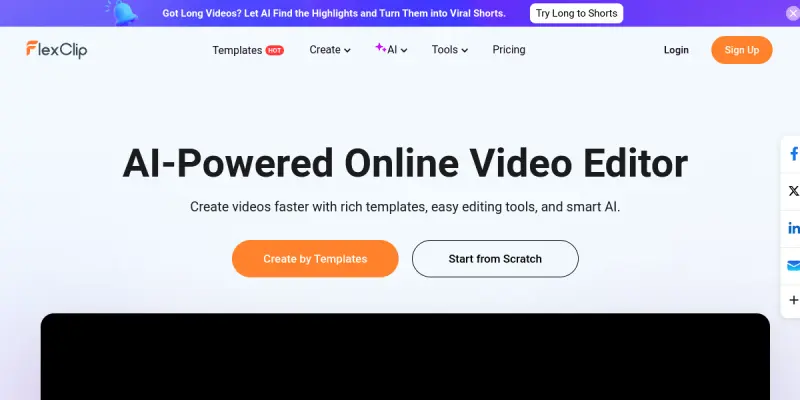
FlexClip is a comprehensive online video creation platform that leverages artificial intelligence to simplify the video production process. It offers a browser-based editor that eliminates the need for software downloads, making it accessible from any device with an internet connection. Designed for users of all skill levels, FlexClip provides a drag-and-drop interface alongside AI-powered features to generate, edit, and refine video content.
Key Features
- AI Text-to-Video: Generate entire videos from text prompts, complete with AI-narrated voiceovers, stock footage, and background music.
- AI Script Generator: Write scripts for videos by entering a topic, with options to adjust tone and length.
- AI Voiceover: Convert text into natural-sounding speech in multiple languages and accents, with adjustable speed and pitch.
- Editable Templates: Access a library of over 6,000 templates for social media, marketing, education, and personal projects.
- Stock Media Library: Search and add millions of royalty-free stock videos, images, and audio tracks directly within the editor.
- Advanced Editing Tools: Trim, crop, split, merge clips, adjust speed, add transitions, animations, and apply filters.
- Text & Titles: Overlay text with customizable fonts, colors, animations, and timing controls.
- Screen Recorder: Record screen, webcam, or both for tutorials, demos, or presentations.
Use Cases
Social Media Content Creation
Content creators and social media managers can quickly produce engaging short videos for platforms like TikTok, Instagram Reels, and YouTube Shorts. FlexClip's AI features help generate hooks, scripts, and captions optimized for each platform.
Marketing and Advertising
Small business owners and marketers can create promotional videos, product demos, and ads without hiring a video editor. The AI script generator and voiceover tools streamline the production of consistent brand messaging.
Educational Tutorials
Teachers and trainers can record screen tutorials, add AI voiceovers, and include captions to create accessible learning materials. The editing tools allow for precise trimming and annotation.
Personal Projects
Individuals can compile photo slideshows, birthday greetings, or travel montages with AI-generated music and transitions, making personal video creation straightforward.
Pricing & Plans
FlexClip operates on a Freemium model with a free plan offering limited features and watermarked exports. Paid plans — Basic, Plus, and Business — unlock higher resolution exports, more storage, premium templates, additional AI credits, and team collaboration features. Pricing is available on the official website, with annual discounts offered. Enterprise pricing is available upon request for organizations with specific needs.
Integrations & Compatibility
FlexClip is a web-based application compatible with all major browsers (Chrome, Firefox, Safari, Edge). It supports importing media from Dropbox, Google Drive, and OneDrive. Exported videos can be directly published to YouTube, Vimeo, and social media platforms. It also offers a mobile app for iOS and Android for on-the-go editing.
Who Is It For?
FlexClip is suitable for content creators, social media managers, small business owners, marketers, educators, and individuals with no prior video editing experience. Its low learning curve makes it accessible, while AI features add efficiency for more experienced users.
Limitations
- The free plan adds a watermark to all exported videos, which may limit professional use without upgrading.
- AI-generated voiceovers can sometimes sound robotic or lack emotional nuance compared to professional voice actors.
- The browser-based editor may lag or crash when handling very large media files or complex multi-track projects.
- Some advanced editing features, such as keyframing or advanced color grading, are absent compared to desktop alternatives.
Final Verdict
FlexClip is a solid choice for users who need to produce videos quickly without installing software. Its AI features are practical and reduce time on scripting and voiceovers. While it may not replace professional desktop editing software for high-end production, it serves its target audience — non-technical creators and small teams — effectively. The freemium pricing model allows testing before commitment.
Tool Facts
Screenshots & Interface
Pros
- ✓ AI text-to-video and script generation features reduce video production time from hours to minutes.
- ✓ Editable templates and a stock media library eliminate the need for external assets.
- ✓ Supports multiple languages for voiceovers and text, broadening global reach.
- ✓ Browser-based editor works on any device without software installation.
Cons
- × The free plan adds a watermark to all exports, limiting professional use without a paid subscription.
- × AI-generated voiceovers can sound robotic and lack emotional range compared to human recordings.
- × Browser-based performance may degrade with large video files or complex projects.
- × Advanced editing features like keyframing and multi-track audio are missing.
How to Use FlexClip in Your Workflow
Integrating FlexClip into your professional toolkit enhances efficiency by automating manual steps. By configuring it to suit your specific project requirements, you can optimize output quality and reduce project cycle times. Standard workflows involve testing the tool on simple tasks before scaling its use to complex operations.
Frequently Asked Questions
What is FlexClip used for?
FlexClip is an AI-powered online video maker that provides editable templates and a suite of editing tools. It is designed for content creators, marketers, and small businesses who need to produce videos quickly. A key differentiator is its AI text-to-video and AI script features integrated directly into the editor.
What is the pricing model for FlexClip?
FlexClip uses a Freemium pricing model.
What are the main advantages of FlexClip?
The key benefits of FlexClip include: AI text-to-video and script generation features reduce video production time from hours to minutes., Editable templates and a stock media library eliminate the need for external assets., Supports multiple languages for voiceovers and text, broadening global reach., Browser-based editor works on any device without software installation..
What are the main limitations of FlexClip?
Some limitations or cons of FlexClip are: The free plan adds a watermark to all exports, limiting professional use without a paid subscription., AI-generated voiceovers can sound robotic and lack emotional range compared to human recordings., Browser-based performance may degrade with large video files or complex projects., Advanced editing features like keyframing and multi-track audio are missing..
Alternative AI Tools

InstaText
InstaText is an AI-powered writing and editing tool that helps users improve clarity, tone, and readability. It is suitable for professionals, students, and non-native speakers who want to polish their written content. A key differentiator is its ability to rewrite sentences while preserving the original meaning and context.

ContentBot
ContentBot is an AI-powered content automation platform that lets users build custom AI workflows. It is designed for content marketers and creators who want to streamline writing, editing, and repurposing tasks with automated flows.

Descript
Descript is an AI-powered audio and video editor for content creators, simplifying editing to resemble text editing. It's designed for podcasters, videographers, and marketers.
Rating Details
Based on 0 ratings
Quick Comparisons
Related Tools
More AI tools from the same workflow, industry, or category.
fablepilot
FablePilot is a free AI story generator that turns a single prompt into a complete story — no sign-up required. Add illustrations or generate a plot outline.
Ghosts.app
Ghosts is an AI ghostwriter for agencies, creators, and law firms. It produces researched, cited drafts in a specific voice without requiring prompts. Users brief a specialist agent and approve a finished draft.
GrowthBar
GrowthBar is an AI tool for content generation, designed to boost productivity and streamline workflows for writers and content creators, with features like editing and tone adjustment.
GetGenie AI
GetGenie AI is an AI-powered writing and SEO assistant that helps content creators and marketers generate optimized content quickly. It includes built-in keyword research and SERP analysis to improve organic search performance.
Reviews
No reviews submitted yet. Be the first to share your experience.
Write a Review
Share Your Experience
Join the community to write reviews, submit ratings, and bookmark your favorite AI tools.