

Fotor AI
Use Fotor AI as the anchor for a real shortlist.
Instead of returning to a broad directory, jump straight into the strongest adjacent matchups for pricing, workflow fit, and differentiation.
Overview
Overview
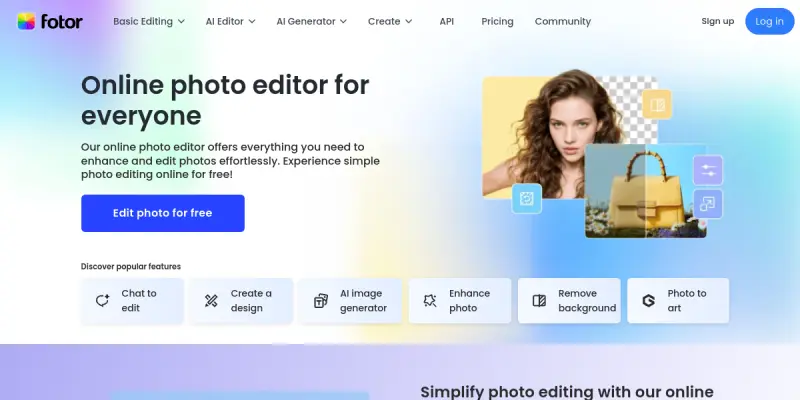
Fotor AI is a comprehensive online photo editing platform that integrates artificial intelligence to streamline image enhancement, retouching, and creative design. Launched in 2022, Fotor has evolved from a basic photo editor into a versatile tool that offers AI-driven features such as one-tap background removal, AI portrait retouching, and AI image generation from text prompts. The platform is accessible via web browser, making it convenient for users across devices without needing to install software.
Key Features
- AI Background Remover: Automatically detects and removes backgrounds from images with a single click, supporting complex edges like hair and fur.
- AI Portrait Retouching: Enhances facial features, smooths skin, removes blemishes, and applies makeup effects using advanced AI algorithms.
- AI Image Generator: Creates images from text descriptions, allowing users to generate unique visuals for projects, social media, or marketing.
- AI Photo Enhancer: Improves image resolution and clarity, reduces noise, and sharpens details automatically.
- Batch Processing: Edit multiple images simultaneously by applying filters, resizing, and exporting in bulk.
- Design Templates: Access thousands of pre-designed templates for social media posts, flyers, invitations, and more.
- Basic Editing Tools: Crop, rotate, resize, adjust brightness/contrast, add text, stickers, and effects manually.
- Collage Maker: Combine multiple photos into one layout with customizable grids and backgrounds.
Use Cases
Social Media Content Creation
Social media managers and influencers can quickly edit photos, add branded text and effects, and generate eye-catching graphics using Fotor’s templates. The AI background remover helps create profile pictures or product shots with transparent backgrounds.
E-Commerce Product Photography
Online sellers can enhance product images by removing backgrounds, improving lighting, and resizing batches of photos. Fotor’s AI enhancer can upscale low-resolution images, making products look more professional.
Personal Photo Enhancement
Casual users can retouch family photos, remove unwanted objects, or apply artistic filters. The AI portrait retouching feature simplifies making subjects look their best without manual editing skills.
Marketing and Advertising
Marketers can design social media ads, banners, and promotional materials using templates and AI-generated visuals. The AI image generator helps create custom illustrations or backgrounds that align with brand identity.
Photography Portfolio
Photographers can quickly edit and retouch images for their portfolios, apply consistent filters, and batch resize images for web uploads.
Pricing & Plans
Fotor operates on a Freemium model. The free tier offers basic editing tools and limited access to AI features (e.g., limited resolution for AI enhancer). The paid Pro plan, starting at around $8.99 per month, unlocks unlimited AI features, higher resolution exports, batch processing, and ad-free experience. An annual plan is also available at a discounted rate.
Integrations & Compatibility
Fotor is a web-based tool accessible from any modern browser on Windows, macOS, Linux, and mobile browsers. It does not offer native integrations with other software, but images can be imported from and exported to cloud storage like Google Drive or Dropbox via manual upload. Mobile apps for iOS and Android provide similar functionality.
Who Is It For?
Fotor AI is suitable for beginners and professionals alike. Casual users will appreciate the simplicity, while designers, marketers, and photographers benefit from advanced AI features without needing extensive editing experience. It is also ideal for small businesses that need a cost-effective solution for branding and marketing materials.
Limitations
- Dependence on Internet Connection: Since it is fully web-based, editing can be slow or impossible without a stable internet connection.
- Free Tier Restrictions: Many advanced AI features are limited in resolution or number of uses on the free plan, potentially frustrating heavy users.
- Limited Professional-Grade Features: While powerful for quick edits, Fotor lacks the extensive manual control of advanced software like Adobe Photoshop.
- Privacy Concerns: Uploaded images are processed on Fotor servers, which may raise data security concerns for sensitive or confidential images.
Final Verdict
Fotor AI is a strong choice for anyone looking for a user-friendly, AI-powered photo editing tool that works entirely in the browser. Its freemium pricing and extensive feature set make it accessible, while the AI capabilities offer real time-saving benefits. However, users needing advanced manual controls or offline editing should consider alternatives. Overall, Fotor is a reliable and impressive tool for everyday photo editing and creative design.
Tool Facts
Screenshots & Interface
Pros
- ✓ AI background removal accurately handles complex edges like hair and fur.
- ✓ Batch processing feature saves time for users editing multiple images at once.
- ✓ Freemium pricing provides a generous free tier with access to essential AI tools.
- ✓ AI image generator allows creation of custom visuals from text prompts.
Cons
- × Fully web-based, so editing is impossible without an internet connection.
- × Many advanced AI features are locked behind the paid subscription or have usage limits on the free tier.
- × Users must upload images to cloud servers, raising potential privacy concerns for sensitive content.
- × Lacks the depth of manual control found in professional desktop applications like Adobe Photoshop.
How to Use Fotor AI in Your Workflow
Integrating Fotor AI into your professional toolkit enhances efficiency by automating manual steps. By configuring it to suit your specific project requirements, you can optimize output quality and reduce project cycle times. Standard workflows involve testing the tool on simple tasks before scaling its use to complex operations.
Frequently Asked Questions
What is Fotor AI used for?
Fotor AI is an online photo editing platform that uses artificial intelligence to enhance, retouch, and transform images. It serves casual users and designers who need quick edits, AI-powered effects, and design templates. Its key differentiator is a free tier with robust AI features like background removal and portrait retouching.
What is the pricing model for Fotor AI?
Fotor AI uses a Freemium pricing model.
What are the main advantages of Fotor AI?
The key benefits of Fotor AI include: AI background removal accurately handles complex edges like hair and fur., Batch processing feature saves time for users editing multiple images at once., Freemium pricing provides a generous free tier with access to essential AI tools., AI image generator allows creation of custom visuals from text prompts..
What are the main limitations of Fotor AI?
Some limitations or cons of Fotor AI are: Fully web-based, so editing is impossible without an internet connection., Many advanced AI features are locked behind the paid subscription or have usage limits on the free tier., Users must upload images to cloud servers, raising potential privacy concerns for sensitive content., Lacks the depth of manual control found in professional desktop applications like Adobe Photoshop..
Alternative AI Tools

Tailor Brands
Tailor Brands offers an AI-powered platform for creating logos, branding materials, and business assets. It guides entrepreneurs through business formation and brand identity development. The service combines design automation with legal business setup tools.

Deep Dream Generator
Deep Dream Generator is an AI-powered art platform offering over 30 models for image and video generation. Designers and content creators can create unique visuals and edit images without prior artistic skills. Its key differentiator is the combination of text-to-image and AI video within a single tool.
Logomaster.ai
Logomaster.ai uses artificial intelligence to help users generate custom logos quickly. The tool is designed for entrepreneurs and small business owners who need a professional brand identity without design experience. Its key differentiator is an intuitive editor that allows for easy customization of AI-generated designs.
Rating Details
Based on 0 ratings
Related Tools
More AI tools from the same workflow, industry, or category.
Createimg.ai
Createimg.ai provides text-to-image generation and photo editing tools including background removal. It is designed for e-commerce sellers and creators needing free visual assets.
JetBrains AI
JetBrains AI is an AI-powered toolset integrated into JetBrains IDEs, offering code completion, debugging assistance, and intelligent suggestions for developers. It leverages large language models to help teams write, understand, and refactor code more efficiently. A key differentiator is its seamless integration with JetBrains' existing development environment.
Stable Diffusion Inpaint
Stable Diffusion Inpaint is an AI-powered tool that uses diffusion models to intelligently fill in or replace parts of an image. It is designed for photographers, designers, and content creators who need precise and context-aware image editing. Its key differentiator is the ability to generate new content that seamlessly blends with the existing image.
Crello AI
VistaCreate (formerly Crello) is a cloud-based design tool using AI to generate graphics from text prompts. It features 100K+ templates for social media and marketing.
Reviews
No reviews submitted yet. Be the first to share your experience.
Write a Review
Share Your Experience
Join the community to write reviews, submit ratings, and bookmark your favorite AI tools.