

Mural AI
Use Mural AI as the anchor for a real shortlist.
Instead of returning to a broad directory, jump straight into the strongest adjacent matchups for pricing, workflow fit, and differentiation.
Overview
Overview
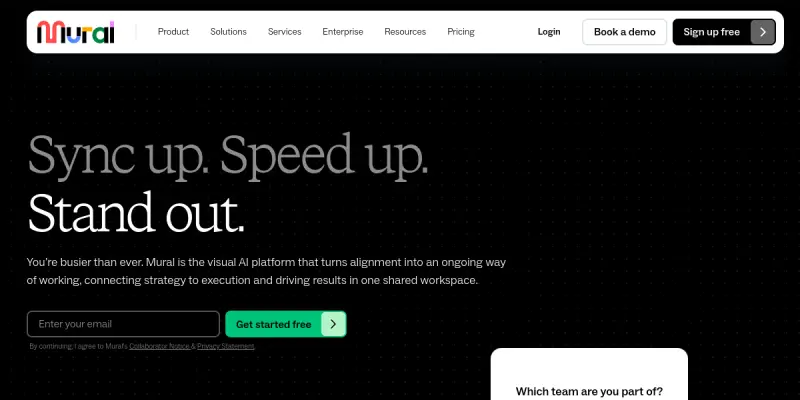
Mural AI is an AI-enhanced visual collaboration platform designed for distributed teams, facilitators, and project managers. It extends Mural's traditional digital whiteboard with artificial intelligence features that help teams generate ideas, synthesize feedback, and streamline workflows. By automating routine facilitation tasks and providing intelligent suggestions, Mural AI aims to make remote and hybrid collaboration more productive and inclusive.
Key Features
- AI Facilitation: Automatically guides teams through structured brainstorming, retrospectives, and workshops using AI-generated prompts and facilitation steps.
- Smart Templates: Offers a library of AI-powered templates for common activities like design sprints, journey mapping, and strategic planning.
- Idea Synthesis: Summarizes sticky notes, clusters similar concepts, and generates action items from workshop outputs.
- Real-Time Collaboration: Multiple users can simultaneously contribute, edit, and interact with the canvas, with changes synced instantly.
- Visual Thinking Tools: Includes drawing, diagramming, flowcharts, and mind maps with AI-assisted layout and organization.
- Integration Ecosystem: Connects with popular tools like Slack, Microsoft Teams, Jira, Asana, and Google Workspace for seamless workflow integration.
- Private & Public Templates: Access a community library of templates or create custom ones, with AI recommending relevant formats based on meeting type.
- Analytics & Insights: Provides data on participation patterns, idea density, and meeting effectiveness to improve future sessions.
Use Cases
Remote Brainstorming & Ideation
Teams use Mural AI to run virtual brainstorming sessions where AI suggestions help break creative blocks. The platform captures all ideas in real time, and the synthesis feature groups related concepts automatically, saving hours of manual sorting.
Agile Sprint Planning & Retrospectives
Scrum masters and product managers leverage AI-facilitated templates for sprint planning, daily stand-ups, and retrospectives. The AI prompts ensure all team members contribute and helps generate action items from retrospective discussions.
Strategic Planning & OKR Alignment
Organizations map out strategic goals, OKRs, and roadmaps using visual canvases. Mural AI can suggest alignments between objectives, highlight dependencies, and track progress over time.
Design Thinking & User Research
Design teams use Mural AI for empathy mapping, journey mapping, and affinity diagramming. AI assistance helps synthesize large volumes of user research data into actionable insights.
Onboarding & Training
New employees can be onboarded with interactive, AI-guided walkthroughs of company processes, values, and team structures. The platform tracks completion and gathers feedback automatically.
Pricing & Plans
Mural offers a multi-tier subscription model. A Free plan provides a limited number of murals and basic features. Team and Business plans unlock advanced AI features, integrations, and user management. Enterprise plans include dedicated support, security controls, and custom deployment options. Detailed pricing is available on the Mural website. Mural AI features are available on paid plans only.
Integrations & Compatibility
Mural AI integrates with Slack, Microsoft Teams, Google Workspace, Jira, Asana, Trello, Monday.com, Microsoft Office 365, and many more. It runs in any modern web browser and offers native apps for Windows and macOS. Mobile companion apps are available for iOS and Android.
Who Is It For?
Mural AI is built for facilitators, product managers, designers, engineers, and any professional involved in collaborative work. It is especially useful for remote and hybrid teams, agencies, educational institutions, and large enterprises that run frequent workshops or strategic sessions.
Limitations
- AI features require a paid subscription; the free tier offers limited access.
- Real-time collaboration depends on a stable internet connection; offline mode is not available.
- AI-generated suggestions may occasionally miss contextual nuances and require human review.
- Learning curve for facilitators to effectively utilize AI facilitation prompts.
Final Verdict
Mural AI transforms a standard digital whiteboard into an intelligent collaboration hub. Its AI facilitation and synthesis capabilities significantly reduce the manual overhead of running workshops and enable teams to focus on decision-making and creativity. While the paid plans may be a barrier for individuals or small teams, the productivity gains for organizations with regular collaborative sessions justify the investment. Mural AI earns a solid recommendation for teams seeking to enhance their visual collaboration with AI.
Tool Facts
Screenshots & Interface
Pros
- ✓ AI facilitation reduces the time needed to run structured workshops and retrospectives.
- ✓ Smart templates streamline common collaboration formats like design sprints and journey mapping.
- ✓ Idea synthesis feature automatically clusters related sticky notes, saving manual sorting effort.
- ✓ Native integrations with Slack, Jira, and Microsoft Teams allow seamless workflow embedding.
- ✓ Real-time multi-user editing supports distributed teams without loss of context.
Cons
- × AI features are locked behind paid plans, limiting free tier usability.
- × No offline mode for murals restricts use in low-connectivity environments.
- × AI suggestions may occasionally misinterpret context and require facilitator adjustment.
- × The interface can become cluttered with large murals containing many elements.
How to Use Mural AI in Your Workflow
Integrating Mural AI into your professional toolkit enhances efficiency by automating manual steps. By configuring it to suit your specific project requirements, you can optimize output quality and reduce project cycle times. Standard workflows involve testing the tool on simple tasks before scaling its use to complex operations.
Frequently Asked Questions
What is Mural AI used for?
Mural AI is an AI-powered visual workspace that enhances team collaboration, planning, and execution. It helps distributed teams brainstorm, organize tasks, and manage projects using intelligent templates and real-time co-creation. Its key differentiator is the deep integration of AI to automate facilitation and synthesis of ideas.
What is the pricing model for Mural AI?
Mural AI uses a Paid pricing model.
What are the main advantages of Mural AI?
The key benefits of Mural AI include: AI facilitation reduces the time needed to run structured workshops and retrospectives., Smart templates streamline common collaboration formats like design sprints and journey mapping., Idea synthesis feature automatically clusters related sticky notes, saving manual sorting effort., Native integrations with Slack, Jira, and Microsoft Teams allow seamless workflow embedding., Real-time multi-user editing supports distributed teams without loss of context..
What are the main limitations of Mural AI?
Some limitations or cons of Mural AI are: AI features are locked behind paid plans, limiting free tier usability., No offline mode for murals restricts use in low-connectivity environments., AI suggestions may occasionally misinterpret context and require facilitator adjustment., The interface can become cluttered with large murals containing many elements..
Alternative AI Tools

Stable Diffusion Inpaint
Stable Diffusion Inpaint is an AI-powered tool that uses diffusion models to intelligently fill in or replace parts of an image. It is designed for photographers, designers, and content creators who need precise and context-aware image editing. Its key differentiator is the ability to generate new content that seamlessly blends with the existing image.
Waifu2x
Waifu2x is an open-source AI image upscaler that enhances resolution and reduces noise for anime and photo images.
Runway ML
Runway ML offers a suite of AI creative tools for video and image generation. It provides an intuitive platform for designers to generate high-quality media assets without coding.
Rating Details
Based on 0 ratings
Quick Comparisons
Related Tools
More AI tools from the same workflow, industry, or category.
Createimg.ai
Createimg.ai provides text-to-image generation and photo editing tools including background removal. It is designed for e-commerce sellers and creators needing free visual assets.
JetBrains AI
JetBrains AI is an AI-powered toolset integrated into JetBrains IDEs, offering code completion, debugging assistance, and intelligent suggestions for developers. It leverages large language models to help teams write, understand, and refactor code more efficiently. A key differentiator is its seamless integration with JetBrains' existing development environment.
Stable Diffusion Inpaint
Stable Diffusion Inpaint is an AI-powered tool that uses diffusion models to intelligently fill in or replace parts of an image. It is designed for photographers, designers, and content creators who need precise and context-aware image editing. Its key differentiator is the ability to generate new content that seamlessly blends with the existing image.
Crello AI
VistaCreate (formerly Crello) is a cloud-based design tool using AI to generate graphics from text prompts. It features 100K+ templates for social media and marketing.
Reviews
No reviews submitted yet. Be the first to share your experience.
Write a Review
Share Your Experience
Join the community to write reviews, submit ratings, and bookmark your favorite AI tools.