

Framer AI
Use Framer AI as the anchor for a real shortlist.
Instead of returning to a broad directory, jump straight into the strongest adjacent matchups for pricing, workflow fit, and differentiation.
Overview
Overview
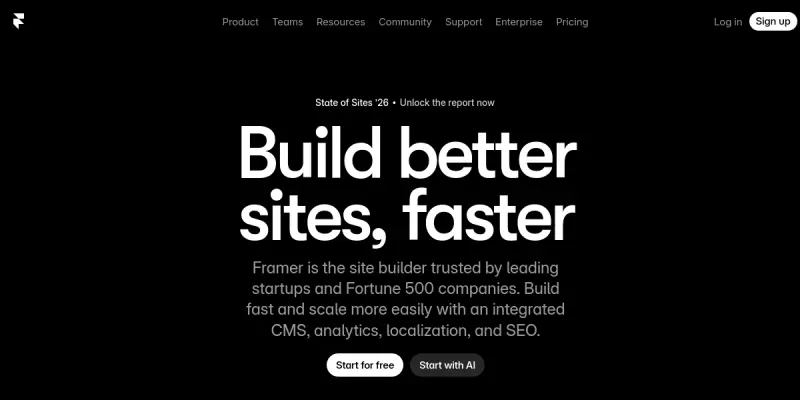
Framer AI is a no-code website builder that empowers designers and teams to create professional, fully custom websites without writing code. It combines a visual drag-and-drop interface with AI-driven layout generation, a powerful content management system (CMS), and built-in SEO tools. Real-time collaboration makes it suitable for both solo creators and design teams.
Key Features
- AI Layout Generation: Automatically generates responsive page layouts based on your content and design preferences.
- Visual CMS: Manage and organize content with a flexible, no-code CMS that supports dynamic collections and custom fields.
- Built-in SEO Tools: Optimize pages for search engines with meta tags, alt text, sitemaps, and structured data.
- Real-time Collaboration: Invite team members to edit and comment on projects simultaneously.
- Drag-and-Drop Editor: Design pixel-perfect pages using a intuitive visual editor with full design freedom.
- Ready-to-Use Templates: Start from a library of professionally designed templates for various industries.
- Custom Interactions & Animations: Add micro-interactions, scroll effects, and page transitions without coding.
- Hosting & Domain Management: Publish sites instantly with integrated hosting and custom domain support.
Use Cases
Building a Portfolio Website
Designers and freelancers can create a visually striking portfolio that showcases their work with custom animations and layouts. The AI layout generator helps speed up the initial design phase.
Launching a Marketing Landing Page
Marketing teams can build high-converting landing pages with built-in SEO and CMS for A/B testing content. The no-code editor allows non-developers to make changes quickly.
Creating a Blog or Content Site
Content creators can set up a blog with a visual CMS that supports rich text, images, and embedded media. Real-time collaboration streamlines editorial workflows.
Designing an E-commerce Storefront
Although not a full e-commerce solution, Framer can be used to design a branded storefront that integrates with third-party shopping carts or payment links.
Prototyping Web Interfaces
UX designers can rapidly prototype web interfaces using the same visual tools, then hand off to developers with exportable code snippets.
Pricing & Plans
Framer AI offers a Freemium model. The free tier includes basic features, Framer branding, and a .framer domain. Paid plans, starting at around $15/month, remove branding, add custom domains, CMS collections, and advanced analytics. Enterprise pricing is available upon request for teams with custom needs.
Integrations & Compatibility
- Third-party Services: Integrates with Google Analytics, Mailchimp, Zapier, and payment processors like Stripe via API.
- Export Options: Ability to export design assets and code for use outside the platform.
- Browser Compatibility: Fully works in modern browsers (Chrome, Firefox, Safari, Edge).
Who Is It For?
Framer AI is ideal for UI/UX designers, freelance creatives, marketing teams, and small to medium-sized businesses that need a professional website without relying on developers. It also suits design agencies that want to collaborate on client projects in real time.
Limitations
- Requires a stable internet connection for real-time editing and collaboration.
- Advanced features like custom domains and removing Framer branding require a paid subscription.
- Not a full e-commerce platform; lacks built-in shopping cart and payment processing.
- The AI generation quality depends on the clarity of user inputs and available templates.
Final Verdict
Framer AI is a powerful no-code website builder that prioritizes design freedom and collaboration. Its AI features help accelerate the design process, while the visual CMS and SEO tools make it practical for real-world projects. The Freemium pricing lowers the barrier to entry, though advanced functionality comes at a cost. Overall, it is a solid choice for designers and teams looking to build custom websites quickly and visually.
Tool Facts
Screenshots & Interface
Pros
- ✓ Visual drag-and-drop editor requires no coding knowledge, making it accessible to non-developers.
- ✓ AI layout generation accelerates the initial design process by automatically creating responsive layouts.
- ✓ Built-in SEO tools allow users to optimize pages without third-party plugins.
- ✓ Real-time collaboration enables multiple team members to work on the same project simultaneously.
- ✓ Flexible visual CMS supports dynamic collections and custom fields for content management.
Cons
- × Requires a stable internet connection for real-time editing and collaboration; offline mode is limited.
- × Advanced features like custom domains and removing branding require a paid subscription.
- × Not a full e-commerce platform; lacks built-in shopping cart and payment processing.
- × AI-generated layouts may need manual refinement to match specific brand guidelines.
How to Use Framer AI in Your Workflow
Integrating Framer AI into your professional toolkit enhances efficiency by automating manual steps. By configuring it to suit your specific project requirements, you can optimize output quality and reduce project cycle times. Standard workflows involve testing the tool on simple tasks before scaling its use to complex operations.
Frequently Asked Questions
What is Framer AI used for?
Framer AI helps designers and teams create fully custom websites using a no-code visual builder. It offers a powerful CMS, built-in SEO tools, and real-time collaboration features. The platform combines design freedom with AI-powered layout generation for faster workflows.
What is the pricing model for Framer AI?
Framer AI uses a Freemium pricing model.
What are the main advantages of Framer AI?
The key benefits of Framer AI include: Visual drag-and-drop editor requires no coding knowledge, making it accessible to non-developers., AI layout generation accelerates the initial design process by automatically creating responsive layouts., Built-in SEO tools allow users to optimize pages without third-party plugins., Real-time collaboration enables multiple team members to work on the same project simultaneously., Flexible visual CMS supports dynamic collections and custom fields for content management..
What are the main limitations of Framer AI?
Some limitations or cons of Framer AI are: Requires a stable internet connection for real-time editing and collaboration; offline mode is limited., Advanced features like custom domains and removing branding require a paid subscription., Not a full e-commerce platform; lacks built-in shopping cart and payment processing., AI-generated layouts may need manual refinement to match specific brand guidelines..
Alternative AI Tools

Wix ADI
Wix ADI automates website creation by generating custom sites based on user inputs and preferences. It offers 500+ design styles and integrates directly with the Wix editor. This tool targets users seeking a quick, AI-driven solution for establishing a professional web presence.
AI Image Enlarger
AI Image Enlarger is an AI-powered tool that upscales and enhances image resolution while preserving details. It is designed for photographers, designers, and marketers who need high-quality enlargements without manual editing. The tool supports batch processing for improved workflow efficiency.
FreeLogoDesign
FreeLogoDesign is an AI-powered logo maker that generates custom logos based on user preferences. It offers a range of templates and design options suitable for entrepreneurs, small businesses, and freelancers. The tool stands out with its free tier and straightforward customization process.
Rating Details
Based on 0 ratings
Quick Comparisons
Related Tools
More AI tools from the same workflow, industry, or category.
Createimg.ai
Createimg.ai provides text-to-image generation and photo editing tools including background removal. It is designed for e-commerce sellers and creators needing free visual assets.
JetBrains AI
JetBrains AI is an AI-powered toolset integrated into JetBrains IDEs, offering code completion, debugging assistance, and intelligent suggestions for developers. It leverages large language models to help teams write, understand, and refactor code more efficiently. A key differentiator is its seamless integration with JetBrains' existing development environment.
Stable Diffusion Inpaint
Stable Diffusion Inpaint is an AI-powered tool that uses diffusion models to intelligently fill in or replace parts of an image. It is designed for photographers, designers, and content creators who need precise and context-aware image editing. Its key differentiator is the ability to generate new content that seamlessly blends with the existing image.
Crello AI
VistaCreate (formerly Crello) is a cloud-based design tool using AI to generate graphics from text prompts. It features 100K+ templates for social media and marketing.
Reviews
No reviews submitted yet. Be the first to share your experience.
Write a Review
Share Your Experience
Join the community to write reviews, submit ratings, and bookmark your favorite AI tools.