

Kaedim
Use Kaedim as the anchor for a real shortlist.
Instead of returning to a broad directory, jump straight into the strongest adjacent matchups for pricing, workflow fit, and differentiation.
Overview
Overview
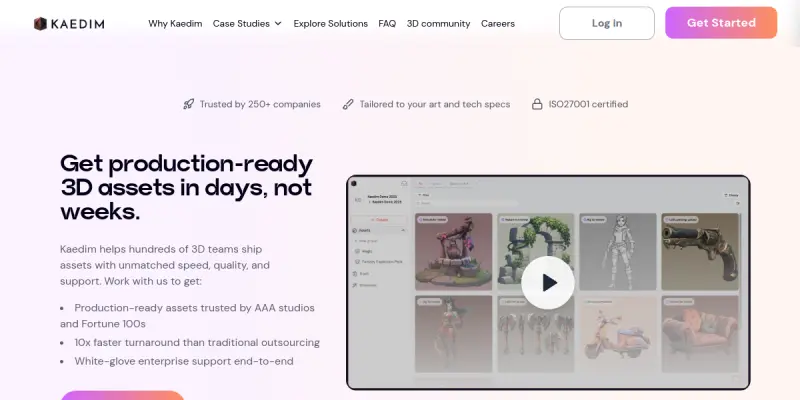
Kaedim is an AI-driven platform that transforms 2D images and text prompts into high-quality, production-ready 3D models. Designed for game developers, 3D artists, and marketing teams, Kaedim automates the asset creation workflow, allowing users to generate complex meshes, textures, and animations that can be directly imported into game engines like Unity and Unreal Engine. The platform bridges the gap between manual modeling and generative AI, offering a middle ground that balances automation with human oversight.
Key Features
- Sketch-to-3D Generation: Converts hand-drawn sketches into detailed 3D assets instantly.
- Text-to-3D Modeling: Creates 3D models from simple text descriptions, ideal for rapid prototyping.
- Iterative Refinement: Users can upload generated assets and request specific changes, allowing the AI to learn and improve over time.
- Style Consistency: Maintains visual style consistency across multiple assets, crucial for cohesive game worlds or brand identities.
- Game-Ready Output: Automatically generates Level of Detail (LOD) meshes and optimized geometry for performance.
- Texture Generation: Produces high-resolution textures that match the generated 3D geometry.
Use Cases
Game Development
Kaedim significantly accelerates the asset pipeline for game studios. Developers can quickly generate props, weapons, and characters, allowing them to focus on level design and gameplay mechanics rather than low-poly modeling. The iterative feedback loop ensures that the assets meet the specific artistic direction of the game.
Product Visualization
E-commerce brands use Kaedim to visualize products in different environments. By generating 3D representations of products, brands can create immersive 360-degree views and interactive marketing materials without the high cost of traditional product photography and 3D rendering.
Rapid Prototyping
Design teams utilize the text-to-3D feature to prototype concepts quickly. This allows stakeholders to visualize spatial arrangements and mechanical designs before committing to expensive manual modeling or physical prototyping.
Pricing & Plans
Kaedim operates on a subscription model with a Freemium tier. Users can access a limited number of generations to test the quality of the AI outputs. Paid plans are typically based on a credit system, where users purchase credits to generate assets. Enterprise solutions are available for large studios requiring dedicated support and API access.
Integrations & Compatibility
Kaedim offers direct integration pipelines with major 3D game engines, including Unity and Unreal Engine. Assets generated can be exported in standard formats such as FBX and OBJ, ensuring compatibility with standard 3D software pipelines like Blender, Maya, and Cinema 4D.
Who Is It For?
This tool is specifically tailored for game studios, indie developers, and creative agencies looking to scale their content production. It is also beneficial for 3D artists who want to speed up their workflow by automating the creation of base meshes and textures.
Limitations
- Manual Cleanup Required: Generated meshes often require manual retopology and cleanup to meet professional standards.
- Prompt Sensitivity: Text-to-3D generation results can be highly sensitive to prompt phrasing, requiring experimentation.
- Style Limitations: While it supports various styles, the AI may struggle with highly complex or abstract artistic concepts.
Final Verdict
Kaedim is a powerful tool for teams looking to reduce the time spent on manual 3D modeling. While it is not a complete replacement for a skilled 3D artist, it serves as an excellent assistant for generating base assets and iterating on ideas rapidly. The ability to refine AI outputs makes it a practical solution for busy production pipelines.
Tool Facts
Screenshots & Interface
Pros
- ✓ Generates detailed 3D models from 2D sketches or text prompts
- ✓ Offers iterative refinement tools to correct and improve AI outputs
- ✓ Supports multiple art styles including realistic, stylized, and cartoon
- ✓ Exports directly to Unity and Unreal Engine
Cons
- × Generated meshes often require manual retopology and cleanup
- × Text-to-3D accuracy varies significantly depending on the prompt
- × Subscription costs can accumulate for high-volume production needs
How to Use Kaedim in Your Workflow
Integrating Kaedim into your professional toolkit enhances efficiency by automating manual steps. By configuring it to suit your specific project requirements, you can optimize output quality and reduce project cycle times. Standard workflows involve testing the tool on simple tasks before scaling its use to complex operations.
Frequently Asked Questions
What is Kaedim used for?
Kaedim transforms 2D images into production-ready 3D models. It helps game studios and designers scale their asset pipelines without hiring additional staff.
What is the pricing model for Kaedim?
Kaedim uses a Freemium pricing model.
What are the main advantages of Kaedim?
The key benefits of Kaedim include: Generates detailed 3D models from 2D sketches or text prompts, Offers iterative refinement tools to correct and improve AI outputs, Supports multiple art styles including realistic, stylized, and cartoon, Exports directly to Unity and Unreal Engine.
What are the main limitations of Kaedim?
Some limitations or cons of Kaedim are: Generated meshes often require manual retopology and cleanup, Text-to-3D accuracy varies significantly depending on the prompt, Subscription costs can accumulate for high-volume production needs.
Alternative AI Tools

Wisecut
Wisecut is an AI video editor that automatically removes silence and adds captions to create short-form clips for social media. It streamlines the editing process for content creators.

Creatomate
Creatomate provides 75+ AI tools for generating content, marketing campaigns, and business growth. It is designed for entrepreneurs and agencies seeking an all-in-one AI platform. A key differentiator is its wide tool set under one subscription.

Panopto AI
Panopto AI uses artificial intelligence to record, capture, and search video content. Designed for IT teams and content creators, it offers automated transcription and smart search across recorded videos. Its key differentiator is AI-powered video capture that makes content instantly searchable.
Rating Details
Based on 0 ratings
Quick Comparisons
Related Tools
More AI tools from the same workflow, industry, or category.
ClipTrend.ai
ClipTrend.ai is an AI image-to-video workspace for creators, marketers, and short-form video teams.
SongR
SongR is a text-to-song app that generates custom music tracks from a few keywords. It is designed for content creators and social media users who need quick, royalty-free songs in genres like pop, rock, hip-hop, and chant. Its key differentiator is instant generation without requiring musical expertise.
Quantum Capture
Quantum Capture generates AI-powered talking head videos from text input. It is designed for content creators and marketers who need quick, studio-quality video clips without expensive equipment. The platform specializes in creating realistic avatars with consistent lip-sync and facial expressions.
Kaltura AI
Kaltura is an enterprise video platform that combines cloud hosting with AI tools for content creation, marketing, and learning management. It helps businesses create branded video experiences for webinars, social media, and internal training.
Reviews
No reviews submitted yet. Be the first to share your experience.
Write a Review
Share Your Experience
Join the community to write reviews, submit ratings, and bookmark your favorite AI tools.